

Migrating from Teamleader or Exact to Odoo: the data playbook
Contacts, deals, invoices, historical documents — the export/transform/import pipeline we run when a company outgrows its starter tools, and the data you should deliberately leave behind.
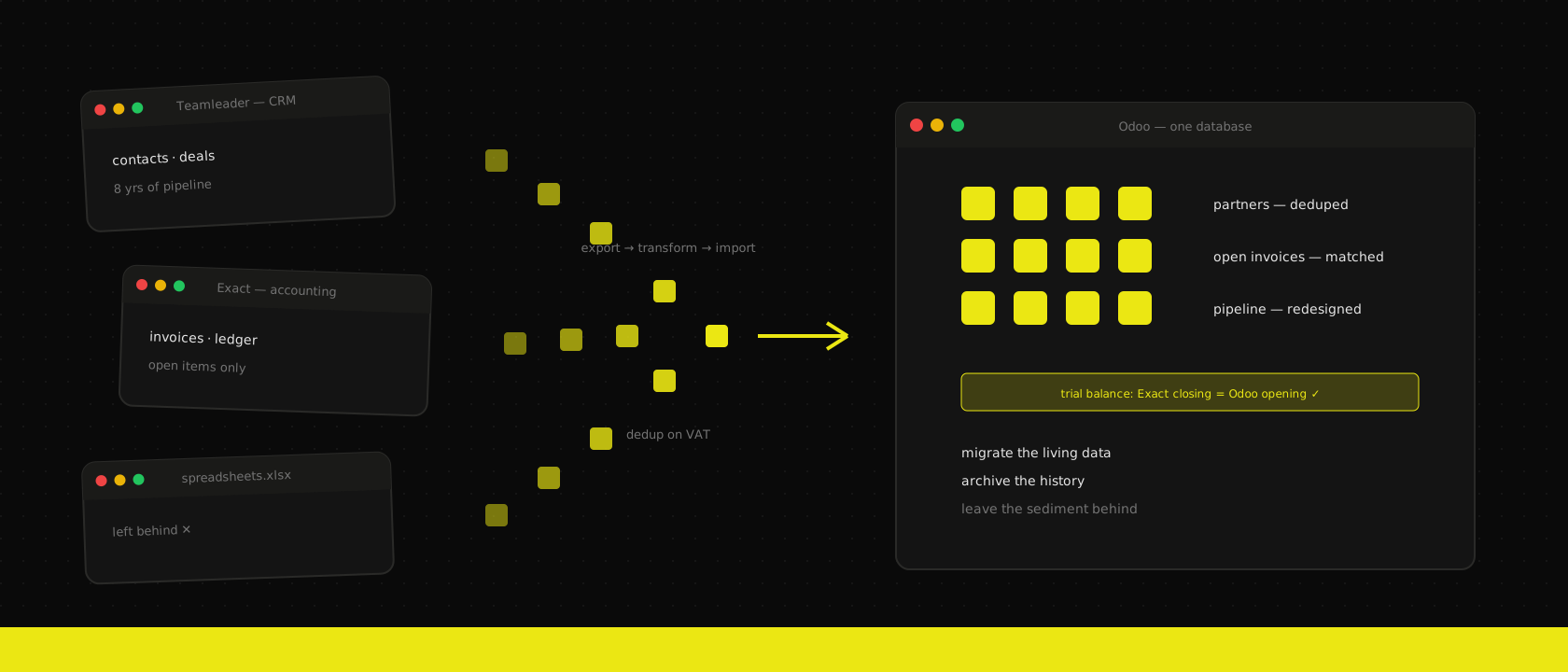
The combination is practically the Belgian SME starter kit: Teamleader for CRM and projects, Exact Online for the books, and a growing constellation of spreadsheets gluing them together. It works — right up until the moment it doesn't. Stock arrives, a second entity appears, the sales team wants quotes that know the margin, and suddenly three systems that never really talked to each other are supposed to run one business.
That's usually when the Odoo implementation conversation starts. And the first question after "can Odoo do all this?" is always the same: "what happens to our data?" Here is the honest answer — the pipeline we actually run, and the part nobody likes to hear: the best migrations move less data, not more.
First decide what moves — not how
The instinct is to migrate everything, because deleting feels like losing. Resist it. Every record you carry over costs mapping, cleaning, testing and — forever after — attention. So before anyone exports a single CSV, we go object by object and put each one in a bucket:
- Migrate as live data — records the business will keep working with: active customers and suppliers, open deals, unpaid invoices, running projects, the product list.
- Migrate as history — records you need to look at but never edit: closed invoices from recent years, won/lost deals. These can land in Odoo as read-only history or stay behind in an archive.
- Deliberately leave behind — and this bucket should be the biggest one. Leads that went cold in 2019. Contacts with no activity in three years. Seventeen half-duplicated versions of the same company, each with a different spelling of the same street.
The leave-behind list is where migrations are won. A CRM that has been running for eight years is roughly 30% living data and 70% sediment. Import the sediment and your shiny new system starts life with the same trust problem the old one died of: nobody believes what's in it.
This sorting exercise isn't separate from scoping — it's a chapter of the fit-gap analysis we run at the start of every implementation. Deciding what data survives is deciding what the business keeps doing.
Contacts and deals: the Teamleader side
Teamleader exports cleanly — companies, contacts, deals and their pipeline stages all come out via the API or CSV. The mechanical mapping to Odoo is straightforward: companies and contacts become partners, deals become CRM opportunities, pipeline phases map onto stages. The real work is in three less obvious places:
- Deduplication before import, not after. We match on VAT number first (this is Belgium — nearly every real customer has one), then on email domain, then fuzzy-match the leftovers. Merging duplicates inside Teamleader beforehand beats untangling them in Odoo afterwards, every time.
- Pipeline archaeology. Eight years of Teamleader means pipeline stages that no longer match how the team sells. Don't replicate the old funnel — design the Odoo pipeline for the current sales process and map old stages onto it, collapsing the ones nobody can explain anymore.
- Activity history is a judgment call. Emails, calls and notes on open deals move — the salesperson needs the thread. The full call log of a customer won in 2021 is sediment; the invoices already tell that story.
Every imported record gets an external ID derived from its Teamleader ID. That single habit makes the import idempotent — re-run it after a fix and Odoo updates records instead of duplicating them:
partner_vals = {
    "id": f"teamleader_company_{tl_company['id']}",  # external ID, stable across runs
    "name": tl_company["name"],
    "vat": normalize_vat(tl_company["vat_number"]),  # BE0123456789, one format
    "email": tl_company["email"],
}
Test loads stop being scary when loading twice is harmless.
Invoices and the books: the Exact side
Here's the counter-intuitive rule that saves the most money: do not re-post your accounting history into Odoo. Rebuilding five years of Exact journal entries inside Odoo is weeks of work to reproduce numbers you already have, in a system your accountant already signed off. Belgian retention rules are satisfied by keeping the old system's records accessible — a read-only Exact archive or a structured export does that job at a fraction of the cost.
What actually moves is small and precise:
- Opening balances per account, agreed with your accountant, posted on a cutover date that is ideally a fiscal year start — or at minimum a quarter.
- Open items: every unpaid customer invoice and vendor bill, imported as individual documents so payment matching and reminders work from day one.
- The partner and product master data those documents reference.
- Historical invoice PDFs, attached to the partner where they belong. Searchable history without a single journal entry.
Then the accountant runs the reconciliation: Exact's closing trial balance against Odoo's opening one, open-items lists side by side, VAT position checked. Boring, printable, and the reason month one closes without surprises.
The pipeline itself: export → transform → import, staged
The mechanics we run are deliberately unglamorous. Export from the source APIs into plain files. Transform with scripts that live in git — every mapping decision (this Teamleader custom field becomes that partner tag, these two Exact accounts merge into one) is code, reviewable and re-runnable, not a one-off Excel session at midnight. Import through Odoo's standard loading mechanisms into a staging database first.
Staged, because the first import always finds something: the VAT number with a space in the middle, the contact whose "company" is a person, the deal in a stage that was deleted in 2022. Each fix goes into the transform script, the staging database gets wiped, and the pipeline runs again from zero — which is exactly why idempotency and version-controlled transforms aren't nice-to-haves. By the third full run the import is clean, the key users have clicked through their own real data in staging, and go-live is a re-run plus a delta, not a leap of faith.
Cutover weekend then looks like this: freeze data entry in the old systems Friday evening, run the final delta (whatever changed since the last test load), reconcile the numbers Saturday, and Monday morning the team logs into Odoo — where their customers, their open deals and their unpaid invoices are already waiting. Teamleader and Exact switch to read-only, kept around for the archive, not the workflow.
Less data, more system
Companies fear the migration will lose their history. In practice the opposite failure is the common one: migrations that dragged every dead lead and every 2018 journal line into the new system, and delivered a new database with the old mess. The playbook above is how we avoid both — move the living data carefully, preserve the history cheaply, and leave the sediment where it belongs.
The result isn't just Odoo with your data in it. It's the first time in years the whole company works from one system that everyone actually trusts — which was the point of leaving the starter tools in the first place.
Want us to publish something specific?
Tell us what you'd like to read and we'll add it to our writing queue.
Get the next one in your inbox
New articles, videos and the occasional engineering note — a short mail when there’s something worth reading, nothing else.