

Odoo access rights done right: groups, record rules and the audit trail
Most Odoo installs run with everyone as admin until the first incident. How we design permission groups that mirror the org chart, record rules that hold up under audit, and logging that answers who changed what — before anyone has to ask.
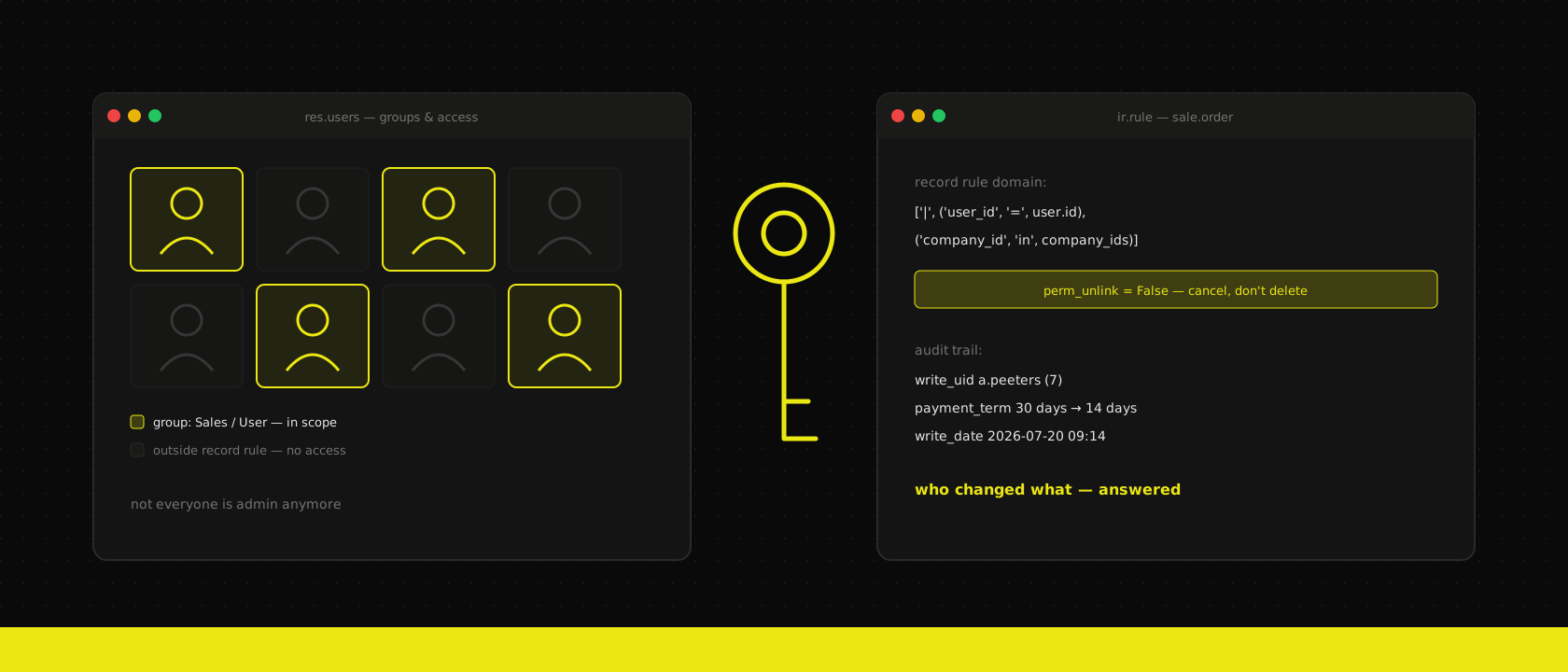
Ask who has admin rights in a typical Odoo install and you'll get an honest, slightly embarrassed answer: "well… everyone, sort of." It starts innocently — the consultant needs admin to configure, the office manager gets it to unblock an invoice, sales gets Settings access because a dropdown needed a new option. Two years later a salary line is visible to the warehouse, a price list got edited by someone who swears they didn't, and nobody can say who deleted the March delivery order.
None of that is an Odoo problem. The permission machinery in Odoo is genuinely good — four layers deep, enforced at the ORM, auditable. It's just that nobody designed anything with it. Access rights are like multi-company setup: an architecture decision that costs an afternoon at go-live and a forensic cleanup afterwards. Here's the design work that afternoon should contain.
Four layers, one mental model
Odoo checks permissions in layers, and every debugging session gets shorter once you know the order:
- Groups — the unit of assignment. A user belongs to groups; everything else hangs off them.
Sales / User,Accounting / Advisor, and any custom groups you define. - Access control lists (ACLs) — per model, per group: create, read, update, delete. The
ir.model.accesstable. This is the "can this role touch invoices at all?" layer. - Record rules — per record, evaluated as a domain. ACLs say you may read invoices; record rules say which invoices — your own, your team's, your company's.
- Field-level security —
groups=on a field definition hides the margin column from everyone outside management. Sparse, surgical, last resort.
The everyone-is-admin install skips all four: admin bypasses record rules entirely (with one exception we'll get to), so the system behaves as if the layers don't exist. Which means the first time you do tighten access, you discover every workflow that silently depended on over-permissioning. Tighten on day one — loosening later is a settings change, tightening later is a project.
Groups that mirror the org chart, not the module list
Odoo ships every app with two or three default groups — User, Manager, sometimes an Advisor or Administrator tier. The lazy mapping is one-to-one: sales people get Sales / User, their boss gets Sales / Manager, done. That works until reality shows up: the customer-service person who needs to see orders but never confirm them, the external accountant who needs journals but not contacts, the intern.
Our approach on every Odoo implementation: write down the org chart first, then map roles to groups — not the other way around. Concretely:
- One custom group per real-world role, inheriting from the standard groups it needs.
Role / Customer CareimpliesSales / User (read patterns via record rules)plusHelpdesk / User. Users get exactly one role group; the role group aggregates the rest. - Implied groups over group soup. Odoo groups can imply other groups (
implied_ids). Use it: assign one group per person and let inheritance do the fan-out. Ten groups per user, assigned by hand, is how drift starts. - Nobody works as admin. The admin account is for configuration, owned by whoever owns the system, used when configuring. The managing director gets a
Role / Directiongroup with wide read, not the settings gear.
The test we apply before go-live is boring and effective: for each role, sit with one person who has it and let them run their actual day. Every "access denied" is either a missing permission or — more often than teams expect — a task that was never supposed to be theirs.
Record rules: the layer that does the real work
ACLs are coarse. The interesting questions are row-level: may a salesperson see colleagues' quotations? May a project manager see other projects' timesheets? Record rules answer with a domain that gets appended to every query for members of a group:
['|', ('user_id', '=', user.id), ('user_id', '=', False)]Simple to read, and enforced at the ORM — list views, search, exports, even API calls through Odoo's external interfaces all pass through the same filter. Three things we've learned designing these:
- Global rules restrict, group rules extend. A rule without a group applies to everyone and intersects with the rest; rules attached to groups union together. Mixing the two carelessly is the classic source of "manager sees less than their team" tickets. Restrict globally (company boundaries), extend per group (team scopes).
- Keep domains dumb. Record rules run on every access to the model. A rule that walks four relations executes that join on every list view, every export, every portal request. If the rule needs a computed field to stay simple, add the field — a stored boolean beats a five-hop domain, on correctness and on the performance graphs.
- Test with the user, not as admin. Admin bypasses record rules, so the person who configures them literally cannot see their effect. Odoo's "log in as" from the user form exists for exactly this; use it before every permission change ships.
Field-level groups= closes the remaining gap: cost price and margin visible to purchasing and management, invisible to everyone else — including in exports, which is where spreadsheet leaks actually happen.
The audit trail: who changed what, answered in one click
Permissions decide who can change things; the audit trail proves who did. Odoo gives you three tiers, and most installs only know about the first:
- Built-in write metadata. Every record carries
create_uid,create_date,write_uid,write_date. Free, always on — and shallow: it only names the last writer, says nothing about what changed, and intermediate edits vanish. - Chatter tracking. Any field on a model inheriting
mail.threadcan settracking=True, and every change lands in the chatter: old value, new value, who, when. This is the workhorse. Our default: track every field a dispute could hinge on — payment terms, price list, bank account on the vendor, delivery address. The marginal cost is a chatter line; the marginal value is the end of "I never changed that" meetings. - Proper audit logging. For regulated contexts — payroll data, medical records, anything GDPR Article 30 asks about — chatter isn't enough, because it lives on the record and dies with it. Dedicated audit modules (OCA's
auditlogbeing the reference) log reads and writes to a separate, append-only table with the full before/after diff. Heavier, so scope it: audit the sensitive models, not all six hundred.
The deletion question deserves its own sentence: the honest answer to "who deleted the March delivery order?" is that in a default install, you often can't tell. Unlink rights should be the rarest permission in the system — most roles need cancel (a state change, fully tracked in chatter), almost none need delete. Taking unlink away from every default group is the single highest-value line in our access-rights checklist.
Where this lands in practice
Access design is one of the workshops in the fit-gap analysis we run before any implementation, for an unglamorous reason: permissions encode the org chart, and the org chart is something only the client knows. What we bring is the mapping — roles to groups, boundaries to record rules, disputes to tracked fields — and the discipline of testing it as real users before go-live rather than after the first incident.
If your install currently answers "who has admin?" with "everyone, sort of" — that's fixable, and cheaper this quarter than next. It's a design exercise, a day of configuration, and a go-live where nothing visibly changes. Which is the point: the best access-rights setup is the one nobody notices until the day it answers a question everyone's glad it can.
Want us to publish something specific?
Tell us what you'd like to read and we'll add it to our writing queue.
Get the next one in your inbox
New articles, videos and the occasional engineering note — a short mail when there’s something worth reading, nothing else.