

Odoo POS offline-first: the checkout that survives a dead connection
Odoo's point of sale keeps ringing up orders when the internet doesn't. How the browser cache, order queue and payment terminal fallbacks actually behave when the line drops — and the drill we run before every opening day.
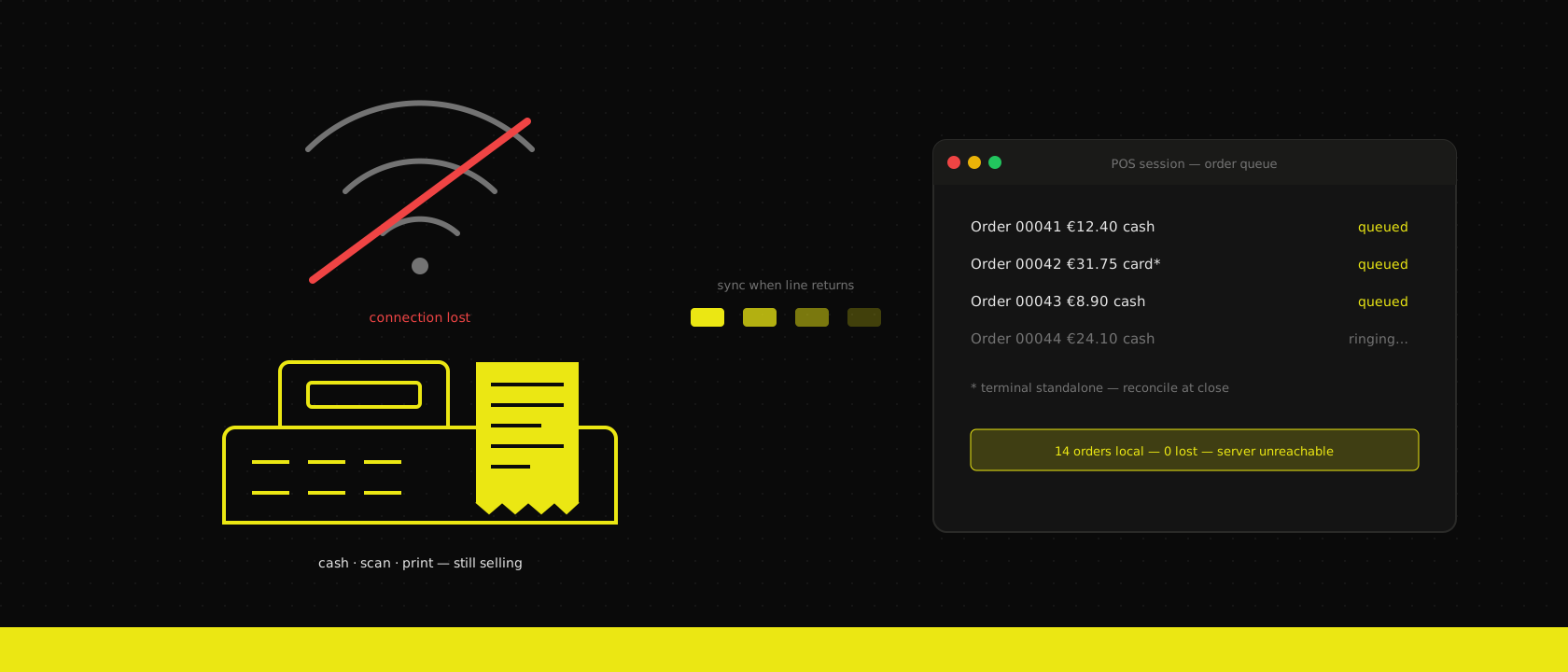
Saturday morning, bakery counter, queue out the door — and the fibre modem picks that exact moment to die. If the till is a cloud dashboard in a browser tab, the shop is now closed. If the till is Odoo POS, the cashier keeps scanning and nobody in the queue notices anything.
That resilience is real, and it's one of the reasons we put Odoo POS in front of retail clients at all. But "works offline" is doing a lot of lifting in that sentence, and the fine print is exactly where opening days go wrong. Offline is not a mode Odoo switches into — it's a set of behaviours that fall out of the architecture, some graceful, some not. Here's what actually keeps working, what quietly doesn't, and what we test before a register goes live.
Why it works at all: the register is the browser
Odoo POS is a single-page application. When the cashier opens a session, the browser pulls the whole working set from the server — products, prices, taxes, customers, payment methods — and stores it locally in the browser's storage. From that moment the server is no longer in the sales path. Scanning a barcode is a lookup against the local catalogue; computing a total is local JavaScript; printing a receipt goes over the LAN to the printer, not over the internet.
The server is needed to open the session and to close it. In between, every order the register creates is written to local storage first and pushed to the server opportunistically. Connection up: orders sync within seconds and the little status indicator stays green. Connection down: orders pile up in a local queue, the indicator turns red, and selling continues exactly as before.
This is a fundamentally different failure mode from a cloud POS. There's no "retry" spinner between the cashier and the customer, because there was never a request between them in the first place.
What keeps working — and what quietly doesn't
While the connection is down, the register still does everything the cached working set covers:
- Scanning and selling — the full product catalogue, price lists and tax rules were loaded at session start.
- Cash payments — no external party involved, fully offline.
- Receipt printing — the printer sits on the local network. If your switch has power, receipts print.
- Existing customers — anyone already in the cached partner list can be set on the order.
And here's the list nobody puts on the demo slide — what stops or degrades:
- Integrated card terminals. The terminal authorises payments against the payment provider's platform, over the internet. No line, no authorisation — regardless of how offline-capable Odoo itself is. This is the big one in Belgium, where the queue pays with Bancontact, not banknotes; more on the fallback below.
- New customer records and cross-register data. A customer created on register 1 doesn't appear on register 2 until both have synced. Loyalty points and gift card balances are only as fresh as the last sync.
- Real-time stock. The register sells from the cached picture; it will happily sell the last croissant twice. For a bakery that's fine. For serialised electronics it isn't — plan accordingly.
- E-mail receipts, invoicing from the POS, session close. Anything that is genuinely a server operation waits until the line is back.
The pattern: the sale is offline-first, the ecosystem around the sale is not. Design the shop's procedures around that line.
The order queue, and how to lose it
Unsynced orders live in the browser's local storage of that specific browser profile on that specific machine. Until they reach the server, that is the only copy of your revenue. Which means the real operational risks aren't exotic:
- Someone "fixes" a sluggish register by clearing the browser data — the classic. The queue goes with it.
- The register is a browser tab among many, someone closes the profile, updates the OS, or swaps machines mid-day before the queue drained.
- The session stays offline for days on a pop-up stand, and the one machine holding a week of orders has no backup.
Our rules for every deployment are correspondingly boring: the POS runs in a dedicated browser profile that is never used for anything else, "clear browsing data" is nobody's troubleshooting step, and a register is never decommissioned or reimaged while the sync indicator is red. After connectivity returns, we reconcile counts before closing the session:
SELECT s.name AS session, COUNT(o.id) AS orders, SUM(o.amount_total) AS total
FROM pos_order o
JOIN pos_session s ON s.id = o.session_id
WHERE s.state != 'closed' AND o.date_order::date = CURRENT_DATE
GROUP BY s.name;
If that count doesn't match what the register shows, the missing orders are still in a browser somewhere — go find them before anyone touches that machine.
Payments: the honest part
Cash is solved. Cards are where offline claims get slippery, so let's be precise.
An integrated terminal (Worldline, Adyen, Stripe Terminal — whatever your setup) is driven by the POS: the register sends the amount, the terminal authorises online, the payment lands on the order automatically. When the internet is down, that authorisation cannot happen. Odoo can't fix that; the money network is simply unreachable.
The workable fallback is the terminal's own standalone mode: most Belgian terminals can run over their own SIM or accept a manually keyed amount independent of the POS. The procedure we train cashiers on: switch the terminal to standalone, key the amount from the register screen, take the payment there, and record it in Odoo against a dedicated "card (standalone)" payment method — one we configure without terminal integration precisely for this scenario. At day's end, that payment method's total must match the terminal's own settlement report. It's manual reconciliation, but it's ten orders on a bad afternoon, not a closed shop.
One hard Belgian caveat: horeca under the GKS/blackbox regime is a different conversation. The certified fiscal data module has its own legal requirements, and improvising around it during an outage is not a procedure we'll put in writing — that setup gets designed with the certification constraints from day one of the implementation.
The cheap insurance nobody demos: a 5G failover
Everything above treats "the internet is gone" as a fact of life. In 2026 it's mostly a choice, because the fix costs less than one afternoon of lost card sales: a second WAN over a 5G data SIM.
Two ways to get there, both boring and both good:
- Dual-mode on the modem you already have. A lot of business routers and fibre modems take a data SIM directly and fail over to it automatically when the primary line drops.
- A standalone 5G router as second WAN. A separate box on a data SIM, plugged into the router's failover port. Slightly more hardware, with the advantage that it also survives the fibre modem itself dying — which is exactly the failure that started this article.
A data SIM for this is a few euros a month. What it buys is not just a working till — it's that the outage stops being an outage: the integrated terminal keeps authorising, the order queue never builds up, the Odoo backend stays reachable for the back office, invoices and e-mail receipts go out, and nobody has to remember the standalone-terminal procedure at all. The shop degrades to slower internet instead of no internet.
So why did we spend an article on offline behaviour? Because failover is a second line, not immunity. The switchover itself takes seconds to a minute — long enough that the register must not blink, which is precisely what the local queue covers. Mobile coverage inside a concrete-and-steel retail unit can be poor exactly where the register sits. The cell network has outages of its own, sometimes the same ones (a digger that cuts fibre takes down more than your street). And if the failure is the router, the dual-mode SIM inside it dies too. Offline-first is the guarantee of last resort; the 5G SIM is the layer that makes you need it a few minutes a year instead of a few hours. We spec both, and neither is expensive.
The opening-day drill: pull the plug
None of the above is theory you want to first encounter with customers in the shop. Every POS go-live we do ends with the same rehearsal, on the real hardware, before opening day:
- Open the session, confirm the catalogue loads at an acceptable speed — a 30,000-SKU catalogue on a cheap tablet is its own performance conversation.
- Pull the fibre line only. The 5G failover should kick in within a minute: sell a couple of orders through it and confirm the integrated terminal still authorises. If there's no failover installed, this is the moment to reread the previous section.
- Now pull everything — WAN cable out, failover SIM disabled. Not "imagine it's down" — pull it.
- Sell ten orders fully offline: cash, plus at least one standalone-terminal payment following the written fallback procedure.
- Confirm receipts still print (printer and register on the same switch, and that switch on the UPS — the modem dying is annoying, the LAN dying is fatal).
- Plug it all back in, watch the queue drain, run the reconciliation query, match the terminal settlement.
- Only then close the session.
Twenty minutes, and it converts "the internet died" from an incident into a non-event. The same drill doubles as training: the cashier who has already sold through an outage doesn't panic during one.
Offline-first is an architecture, not a promise on a feature page — Odoo's POS holds up its end, and the implementation has to hold up the rest: the failover SIM, the browser discipline, the payment fallback, the reconciliation habit. That's the part we scope explicitly in the fit-gap analysis for every retail client, right next to the question of what the shop does when the lights flicker. Because the queue doesn't care whose fault the outage is — it only cares whether the next customer gets rung up.
Want us to publish something specific?
Tell us what you'd like to read and we'll add it to our writing queue.
Get the next one in your inbox
New articles, videos and the occasional engineering note — a short mail when there’s something worth reading, nothing else.