

Odoo Studio vs custom modules: where clicking ends and code begins
Studio is brilliant for a field and a filter — and a trap for business logic. The boundary we draw between no-code tweaks and real modules, and what each choice costs at upgrade time.
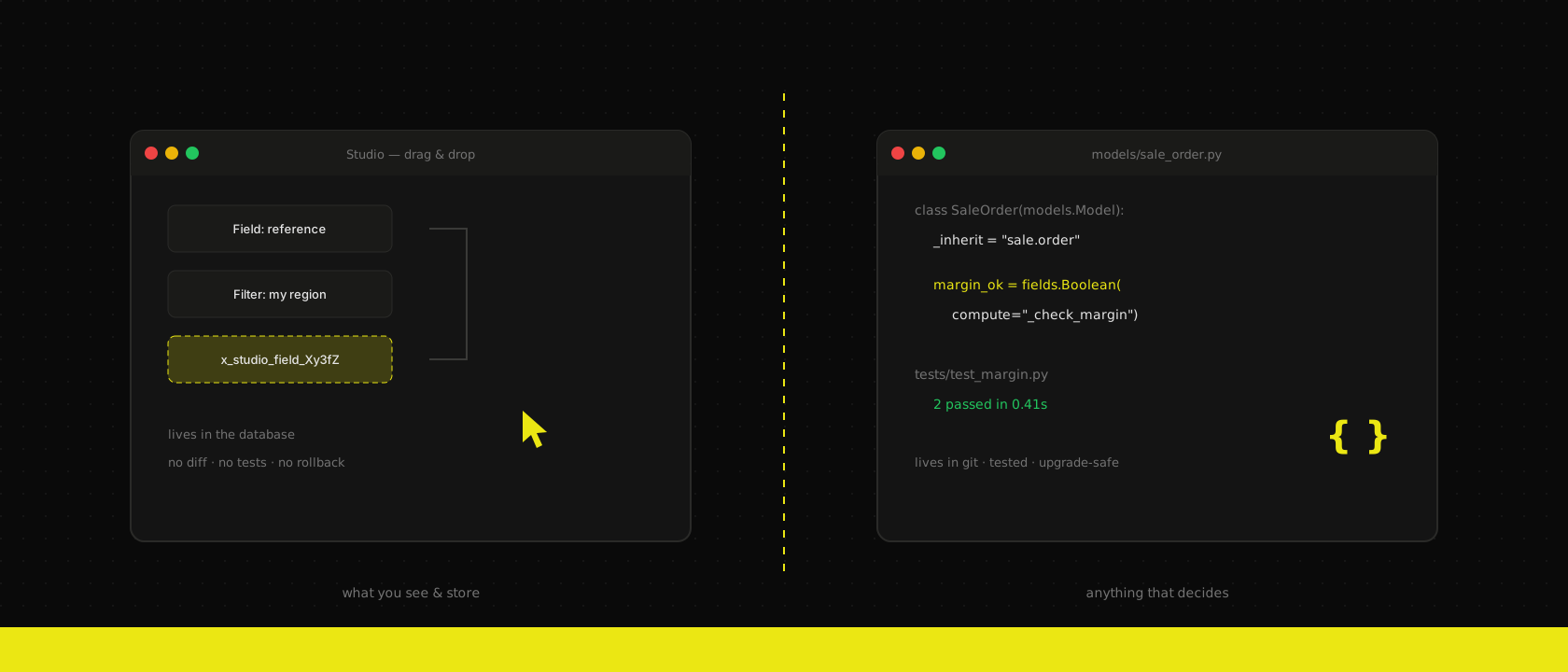
Odoo Studio demos beautifully. Drag a field onto the form, add a filter, tweak a report — no developer, no deployment, live in seconds. So the question lands in almost every implementation we run: "If we can click it in Studio, why would we ever pay for a custom module?"
Because Studio and modules are not two prices for the same thing. They're two different places for your customisation to live — and that difference is invisible on day one and very visible at upgrade time.
What Studio is genuinely good at
Let's be fair to it first. Studio earns its licence when the change is structure, not behaviour:
- An extra field on a form — a reference number, a checkbox, a date the standard model lacks.
- View tweaks — reorder columns, hide what your team never uses, rename a confusing label.
- Filters and grouping that match how your people actually search.
- Simple report touch-ups — a logo, a footer clause, a column on the quote.
For this class of change, Studio isn't just acceptable — it's the right tool. The key user who owns the process makes the change themselves, in minutes, without a ticket. We actively encourage it; an implementation where every renamed label needs a developer has failed at something more basic than tooling.
Where the trap springs
The trouble starts when clicking stops describing what data you store and starts describing what the business does: computed fields with Python snippets, chained automations, approval logic, anything that decides amounts, dates or states.
Technically you can build all of that in Studio. Here's what you've actually built:
Logic that lives in the database, not in code. Every Studio change is data — rows in ir.ui.view, ir.model.fields, automation tables. It's not in git, so there's no diff, no review, no blame, no rollback. When something breaks, the answer to "what changed last Tuesday?" is archaeology, not git log.
No test path. A custom module travels dev → staging → production, with tests gating each step — the same discipline as any module we write. A Studio change is made in an environment, by hand. Rebuilding it on staging means clicking it again and hoping you clicked the same thing.
A namespace that never goes away. Every Studio field is x_studio_something, forever:
# What five years of Studio leaves in your sale.order model
x_studio_margin_check
x_studio_margin_check_1        # someone's second attempt
x_studio_approval_state_old    # nobody dares delete it
x_studio_field_Xy3fZ           # auto-generated, meaning unknown
Ask what x_studio_field_Xy3fZ does and the honest answer is usually: the person who knew left in 2023.
Invisible coupling. Studio automations happily reference other Studio fields, which reference server actions, which reference more fields. There's no dependency graph — the first complete map of the wiring is the stack trace that appears the day one piece changes.
The upgrade-time difference
This is where the two paths properly diverge. A custom module is code: at upgrade time it's tested against the new version, its migrations run, and when something breaks it breaks loudly — in CI, before production.
Studio customisations are data riding along with the database. Most fields survive the trip fine. But the Python snippet in a computed field, the automation that calls a method Odoo renamed, the view XPath that no longer matches — those fail silently, discovered one by one, in production, by the people doing the work. Multiply by three years of accumulated clicks and "we'll just upgrade" becomes a forensic project. We've inherited enough of those databases to know the pattern by heart: nobody decided to build a critical process in Studio — it accreted, one reasonable click at a time.
The boundary we draw
Our rule fits in one sentence: Studio may change what you see and store; a module owns anything that decides. In practice, it becomes a checklist. Move it to a module when any of these is true:
- It computes or decides something. Margins, deadlines, approval outcomes, anything with an
if. - It crosses models. Logic spanning sales and inventory and accounting belongs in tested code, not in chained automations.
- Breaking it costs real money. If a failure blocks invoicing or shipping, it needs tests — and testable means module.
- It must survive upgrades predictably. Version-controlled code with migrations, not database rows and hope.
- A third field revision is happening.
x_studio_thing_2is the system telling you the design was never settled.
Everything below that line — cosmetic view changes, simple stored fields, filters, report layout — stays in Studio, guilt-free.
Making the two coexist
The boundary only holds if someone maintains it, so we bake it into the way we run projects:
- Every Studio change gets a one-line log — what, where, why. Thirty seconds that turn future archaeology into reading.
- Periodic harvest. At review moments we walk the Studio inventory; anything that has grown logic gets promoted into a proper module — deliberately, with tests, on the roadmap. Studio even helps here: its export gives a developer a starting inventory of what accumulated.
- The split is decided up front. Which gaps are Studio-class and which are module-class is a standard output of the fit-gap analysis, not something discovered mid-project.
That's the honest version of "no-code vs code": it was never a rivalry. Studio is an excellent screwdriver and a terrible foundation — use it for what it's for, and when a tweak starts making decisions for your business, give it the engineering it deserves. The click was cheaper on Monday; the module is cheaper every day after that.
Want us to publish something specific?
Tell us what you'd like to read and we'll add it to our writing queue.
Get the next one in your inbox
New articles, videos and the occasional engineering note — a short mail when there’s something worth reading, nothing else.