

Server Components for ERP data: where the fetch belongs now
React Server Components moved the data question out of the client bundle and into the render. For pages backed by an ERP, that's not a trend to adopt blindly — it's a boundary worth drawing precisely.
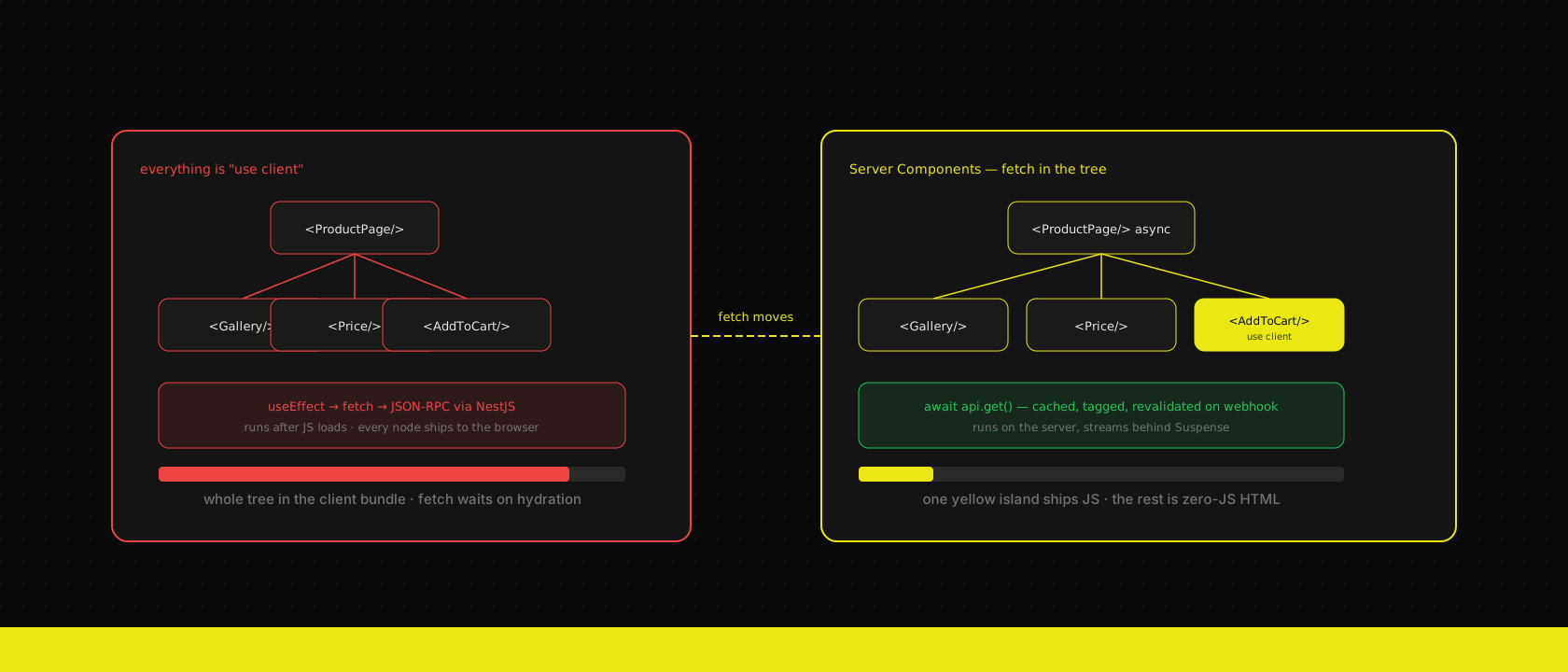
Every framework migration comes with a slogan, and Server Components got a good one: "fetch where you need the data." It's true, and it's also the kind of advice that makes people delete every "use client" directive in a codebase and call it a day. On an ERP-backed page, that's the wrong move about half the time. The interesting work isn't adopting Server Components — it's deciding, per piece of UI, which side of the network they should run on.
The boundary before Server Components
The default we described in our TanStack Query piece was the pre-RSC shape of every ERP frontend: a Client Component, a useEffect, a fetch to the browser, and a loading spinner while the request round-trips to Odoo through our NestJS API layer. That shape ships the fetching logic to the browser even though the fetching itself always had to happen somewhere the ERP could see it. The client never needed to own that code — it just always had.
The cost shows up twice. First in the bundle: query hooks, response types, and mapping logic for data the user never touches directly all travel to the browser. Second in the waterfall: the page's JS has to load and hydrate before the component can even start asking for data, so the ERP round-trip stacks on top of the download instead of running alongside it.
Fetch in the component, not in a client effect
A Server Component is just a component that runs on the server and can await before it renders. No effect, no loading state for data that's ready by the time HTML leaves the server:
export default async function ProductPage({
  params,
}: {
  params: Promise<{ id: string }>
}) {
  const { id } = await params
  const product = await api.get<Product>(`/catalogue/products/${id}`)

  return (
    <ProductDetail product={product}>
      <AddToCartButton productId={product.id} />
    </ProductDetail>
  )
}
api.get here calls our NestJS layer, not Odoo's JSON-RPC directly — that boundary doesn't move just because the caller is a Server Component. What moves is where the caller runs: on our infrastructure, on a connection close to the ERP, instead of on a customer's phone over whatever network they're on. The 300–800 ms Odoo round-trip we've written about before is unavoidable either way; the question is only whose latency budget absorbs it. Server-side, it overlaps with the rest of the server render. Client-side, it's pure added time after a JS bundle has already loaded.
Streaming keeps one slow field from blocking the page
The naive version of "fetch in the component" reintroduces a waterfall of its own: await everything at the top of the page, and the slowest ERP call gates the whole response. Suspense fixes that by letting the shell render immediately and each slow piece stream in when it's ready:
export default async function ProductPage({ params }) {
  const { id } = await params

  return (
    <ProductLayout>
      <ProductHeader id={id} />
      <Suspense fallback={<StockSkeleton />}>
        <StockLevel id={id} />
      </Suspense>
    </ProductLayout>
  )
}
ProductHeader — title, price, images — comes from a catalogue endpoint we cache aggressively and returns fast. StockLevel hits a live-ish endpoint that's slower and changes more often. Splitting them means a stale-tolerant field never waits on a volatile one, and the volatile one never blocks a page that was otherwise ready. Same principle as the tiered staleTime values in our TanStack Query setup, applied one layer up: not every piece of ERP data deserves the same patience.
Caching at the boundary, not in the browser
The interesting cache in a Server Components app isn't in the client at all — it's the fetch cache Next.js sits in front of your fetch calls, keyed by URL and controllable per request:
export async function getProduct(id: string) {
  return fetch(`${API_URL}/catalogue/products/${id}`, {
    next: { revalidate: 900, tags: [`product:${id}`] },
  }).then((r) => r.json())
}
That revalidate: 900 is the same question we ask of staleTime in the client cache — how old may this answer be before it's wrong — just answered once, on the server, for every visitor instead of once per browser tab. The tags option is what makes it precise: when a product changes in Odoo, our NestJS layer's webhook handler calls revalidateTag for that product's tag, and that one cache entry drops, instead of waiting out a fifteen-minute TTL or nuking the whole catalogue cache to be safe. It's the server-render version of the query-key invalidation we already do client-side — the two caches stack the same way the browser cache and the API layer's cache stack: a request that misses the fetch cache still hits the layer's own cache before it ever reaches an Odoo worker.
Zero client JS for the part that's just reading
A product page that only displays ERP data — no filters, no cart, no live updates — doesn't need to ship a single byte of data-fetching JS to the browser. The Server Component renders the HTML, streams it down, and the client's job is done before it starts. On catalogue and listing pages, which are most of the pages on a commerce or ERP-backed site, that's a meaningful chunk of a typical React bundle that simply isn't there anymore — not deferred, not code-split, gone.
That only holds for genuinely read-only views, though. The moment a page needs to react to a click without a full navigation — add to cart, apply a filter, edit a quantity — some part of it has to run in the browser, and pretending otherwise produces a page that re-fetches the world on every interaction just to stay a Server Component.
Where the client boundary still earns its keep
This is the split we actually ship: Server Components own the read, Client Components plus TanStack Query own what happens after the user acts on what they read.
// Server Component: renders with data already in hand
export function ProductDetail({ product, children }: Props) {
  return (
    <article>
      <ProductGallery images={product.images} />
      <h1>{product.title}</h1>
      <Price value={product.price} />
      {children /* client island, see below */}
    </article>
  )
}"use client"
export function AddToCartButton({ productId }: { productId: number }) {
const { mutate, isPending } = useAddToCart()
return (
<button onClick={() => mutate({ productId })} disabled={isPending}>
Add to cart
</button>
)
}The gallery, title, and price never needed a client cache — they were correct the moment the server rendered them. The cart mutation does need one: it has to update optimistically, survive navigation, and stay consistent with a cart badge rendered somewhere else on the page. That's exactly the optimistic-update, invalidate-by-prefix pattern we already had, now scoped to a small client island instead of the whole page. Rather than asking "Server Component or Client Component" for an entire route, we ask it per element: does this need to react to the user, or just show them something true at render time?
What doesn't change
Server Components move where a fetch runs. They don't touch what the fetch is asking of Odoo, and they're not a substitute for the things that actually make ERP data fast:
- The NestJS layer's contract still matters. A Server Component calling a bloated, unshaped endpoint is still a bloated, unshaped endpoint — it's just closer to the source now.
- A slow Odoo query is still slow. Moving the
awaitserver-side hides the wait from a JS bundle, not from the render. Fix the query, don't just relocate who's stuck waiting on it. - Interactive state still needs a client cache. Suspense streams a read; it doesn't give you optimistic updates, background revalidation, or offline-tolerant mutations. That's still TanStack Query's job.
The rule of thumb
On every custom web application we build in front of an ERP now, the default is a Server Component: fetch through the API layer, cache with a tag the layer can invalidate, stream the slow parts behind Suspense. A piece of UI only earns a "use client" boundary when it has to react to the user after the page has already rendered — a button, a filter, a form. Everything else was never the client's job to fetch; it just used to be, because it was the only place we could await.
That's the whole shift. Not "Server Components instead of a client cache" — Server Components for the read, a client cache for what the read leads to, and a line between them drawn on purpose instead of by default.
Want us to publish something specific?
Tell us what you'd like to read and we'll add it to our writing queue.
Get the next one in your inbox
New articles, videos and the occasional engineering note — a short mail when there’s something worth reading, nothing else.