

Headless commerce with Odoo and React: the complete guide
Decouple the storefront from Odoo and you get a faster, safer, upgrade-proof shop. DragonflyDB caching, island architecture, GitHub version control, PR previews, VPN-isolated ERP, PWA mobile UX — everything we ship on every headless e-commerce project.
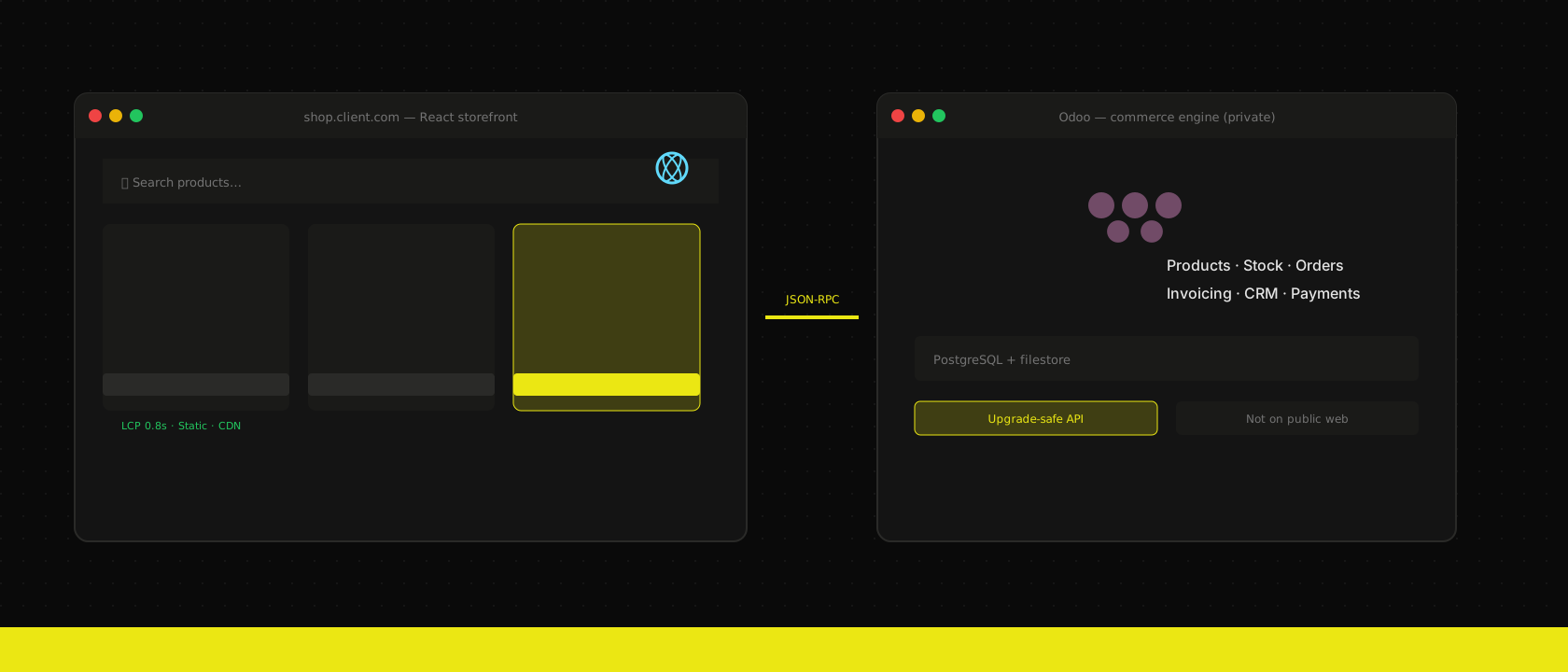
The default Odoo eCommerce website works. It also ships your entire ERP's JavaScript bundle to every product page, ties your storefront redesign to Odoo upgrade cycles, and makes "make the shop feel like our brand" a fight against someone else's theme system.
Headless commerce fixes all of that by treating Odoo as what it is best at — products, pricing, stock, orders, invoicing, fulfilment — and building the customer-facing experience in React, where it belongs.
The architecture in one diagram
Browser ──► Next.js / React storefront (CDN, static where possible)
                    │
                    ▼ read-through cache
              DragonflyDB (product JSON, categories, sessions)
                    │ cache miss only
                    ▼ JSON-RPC / REST
              Odoo API layer (products, cart, checkout, payments)
                    │
                    ▼
         PostgreSQL + filestore (single source of truth)
The storefront is a thin, fast client. Odoo remains the system of record. Nothing is duplicated; nothing drifts.
What Odoo still does — and does well
Headless is not "replace Odoo." It is "use Odoo for what Odoo is great at":
- PIM — variants, attributes, pricelists, translations.
- Stock — real-time availability, multi-warehouse, dropship rules.
- Orders — SO → delivery → invoice, fully traceable.
- CRM — abandoned cart recovery, customer history, support tickets.
- Accounting — payment reconciliation, VAT, intrastat.
The React app is a sales channel — the shop your customers experience. Odoo is the engine room behind it. You get both: a branded storefront that converts, and an ERP that fulfils every order.
Performance: pages that actually load instantly
A themed Odoo website page often pulls in the full web client stack — even on the shop. A React storefront built with Next.js can prerender product and category pages at build time, serve them from the edge, and hydrate only the interactive parts (cart, filters, checkout).
What we typically see after a headless migration:
- Largest Contentful Paint drops from 3–5 seconds to under 1 second on product pages.
- Time to Interactive improves dramatically because the JS payload is kilobytes, not megabytes.
- Core Web Vitals go green — which matters for Google, for conversion, and for the CFO who reads the analytics dashboard.
Static generation + CDN caching means Black Friday traffic hits Bunny or Cloudflare, not your Odoo workers. Odoo handles cart mutations and checkout; the catalogue browsing scales for free.
A headless shop is only as fast as the decisions you make on the React side. Odoo can respond in 200ms; if your storefront waits for client-side waterfalls, you have wasted it.
Static-first catalogue pages
Product and category URLs should be prerendered. At build time (or on a revalidation schedule), fetch product data from Odoo and bake it into HTML:
export async function generateStaticParams() {
  const products = await odoo.listProducts({ limit: 5000 })
  return products.map((p) => ({ slug: p.slug }))
}

export default async function ProductPage({ params }: Props) {
  const product = await odoo.getProduct(params.slug)
  return <ProductDetail product={product} />
}
The user gets HTML immediately. Odoo is hit once per revalidation, not once per page view.
Cache the hot paths with DragonflyDB
Every product page view does not need a round trip to Odoo. We use DragonflyDB — a Redis-compatible in-memory store that is dramatically faster on modern multi-core hardware — as a read-through cache between the Next.js server and Odoo:
| Layer | What | TTL |
|---|---|---|
| CDN | Static HTML + assets | Hours |
| DragonflyDB | Product JSON, category trees, navigation, pricelist snapshots | 5–15 min |
| Odoo | Source of truth (cart, checkout, stock mutations) | Always |
On a cache hit, the storefront responds in single-digit milliseconds without touching Odoo at all. A catalogue page that would otherwise trigger three JSON-RPC calls per request becomes one Dragonfly lookup. Under normal browsing traffic, Odoo sees a fraction of the API load — which means your web workers stay free for checkout and back-office work, and you do not need to scale Odoo just because marketing ran a campaign.
Cache invalidation is event-driven where it matters: when a product is updated in Odoo, a webhook or automated action busts the relevant keys in Dragonfly. Stale product data for fifteen minutes is acceptable for catalogue browsing; stale cart state is not — cart and checkout always bypass the cache and hit Odoo directly.
We run Dragonfly on the same Kubernetes clusters as the rest of the stack — often the same instance that holds Odoo sessions, so infrastructure stays simple.
Images: never serve originals
Odoo's product images are often 4000px wide. The storefront should request resized variants through your CDN's image optimizer. next/image with a Bunny or Cloudflare loader keeps bytes off the wire and CPU off Odoo.
We target LCP under 1.2s and TBT under 200ms on mobile for product pages. Headless clients routinely beat their old Odoo-themed shop by 40–60 points on Lighthouse performance. Speed is not vanity — it is margin.
Partial hydration and island architecture
Odoo's built-in shop behaves like a small app inside a page: change a product variant, update a quantity, or log in to see your B2B price — and the browser often reloads or re-renders far more than necessary. Images flicker, scroll position jumps, and the user waits while the entire page reconciles.
A React storefront built with Next.js App Router flips that model. Most of the page is static HTML — hero, product gallery, description, SEO content — shipped from the CDN with zero JavaScript required to display it. Only the parts that need interactivity become islands: the variant picker, the live price, the add-to-cart button, the mini-cart in the header, the stock indicator.
That is partial hydration (or selective hydration): the browser downloads a small JS bundle per island, not a framework big enough to run the whole shop client-side.
What this feels like in practice:
- A buyer selects a different colour on a product page → only the price and SKU island fetches the updated variant from Odoo (via Dragonfly or a thin API route). The gallery, description, and reviews do not re-render. No full page refresh.
- A logged-in B2B customer sees contract pricing → the pricelist island updates. The rest of the catalogue page stays put.
- Someone adds an item to cart → the cart badge island updates. The product page they are reading does not reload.
Compare that to a monolithic Odoo page where a variant change can trigger a round trip that feels like navigating again — especially on mobile, especially on a heavy theme.
React Server Components push this further: product data can be fetched on the server at render time and streamed as HTML, while client components ("use client") wrap only the interactive edges. You get the SEO and first-paint benefits of server rendering with the responsiveness of a SPA where it actually matters — checkout, configurators, account portals — without paying the SPA tax on every catalogue page.
For shops with complex configurators (dimensions, engravings, bundle builders), islands keep the expensive UI scoped to one component tree. For simple catalogue browsing, most visitors never hydrate more than a cart icon and a search box. That is how you keep TBT low even as the shop grows features Odoo's theme system would implement by loading more global assets for everyone.
Every public Odoo website exposes Odoo itself to the internet — login forms, RPC endpoints, module assets. Headless architecture puts a React app in front and keeps Odoo on a private network or behind strict ingress rules.
Security for headless Odoo is mostly geography: the ERP should not be on the same hostname as your shop.
example.com       ──► React storefront (public CDN)
api.example.com   ──► API gateway ──► Odoo (cluster-internal / VPN only)
Odoo pods get no public ingress. Only the gateway can reach them. The gateway validates JWTs, rate-limits, and strips anything that is not on the allowlist.
Take it further: put Odoo entirely behind a firewall or VPN. Clients, vendors, and anonymous visitors never touch Odoo — they interact only with the React frontend or B2B portal. Your own employees reach Odoo from the office network or over VPN. That is perfect isolation: the attack surface for the outside world is a narrow, audited API; the full ERP admin UI is visible only to people who are supposed to see it. Pen testers cannot find a login form that does not exist on the public internet.
The storefront talks to a narrow API surface:
GET /products,GET /products/:idPOST /cart/*,POST /checkoutGET /account/orders(authenticated)
No admin UI, no database manager, no accidental /web/database/selector on a misconfigured reverse proxy. Do not proxy /web, /xmlrpc, or /longpolling to the internet. If a pen test cannot find your Odoo login page, you are doing it right.
Storefront sessions live in DragonflyDB with short TTLs. Odoo credentials for server-side calls live in Kubernetes secrets, rotated on deploy. Never embed API keys in client bundles — server actions or BFF routes only.
For GDPR-heavy clients, headless means customer PII in the browser is minimal (cart token, not full ERP records). Odoo stays in the EU cluster; the CDN serves static assets globally. Data processing agreements get simpler when the public tier does not touch the database.
Upgrade-safe: never rebuild the shop because Odoo bumped a minor version
This is the benefit clients feel most acutely two years in.
With a monolithic Odoo website, an Odoo 17 → 19 upgrade can break your theme, your custom QWeb templates, your JavaScript widgets, and your checkout flow — all at once. With headless, the upgrade scope is the API contract: do product queries still return the fields we need? Does checkout still work?
Your React storefront did not change. Your brand did not change. You test the API, not 400 template files.
We have migrated headless clients across two major Odoo versions without touching the storefront codebase beyond dependency bumps. Try saying that with a custom Odoo theme.
Developer experience: hire for React, not for Odoo frontend archaeology
Your team (or ours) builds in TypeScript, Tailwind, component libraries, Storybook, Playwright — the modern web stack. Odoo frontend development means QWeb, OWL widgets, and asset bundles that fight you on every custom animation.
Headless lets you:
- Reuse design systems across marketing site and shop.
- A/B test landing pages without deploying to Odoo.
- Ship frontend changes ten times a day without restarting Odoo.
Version control: plan, preview, and ship — without going live by accident
This is the operational advantage that is hardest to explain until you have lived with Odoo Website Builder.
Odoo website changes live in the database. Edit a page, click Save, and it is live — immediately. There is no draft mode, no schedule-for-next-Monday, no pull request. If your designer moves a hero banner at 4 PM on Friday, that is what every visitor sees at 4:00:01 PM. Rolling back means manually undoing changes or restoring a database backup. You cannot git revert a QWeb template. You cannot see who changed which block, when, or diff two versions side by side.
A headless storefront is pure code in GitHub. Every layout change, content block, component tweak, and translation update is a commit. That gives you:
- Full audit trail — who changed what, when, which files (blame, history, signed commits).
- Pull requests — review design and copy before anything reaches production.
- PR preview instances — the client opens a URL, clicks through the actual shop with the proposed changes, approves or requests edits. No screenshots, no "trust me, it looks good on my laptop."
- Scheduled releases — merge the PR Monday morning when the campaign starts. Until then, production is untouched.
- One-click revert — bad deploy? Revert the merge commit. Production matches the previous known-good state in minutes, not hours of manual undo.
The workflow difference is stark: with Odoo Website, approving a design often means redoing the same work twice — once in staging or a mockup, then again in production because there is no code merge for website content. With headless, what you preview in the PR is exactly what ships when you merge. We do not rebuild pages in production after sign-off; we promote the same artifact ArgoCD already deployed to the preview URL.
This is the same GitOps discipline we use for Odoo itself — applied to the storefront your customers actually see.
Multiple storefronts from one engine room
Need a consumer shop and a separate B2B portal? With headless, duplicate the Next.js codebase (or run two deployments from one monorepo), point both at the same Odoo instance, and differentiate with pricelists, assortments, and authentication — or keep them fully separate branded experiences on example.com and b2b.example.com.
Some clients prefer one Odoo, one catalogue, two sales channels — extended pricelist and visibility logic handles who sees what. Others want physically separate portals — a wholesale ordering site with MOQ rules and account-only access alongside a retail shop with a completely different brand. Both patterns are straightforward when the frontend is code you control, not a single shared Odoo theme.
Spinning up a spinoff brand — a sub-label, a regional variant, a partner white-label shop — is a new git branch and a deploy, not a risky copy-paste inside Odoo's website editor.
Integrate the tools your marketing team already uses
Odoo Enterprise PIM and website editing licenses exist, but headless frees you from needing them just to give marketers and translators a good workflow.
- External PIM / DAM — Akeneo, Plytix, or any system with an API. Product enrichment and asset management happen in tools built for that job. Odoo receives the canonical SKU, stock, and order data; the PIM owns the rich marketing content the storefront displays. Translations go through open-source platforms like Weblate, Tolgee, or Pontoon — glossaries, review workflows, and in-context editing for your translators, with completed strings pulled into the storefront at build time.
- Visual page builders — embed Puck or similar React-native editors so non-developers compose landing pages from approved components, still stored as code in the repo (version control benefits intact).
- Headless CMS — Sanity, Storyblok, or Contentful for editorial content, blog posts, and campaign pages — decoupled from both Odoo and your deploy cycle for copy, coupled where it needs to be for commerce data.
Your translators do not need Odoo logins. Your designers do not need to learn QWeb. The ERP stays focused on operations; the experience layer uses the best tool for each job.
Connecting React to Odoo: JSON-RPC and stable API contracts
Odoo speaks JSON-RPC over HTTP. Your React app should not scatter raw fetch calls everywhere — wrap it once, type it properly, and sleep better.
type JsonRpcResponse<T> = { result: T; error?: { message: string } }

export async function odooCall<T>(
  model: string,
  method: string,
  args: unknown[] = [],
  kwargs: Record<string, unknown> = {},
): Promise<T> {
  const res = await fetch(process.env.ODOO_URL + "/jsonrpc", {
    method: "POST",
    headers: { "Content-Type": "application/json" },
    body: JSON.stringify({
      jsonrpc: "2.0",
      method: "call",
      params: { model, method, args, kwargs },
      id: crypto.randomUUID(),
    }),
  })
  const data: JsonRpcResponse<T> = await res.json()
  if (data.error) throw new Error(data.error.message)
  return data.result
}
Run this server-side only (Route Handlers, Server Actions). The browser never sees Odoo credentials.
Do not expose generic search_read to the storefront. Write thin Odoo model methods that return exactly the JSON shape your React components expect. When Odoo upgrades, you fix one Python method — not fifty React files.
Odoo returns UserError for business rules ("out of stock", "minimum quantity"). Map those to HTTP 422 with a message the UI can show. Log everything else to Sentry. This layer is the contract that makes headless Odoo implementations maintainable for years.
PWA: app-like mobile UX without app-store fees
Your customers do not want to download another app. They do want something that feels like one — home screen icon, fast repeat visits, push notifications when their order ships.
A headless Odoo storefront as a PWA delivers that without maintaining iOS and Android codebases.
What works offline:
- Browsing cached product pages (precached at install or on first visit).
- Building a cart locally, syncing when connectivity returns.
- Viewing order history from IndexedDB (last sync).
What does not work offline: stock checks and checkout. Be honest in the UI — "we will confirm availability when you are back online."
Use Workbox with a stale-while-revalidate policy for product JSON and cache-first for static assets. Invalidate on deploy via a versioned precache manifest.
When a delivery order moves to "done", an Odoo automated action hits your push gateway (Firebase, OneSignal). The PWA subscription lives in Odoo as a field on res.partner. One system, one customer record.
PWAs convert mobile browsers better than responsive themes because repeat visits are one tap away. For B2B reorder flows — "order the same pallet as last month" — the speed difference is measurable in reorder frequency.
How we implement it
Our standard stack for Odoo e-commerce headless projects:
- Next.js or TanStack Start storefront — App Router / file-based routing, static generation for catalogue pages.
- Typed API client wrapping Odoo JSON-RPC (or REST if you run
base_rest). - DragonflyDB for session storage, cart state, and read-through caching of product/category API responses — fewer Odoo calls, sub-10ms cache hits.
- Stripe / Mollie / Adyen payment flows with Odoo payment providers on the backend.
- Kubernetes deployment — storefront and Odoo scaled independently; Odoo on a private network or VPN, API gateway for the storefront only.
- GitHub + Woodpecker CI + ArgoCD — repo on GitHub; Woodpecker runs lint, build, and deploy pipelines in our own cluster (no GitHub Actions); every PR gets a preview URL; merge to promote the exact tested artifact to production.
We have shipped this for B2B portals, consumer brands, and multi-language shops across the EU and US. We bundle PWA setup on projects where mobile traffic exceeds 40%. The pattern is proven; the ROI is measurable in conversion rate and upgrade cost avoided.
This is standard in every cloud-hosted headless project we run.
When headless is not the answer
If you need a simple shop live next week with fifty products and no custom UX, Odoo's built-in website may be enough. If you care about brand, speed, mobile UX, or you plan to be on Odoo for years — headless pays for itself before the first major upgrade.
That is why it is one of our best-selling services. The shop your customers see should not be limited by your ERP's frontend framework.
Want us to publish something specific?
Tell us what you'd like to read and we'll add it to our writing queue.
Get the next one in your inbox
New articles, videos and the occasional engineering note — a short mail when there’s something worth reading, nothing else.