

Deploy strategies for boring business apps: rolling, blue-green, canary
Not every deployment needs progressive delivery. Matching strategy to blast radius — what we roll, what we blue-green, and the one system that gets canaries.
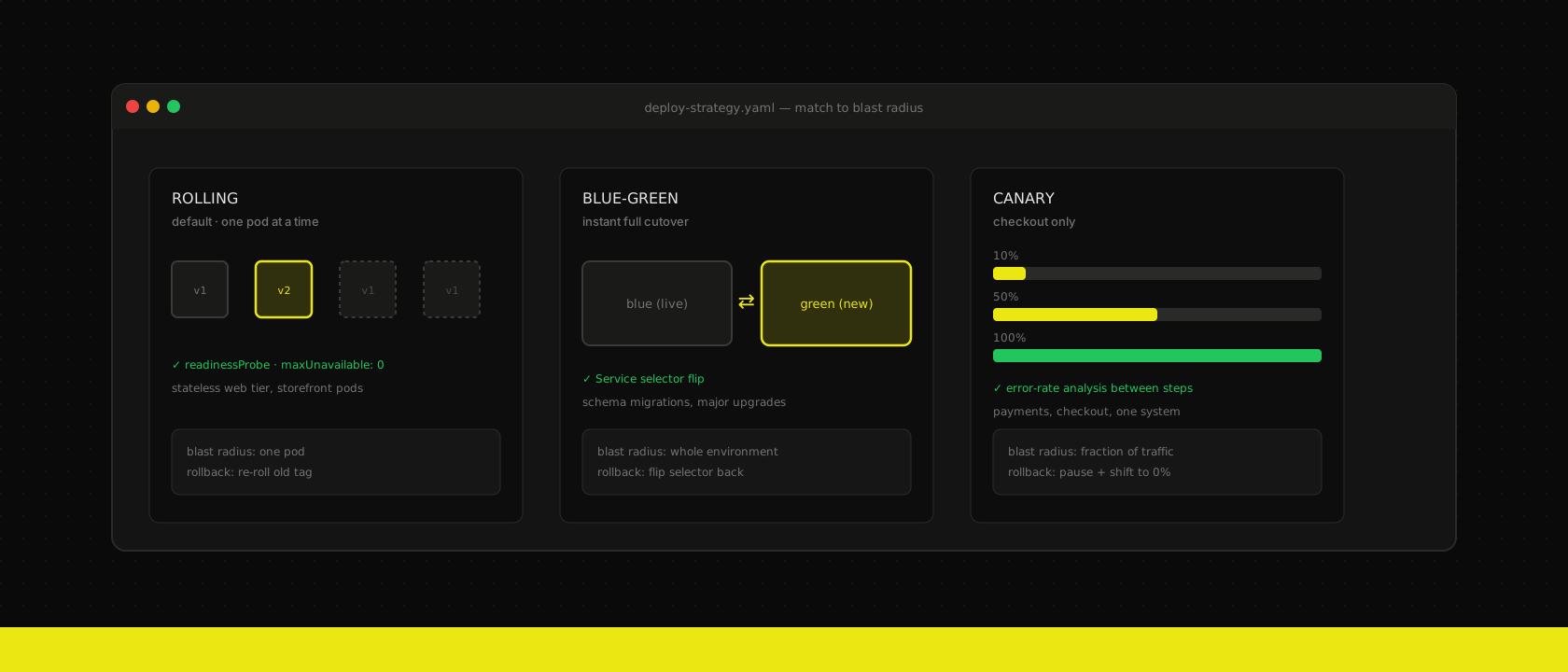
A client asks, roughly once a quarter: "should we set up canary deployments?" They read a blog post — maybe one of ours — and now every service in the cluster feels underdressed without progressive delivery. The honest answer is almost always no. Most of what we run is a marketing site, an Odoo backend, or a React storefront's catalogue pages — systems where the worst failure mode a bad rollout produces is "the old pod comes back and nothing happened." Progressive delivery is a tool for the failure mode where a bad version keeps serving some traffic while you decide, and most business apps don't have that failure mode. Building canary infrastructure for a service that doesn't need it is pure ceremony: another controller to run, another dashboard to watch, and a rollout that takes twenty minutes longer for zero extra safety.
The strategy should follow the blast radius of getting it wrong, not the sophistication of the tooling available.
Rolling: the default for almost everything we run
Rolling updates are what Kubernetes gives you for free, and for stateless services they're enough. Odoo web workers, Next.js storefronts, internal dashboards — anything without server-side session state and without a breaking change to the data contract rolls one pod at a time, verified by a readiness probe before the next one goes:
spec:
  strategy:
    type: RollingUpdate
    rollingUpdate:
      maxUnavailable: 0
      maxSurge: 1
  template:
    spec:
      containers:
        - name: web
          readinessProbe:
            httpGet:
              path: /healthz
              port: 3000
            periodSeconds: 5
We covered the probe discipline this depends on in self-hosting Next.js on Kubernetes — a readiness probe pointed at / instead of something that actually exercises the app is how a rolling update ships a broken pod with a green checkmark next to it. Get the probe right and maxUnavailable: 0 means users never see a blip: old pods keep serving until new ones are verifiably ready, and if the new version can't pass its own health check, the rollout stalls with the old version still fully up.
The one place rolling breaks down is a backward-incompatible data contract. If v2 writes a column v1 doesn't know how to read, you have both versions live against the same database for the seconds-to-minutes the rollout takes — that's not a rollout risk, that's a correctness bug, and no deploy strategy fixes it. Odoo module upgrades that touch the schema get a pre-sync migration job, not a rolling pod restart, exactly as we described in GitOps for Odoo: one job runs the migration to completion, then the deployment rolls against a schema every replica already agrees on.
Blue-green: when the rollback needs to be instant, not gradual
Rolling gives you a fast, low-drama default. It does not give you an instant, single-action rollback — undoing a bad rolling update means rolling forward again with the old image, pod by pod, which takes exactly as long as rolling out did. For the handful of changes where that's not acceptable — a major Odoo version upgrade, a schema migration too large to run as a pre-sync job without extending the maintenance window — we run two full environments and cut traffic over at the Service or Ingress level:
apiVersion: v1
kind: Service
metadata:
  name: odoo-web
spec:
  selector:
    app: odoo
    version: green   # was: blue
  ports:
    - port: 8069
Both environments run simultaneously against their own database copy until the switch happens, which is expensive — you're paying for double the compute for the overlap window — but it buys you something rolling can't: the old environment stays warm and fully intact, so a bad cutover is one selector edit away from undone, not a second deployment away. This is the mechanism behind the maintenance-window upgrades in Odoo upgrades without downtime — staging becomes green, production is blue, and the cutover only happens once the automated suite and a manual smoke pass are both clean.
We reserve blue-green for changes that are all-or-nothing by nature. Anything that can be expressed as "some pods on v1, some on v2, both serving correctly" doesn't need a second full environment — it needs a rolling update.
Canary: the one system that earns it
We run exactly one canary pipeline in production, on the checkout and payment path of a headless storefront we described in headless commerce with Odoo and React. Everything else in that stack — catalogue pages, category browsing, the marketing shell — rolls. Checkout doesn't, because it's the one place where "broken for 2% of traffic for six minutes" is a materially better outcome than "broken for 100% of traffic for ninety seconds," and where the failure mode is subtle enough — a payment webhook silently failing, a cart total off by a rounding error — that you want live traffic and an automated gate deciding whether to continue, not a human staring at a dashboard:
spec:
  strategy:
    canary:
      steps:
        - setWeight: 10
        - pause: { duration: 5m }
        - analysis:
            templates:
              - templateName: checkout-error-rate
        - setWeight: 50
        - pause: { duration: 10m }
        - analysis:
            templates:
              - templateName: checkout-error-rate
        - setWeight: 100
The analysis step is what makes this worth the extra infrastructure — it queries Prometheus for the checkout error rate and payment webhook failure rate on the canary pods specifically, and aborts the rollout automatically if either crosses a threshold, before a human would have noticed the Slack alert. Ten percent of checkout traffic for five minutes is enough signal on any storefront doing real volume; a service with light traffic would need a longer soak just to get a statistically meaningful sample, which is itself a sign canary isn't the right tool for that service.
Match the strategy to what actually breaks
| Strategy | Use when | Rollback |
|---|---|---|
| Rolling | Stateless, backward-compatible with the current data contract | Roll forward with the old tag |
| Blue-green | All-or-nothing change: major upgrade, schema migration, anything you need to undo in one action | Flip the selector back |
| Canary | High-traffic, high-cost-of-failure path where partial exposure plus automated analysis buys real signal | Pause and shift weight back to zero |
None of these are a maturity ladder — canary isn't "better" than rolling, it's more expensive in exchange for a failure mode most services don't have. The question that actually matters isn't "what's the most advanced strategy we could run," it's "what does getting this specific deploy wrong actually cost us, and does that cost justify the infrastructure." For most of what we run on every cluster we host, the honest answer is a rolling update and a readiness probe that isn't lying to Kubernetes about what "ready" means.
Want us to publish something specific?
Tell us what you'd like to read and we'll add it to our writing queue.
Get the next one in your inbox
New articles, videos and the occasional engineering note — a short mail when there’s something worth reading, nothing else.