

Headless WooCommerce: a React storefront on the shop you already run
You don't have to replatform to get a fast shop. Keep WooCommerce as the order engine and wp-admin your team knows, put React in front of it, and be honest about the one hard part: checkout.
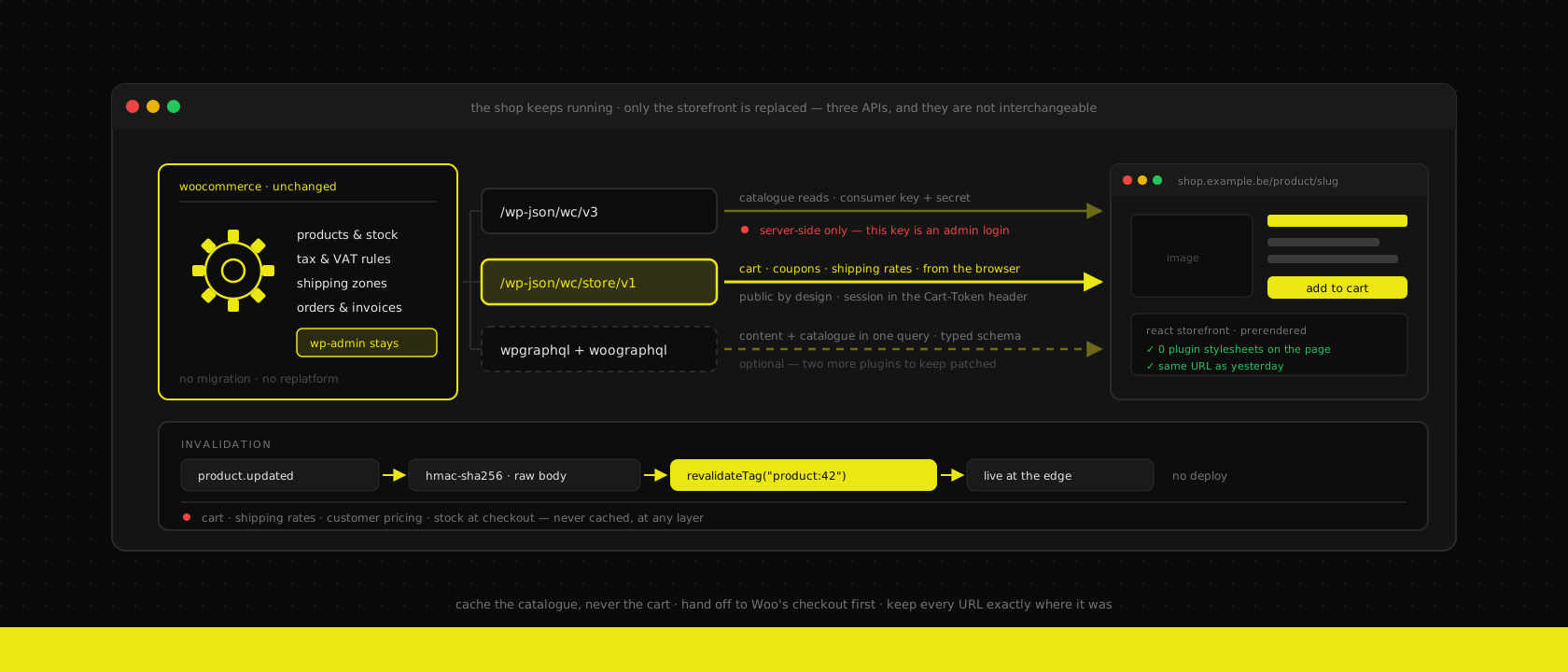
The pitch a WooCommerce shop owner usually hears is "your site is slow, you should replatform." It's an expensive sentence. Replatforming means a new admin your team has to relearn, a data migration, a payments integration rebuilt against a different gateway abstraction, and a VAT and shipping setup that took three years of edge cases to get right — thrown away and reassembled from memory.
Almost none of that is where the slowness lives. The slowness lives in the thirty-eight-plugin frontend: a page builder rendering nested divs, four render-blocking stylesheets, a slider, a review widget loading its own jQuery, and a server rendering all of it per request. WooCommerce — the thing that actually holds your products, tax rules, shipping zones, orders and invoices — is not what's making the page take four seconds.
So separate them. WooCommerce stays exactly where it is and keeps doing the part it's good at. The customer-facing site becomes a React app that reads from it. Same argument we make for headless commerce on Odoo, with one significant difference: WordPress was never designed to be a backend, so the API story is messier and worth getting right before you write a line of frontend code.
Three APIs, and they are not interchangeable
This is where most headless Woo projects go wrong in week one. WooCommerce exposes several ways in, they have different auth models and different threat profiles, and picking one for everything is how you end up either leaking credentials to the browser or rebuilding a cart engine you didn't need to.
The REST API (/wp-json/wc/v3) is the admin-grade one. Consumer key and secret, full read/write on products, orders, customers, coupons, refunds. It is server-side only — those credentials are equivalent to a shop admin login, and there is no scoping that makes them safe in a bundle. Use it for catalogue reads at build time, order lookups behind your own auth, and anything a back-office screen needs.
The Store API (/wp-json/wc/store/v1) is the public one, and it's the piece people miss. It's what WooCommerce Blocks itself talks to: unauthenticated, session-based, cart-aware. Add to cart, apply a coupon, select a shipping rate, read a customer-specific price — all of it, from the browser, with no secret. The session travels in a Cart-Token header that the API hands you on first contact and you return on every subsequent call; write operations also want the Nonce header from the previous response.
// The Store API is public by design — no consumer key ever reaches the browser.
// It hands back a Cart-Token on first contact; every later call must return it.
export async function addToCart(id: number, quantity: number) {
  const res = await fetch(`${STORE_API}/cart/add-item`, {
    method: "POST",
    headers: {
      "Content-Type": "application/json",
      ...(cartToken && { "Cart-Token": cartToken }),
      ...(nonce && { Nonce: nonce }),
    },
    body: JSON.stringify({ id, quantity }),
  })
  cartToken = res.headers.get("Cart-Token") ?? cartToken
  nonce = res.headers.get("Nonce") ?? nonce
  return res.json()
}
WPGraphQL plus WooGraphQL is the third option, and it earns its place when your storefront needs product data and editorial content in the same view — a category page with a hand-written intro, a landing page with three curated products. One query instead of three REST round-trips, and you get a typed schema for free. It's two more plugins to keep patched, which is a real cost on a stack whose whole reputation problem is plugins.
Our default split: WooGraphQL for reads that mix content and catalogue, REST server-side for the bulk catalogue sync, Store API in the browser for anything cart-shaped. Nobody writes a cart engine.
Cache the catalogue, never the cart
A product page is the same for every visitor until someone edits the product. That's a build-time answer, exactly as it is for any static-first site — render it once, serve it from the edge, and stop asking WordPress.
The interesting question is invalidation, and WooCommerce answers it properly: it ships webhooks. Point product.updated, product.deleted and product.created at a route on the storefront and a price change in wp-admin is live in seconds without a deploy.
The part worth writing down is the signature check, because a revalidation endpoint that anyone can POST to is a free denial-of-service against your origin:
import { createHmac, timingSafeEqual } from "node:crypto"
import { revalidateTag } from "next/cache"

export async function POST(request: Request) {
  // Woo signs the RAW body — parse it only after the signature checks out.
  const body = await request.text()
  const signature = request.headers.get("x-wc-webhook-signature") ?? ""

  const expected = createHmac("sha256", process.env.WOO_WEBHOOK_SECRET)
    .update(body)
    .digest("base64")

  const a = Buffer.from(signature)
  const b = Buffer.from(expected)
  if (a.length !== b.length || !timingSafeEqual(a, b)) {
    return new Response("invalid signature", { status: 401 })
  }

  const product = JSON.parse(body)
  revalidateTag(`product:${product.id}`)
  revalidateTag("catalogue")
  return new Response(null, { status: 204 })
}
Two details that bite people. The signature is a base64 HMAC-SHA256 over the raw request body, so read it as text and verify before parsing — a JSON round-trip changes the bytes and every delivery fails with a signature error you'll spend an afternoon on. And WooCommerce fires a webhook per product, so a 4,000-SKU price import fires 4,000 deliveries; tag-level invalidation absorbs that fine, a full rebuild per delivery does not.
What must never be cached, at any layer: the cart, shipping rates, customer-specific pricing, and stock at the moment of checkout. The catalogue can be a minute stale and nobody is harmed. A stale cart charges the wrong amount. Same rule we apply in front of a slow ERP — cache for feel, validate at the moment of truth.
Checkout is the decision, everything else is work
The catalogue is straightforward engineering. Checkout is where the project's scope is actually set, and there are two honest answers.
Hand off to Woo's checkout. Build the cart in React, then send the customer to the WooCommerce checkout page for payment. Your PCI scope doesn't change, every payment plugin the shop already runs keeps working, and the tax and shipping calculation stays in the one place that has always been right. The cost is a visible seam — a page that looks like a different site unless you theme it, on a different domain unless you put both behind one.
Own the checkout. Drive the whole flow through the Store API and hand off only for the payment redirect — Mollie for Bancontact, which is still how most Belgian customers pay, or Stripe. You get one continuous branded flow and full control of the funnel. You also inherit responsibility for every rule the plugin ecosystem was quietly enforcing: minimum order values, per-zone shipping, B2B VAT validation, coupon stacking. Each one is small. There are twenty of them.
We use the same rule here as everywhere: hand off first, own it when the conversion data says the seam is costing more than the rebuild. On a shop doing a few hundred orders a month it never does. It usually does above a few thousand, where a two-percent funnel improvement pays for the work in a quarter.
The plugins are the migration, not the code
The real fit-gap on a headless Woo project — and we do run a proper fit-gap before quoting one — is a plugin inventory, sorted into two piles.
Plugins whose value is data or business logic survive untouched. Tax engines, shipping-rate calculators, subscriptions, points and rewards, ERP connectors, invoicing. They run server-side, their output arrives through the API, and the storefront neither knows nor cares that they exist.
Plugins whose value is rendered output stop existing the moment you go headless. Page builders, sliders, popup builders, review widgets, related-product blocks, cookie banners, anything that works by filtering the_content or enqueueing a script. Their functionality has to be rebuilt in React, which is fine and usually an improvement — but it has to be counted, and it never is in the initial estimate.
The pile that surprises people is the third one, straddling both: SEO plugins. Yoast holds the meta titles, descriptions and canonical URLs an editor has been tuning for years. That data is available over the API, but only if you ask for it — and nothing will tell you that you forgot until traffic drops. Which brings us to the part that actually loses money.
Do not renumber the URLs
A headless rebuild is a replatform as far as Google is concerned, and the two ways to hurt yourself are both avoidable.
Keep the URL structure byte-for-byte. If products live at /product/slug and categories at /product-category/slug, they still do afterwards. "While we're at it, let's clean up the URLs" is how a shop loses a third of its organic traffic for two months in exchange for prettier paths nobody types. If a change is genuinely worth it, do it as a separate project with a 301 map, after the rebuild has proven stable — not in the same deploy, where you can't tell which change caused what.
Carry the metadata across deliberately: title, description, canonical, Open Graph, and the Product structured data with price and availability that drives your rich results. Woo's own theme emitted that markup for free. Headless, it is yours to emit, and a missing price or availability silently drops you out of the shopping results you had last week. Nobody notices for a fortnight, which is exactly long enough for it to be expensive.
Where we don't recommend this
A headless build is a bigger surface than a themed one — two deployables, an API contract between them, and a caching layer that can be wrong. That's worth it above a certain size and silly below it.
- Shops under a few hundred orders a month. A well-hosted, plugin-pruned WooCommerce on decent infrastructure is fast enough. Buy the hosting and delete twenty plugins first; measure again. We've closed more than one enquiry that way, and it's the honest answer.
- Sites where marketing builds the pages. If the value of the site is that a marketer assembles landing pages in a builder without a developer, headless takes that away. It's the same trade-off as running a site with no CMS at all — good for the people who commit, bad for the people who don't.
- Design that lives entirely in a theme. If the shop's look is a premium theme plus its customizer, going headless means paying a designer to reproduce it. That's a legitimate spend, but it's a redesign wearing a performance project's clothes, and it deserves to be argued on its own.
- No one to keep two things patched. WordPress still needs updating. If the current shop is three major versions behind because nobody owns it, adding a Next.js app doesn't fix that — it adds a second thing nobody owns. Fix ownership, then talk architecture.
The rule of thumb
When a client asks us whether their WooCommerce shop needs replacing, the answer is almost always no — the shop is fine, the storefront is the problem, and those are separable. Keep WooCommerce as the order engine and wp-admin as the place your team already knows how to use. Read the catalogue server-side over REST or WooGraphQL, cache it hard, and let Woo's own webhooks invalidate it. Do cart and checkout over the Store API, from the browser, where the session belongs. Hand off to Woo's checkout on day one and only own it when the numbers ask you to. Keep every URL exactly where it was.
That's the shape of every headless commerce build we ship on top of WordPress and WooCommerce, and the reason it lands as a two-month project rather than a two-quarter one: the hard part — everything that knows what a customer owes you — was already working, and we didn't touch it.
Want us to publish something specific?
Tell us what you'd like to read and we'll add it to our writing queue.
Get the next one in your inbox
New articles, videos and the occasional engineering note — a short mail when there’s something worth reading, nothing else.