

Prefetching on intent: ForesightJS and the click you already predicted
Prefetch-everything wastes bandwidth, prefetch-on-hover fires too late, and neither exists on a phone. Cursor trajectory, tab distance and scroll direction are better signals — and this site already runs them.
Every framework's answer to slow navigation is the same: prefetch the next page. The disagreement is only about when, and both popular answers are wrong in opposite directions.
Prefetch everything in the viewport — the App Router default — and a blog index with sixty links fires sixty requests for pages nobody will open. Prefetch on hover and you've waited until the cursor already arrived, which buys you the 200–400ms of hover-to-click we measured in the TanStack Query post and nothing before it. On a phone, hover doesn't exist at all, so the whole strategy silently degrades to "no prefetch."
There's a third signal sitting between those two, and it's been available in the browser the whole time: where the cursor is going. A pointer moving toward a link is intent. A tab key two stops away from a link is intent. A scroll heading toward a card is intent. ForesightJS turns those into a callback, and we've been running it on this site since the speed pass in July.
Hover is a confirmation, not a prediction
By the time mouseenter fires, the decision is already made — the user is on the target. You get whatever time the browser needs to be told, plus human click latency, which is real but small and wildly variable.
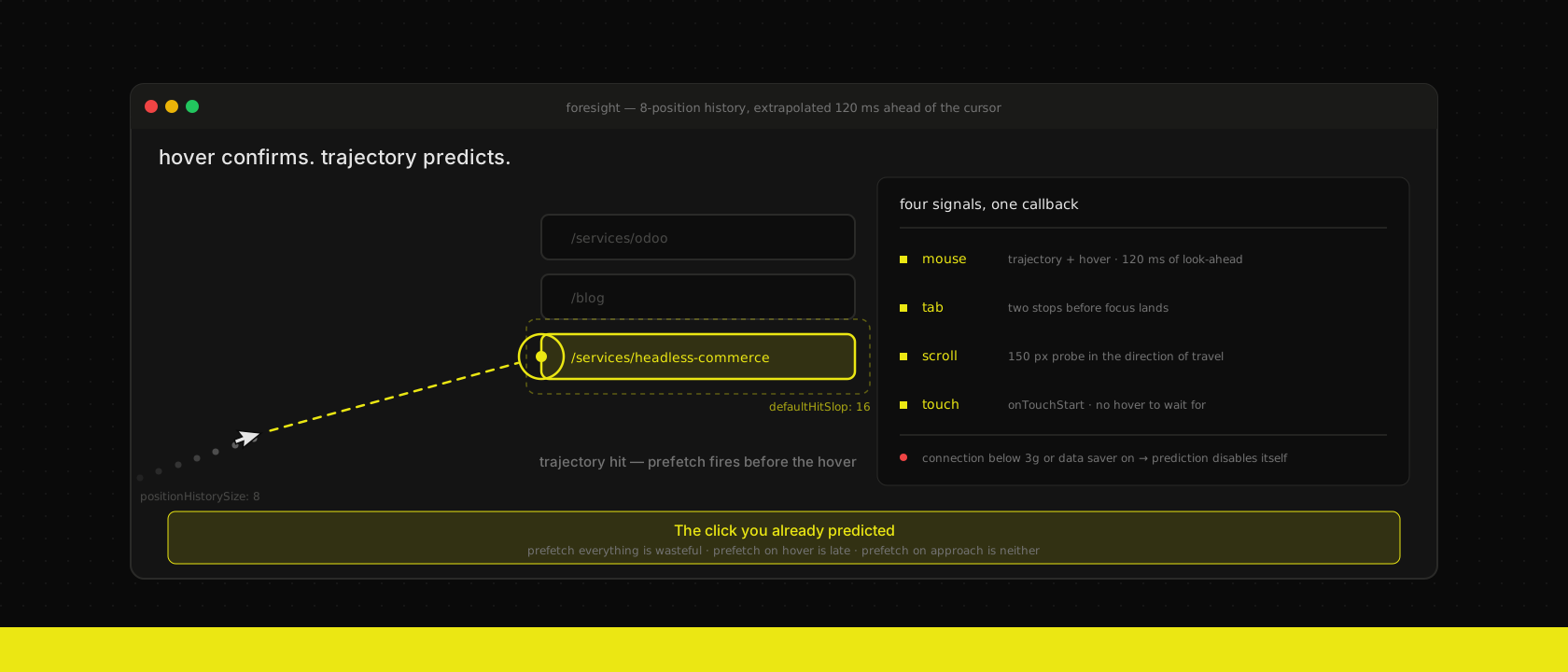
Trajectory is the same signal, earlier. Keep the last few cursor positions, extrapolate the vector forward a fixed number of milliseconds, and check whether that projected line crosses a registered element's box. If it does, you've predicted the hover that hasn't happened yet — and you fire the prefetch during the approach instead of after the arrival.
ForesightJS's default extrapolation is trajectoryPredictionTime: 120 — 120ms of look-ahead, computed from a rolling history of eight mouse positions. That's the whole trick, and it's worth being precise about what it buys: not a page load's worth of time, but roughly 120ms added to the front of a hover-to-click window that was 200–400ms. A third to a half more head start, on a prefetch that typically needs 80–150ms to land. That's frequently the entire difference between a navigation that's already there and one that flashes a loading state.
Four signals, not one
The reason we picked a library instead of writing an onMouseEnter handler is that mouse trajectory is only the desktop-with-a-mouse case, and that's maybe half our traffic.
- Mouse — the trajectory prediction above, plus plain hover as a fallback hit.
- Keyboard —
tabOffset: 2by default. When a registered element is two tab stops away from the currently focused element, it fires. Keyboard users get predictive prefetch that a cursor-only implementation never gives them, and it costs nothing extra. - Scroll —
scrollMargin: 150, a 150px probe cast from the cursor position in the direction of travel. Someone scrolling a listing page toward a card is telegraphing the same intent a cursor does. - Touch —
touchDeviceStrategy, defaulting toonTouchStart. Firing on touch-start rather than on the click that follows it sounds marginal, but that gap is a real 70–150ms of free prefetch time on exactly the devices that need it most. The alternative,"viewport", prefetches what's on screen — closer to the framework default, and the right choice only if the payloads are small.
That last one matters more than it reads. The field data that actually grades you is dominated by mid-range Android on mobile networks. A prefetch strategy that only works for a mouse is a prefetch strategy for the visitors who were already fast.
What we actually ship
No per-component wiring, no custom <Link> wrapper that every developer has to remember to import. One client component in the root layout registers every internal anchor on the page and re-registers after each navigation:
"use client"

import { ForesightManager } from "js.foresight"
import { usePathname, useRouter } from "next/navigation"
import * as React from "react"

let initialized = false

export function ForesightPrefetch() {
  const router = useRouter()
  const pathname = usePathname()

  React.useEffect(() => {
    if (!initialized) {
      ForesightManager.initialize({ defaultHitSlop: 16 })
      initialized = true
    }

    const anchors = Array.from(
      document.querySelectorAll<HTMLAnchorElement>('a[href^="/"]')
    )
    const registered: HTMLAnchorElement[] = []

    for (const anchor of anchors) {
      const href = anchor.getAttribute("href")
      // In-page anchors have nothing to prefetch.
      if (!href || href.includes("#")) continue

      ForesightManager.instance.register({
        element: anchor,
        callback: () => router.prefetch(href),
        name: `${pathname} → ${href}`,
      })
      registered.push(anchor)
    }

    return () => {
      for (const anchor of registered) {
        ForesightManager.instance.unregister(anchor)
      }
    }
  }, [router, pathname])

  return null
}
Three deliberate choices in there.
defaultHitSlop: 16 inflates every link's hit box by 16px in each direction. Nav links are text, text boxes are thin, and a cursor heading at a 20px-tall link from across the viewport will miss it by a few pixels while obviously aiming at it. Sixteen pixels of invisible slop converts most of those near-misses into hits without meaningfully increasing false positives.
The name is "/blog → /services/odoo", not "link". It shows up in the devtools panel and in every callbackInvoked event, and a debugging session where you can't tell which of forty registered anchors fired is not a debugging session.
And the whole thing re-runs on pathname. The App Router keeps the layout mounted across navigations, so without that dependency you'd register the homepage's links once and then predict nothing for the rest of the visit. The cleanup unregisters what this pass registered — not everything — so a mid-navigation re-run can't orphan another pass's elements.
We know this is the blunt version. Querying the DOM for anchors is a workaround for not having the router's link table, and it misses anything rendered after the effect runs. For a marketing site whose pages are prerendered at build time and stable on arrival, that's fine. In a custom web application with virtualised lists and links appearing on demand, we'd reach for @foresightjs/react and register per component instead:
import { useForesight } from "@foresightjs/react"

export function ProductRow({ id }: { id: string }) {
  const { elementRef, isPredicted } = useForesight<HTMLAnchorElement>({
    callback: () => queryClient.prefetchQuery(productQuery(id)),
    hitSlop: { top: 8, bottom: 8, left: 40, right: 40 },
    name: `product:${id}`,
  })

  return <a ref={elementRef} href={`/products/${id}`} data-warm={isPredicted} />
}
Note the asymmetric hitSlop. In a vertical list, a generous horizontal slop catches cursors travelling along the row; a generous vertical one just steals hits from the neighbouring row.
The settings worth touching, and the ones that aren't
It works with no configuration, which is most of why we adopted it. These are the knobs we've actually had a reason to think about:
| Setting | Default | When we'd change it |
|---|---|---|
trajectoryPredictionTime | 120 (clamped 10–200) | Raise it when the prefetch is expensive and late; lower it when you see prefetches for pages the cursor merely flew past |
defaultHitSlop | — | Set it. 16px is a good starting point for text links |
tabOffset | 2 (clamped 0–20) | Raise on a dense tab order, where two stops go by inside a single held keypress |
scrollMargin | 150 (clamped 30–300) | Raise for long, sparse listing pages |
touchDeviceStrategy | "onTouchStart" | "viewport" when payloads are small and you want mobile to behave like the framework default |
minimumConnectionType | "3g" | Almost never — see below |
positionHistorySize | 8 (clamped 2–30) | Almost never. More history is smoother and later |
Prefetching is a bandwidth decision someone else pays for
This is the part that gets skipped, and it's the reason "prefetch everything" is not a free optimisation. Every speculative request is data on a connection you don't own, on a plan you're not paying for, possibly on a metered roaming SIM in a client's van.
ForesightJS handles this by default: minimumConnectionType: "3g" means that when the Network Information API reports an effective connection slower than 3g, or the user has Data Saver on, registered elements stay registered but go inactive — isLimitedConnection flips true, isActive goes false, and no callback fires. Prediction turns itself off for exactly the people who'd be hurt by it, and turns itself back on when conditions improve.
That behaviour is why we're comfortable registering every internal link rather than a curated list. The failure mode of over-registration is bounded by the library, not by our judgment about which links matter.
It composes with what Next already does
router.prefetch() populates the same client router cache <Link> fills, so this isn't a parallel prefetching system — it's a better trigger for the existing one. Prefetching a route twice doesn't fetch it twice.
Which means the two layers do different jobs. Next 16.3's partialPrefetching gets the static shell of a dynamic page into the cache cheaply on viewport entry; ForesightJS decides which of those the user is actually about to open and warms the rest. On a site where nearly every route is prerendered, the shell is the whole page and prediction is what turns a fast navigation into an invisible one. On a route backed by live ERP data, the shell arrives early and the prediction buys the dynamic half a head start it wouldn't otherwise have.
If you're on TanStack Router — which we use for internal tools — you already get hover-prefetch of loader data for free. ForesightJS is the upgrade from hover to approach; wire the callback to the same loader or query key and nothing else changes.
How to tell whether it's doing anything
It won't move your Core Web Vitals. LCP, INP and CLS grade the load you're already on; predictive prefetching improves the next navigation, which is a different number and one Google doesn't collect for you. If you go looking for this in PageSpeed Insights you will find nothing and conclude, wrongly, that it did nothing.
Measure it where it happens. The manager emits callbackInvoked and callbackCompleted events with a hitType telling you whether the hit came from mouse (hover or trajectory), tab, scroll, touch or viewport:
ForesightManager.instance.addEventListener("callbackInvoked", (event) => {
  posthog.capture("prefetch_predicted", {
    name: event.state.name,
    kind: event.hitType.kind, // mouse | tab | scroll | touch | viewport
    sub: event.hitType.subType, // trajectory | hover | forwards | down | ...
  })
})
The ratio you want is trajectory hits to actual navigations. A high hit count with few navigations means you're predicting too eagerly — lower trajectoryPredictionTime or tighten hitSlop. Navigations that arrive with no preceding prediction mean the opposite.
During development, js.foresight-devtools draws the predicted cursor path and every registered element's expanded hit box on screen, which turns "why didn't that fire" from a guess into something you can watch. And because setDataAttributes is on by default, [data-predicted] is a plain CSS hook — we've used it to confirm at a glance that the right links are warming, with no React re-render involved.
Where we don't use it
Prefetching is speculative, and speculation is only safe when the request is cheap and idempotent. We leave it off for anything that costs the backend real work per call — a report endpoint, a search that hits Odoo synchronously, anything rate-limited per user. A prediction that's wrong 40% of the time is fine when it costs a cached HTML shell and unacceptable when it costs an ERP query. enabled: false on registration, or simply not registering, is the correct amount of cleverness there.
And never on a GET that mutates. If prefetching a link can log something out, mark something read, or consume a one-time token, the bug is the endpoint, but the thing that will expose it is a library that visits links the user was only thinking about.
What we actually do
Register every internal link, let the library decide what the cursor, the tab key, the scroll and the finger are aiming at, and let it disable itself on connections that can't afford it. Keep the trigger separate from the fetch, so the framework's cache stays the single place a route lives. And judge it on navigation feel and prediction ratios rather than on a Lighthouse score that was never going to show it.
It's one client component in the root layout and one dependency. That is a very small amount of code for the difference between a site that loads fast and a site where the second page was already there.
Want us to publish something specific?
Tell us what you'd like to read and we'll add it to our writing queue.
Get the next one in your inbox
New articles, videos and the occasional engineering note — a short mail when there’s something worth reading, nothing else.