

313 GB of database, 71 GB of rows: the vacuum nobody let finish
A disk alert at 94% on a database where nothing had been imported and nothing had been deleted. Why Postgres grows faster than your data, the single idle connection that had been quietly blocking every vacuum for eleven days, the autovacuum defaults that are expressed in the wrong unit on a large table, and the difference between bloat you can vacuum away and growth you have to agree a retention policy for.
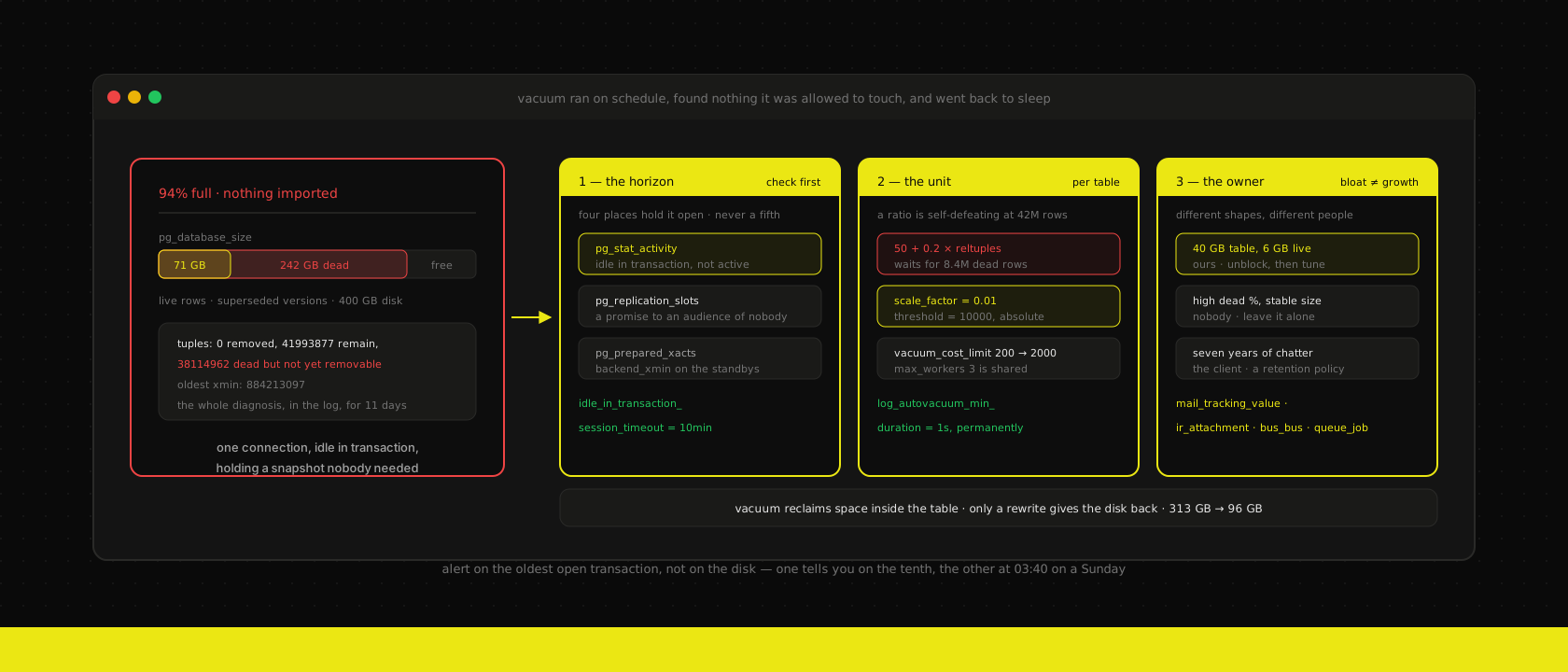
The alert came in at 03:40 on a Sunday: the Postgres volume behind a client's ERP was 94% full, on a 400 GB disk. Nobody had imported anything that weekend. Nobody had imported anything that month. The business had not grown 20% since Thursday.
pg_database_size said 313 GB. Adding up what was actually in there — every live row in every table, every index — came to roughly 71 GB. The other 242 GB was rows that had been superseded or deleted, in some cases years earlier, that Postgres had never been permitted to clean up.
Autovacuum was on. It had always been on. It had been running on those tables several times a day, logging dutifully, finding nothing it was allowed to touch, and going back to sleep. The thing stopping it had been there since the ninth of the month: one connection, belonging to a reporting tool, sitting idle in transaction for eleven days because somebody's dashboard had opened a transaction and never closed it.
This is the most common database problem we get called about on hosted stacks, and it is nearly always diagnosed as the wrong thing. The ticket says "the database is too big" or "we need a bigger disk." Both are usually false.
Postgres never changes a row, it writes a new one
The mechanic underneath all of this is worth stating plainly, because every surprise in this post follows from it.
Postgres is an MVCC database. An UPDATE does not modify a row in place — it writes a complete new version of that row and marks the old version as valid only up to the transaction that replaced it. A DELETE does not remove anything; it stamps the row as dead from that transaction onward. Readers that started earlier still need the old version, which is how you get a consistent snapshot without blocking writers, and it is genuinely one of the best design decisions in the system.
The cost is that writes leave litter. Update one column on a row and you have paid for a whole new row. Update four million rows in a loop and you have written four million new rows plus index entries, and the four million originals are still on disk taking up exactly as much space as they did before.
VACUUM is the collector. And here is the first thing people get wrong about it:
Vacuum does not shrink your database. It marks dead space inside each table as reusable, so future inserts and updates fill it in instead of extending the file.
That is the normal, healthy, steady state: a table runs at some percentage of dead space, vacuum keeps recycling it, and the file stops growing. A table that is 30% dead and stable is not a problem and does not need fixing. The file itself only gets smaller if the reclaimed space happens to sit at the physical end of the table, which on a busy table is a coincidence you cannot plan around.
So "the database is 313 GB" was never the symptom to chase. The symptom was that it had been monotonically increasing for months, which means something was preventing the recycling from happening at all.
Vacuum can only remove what nothing can still see
Vacuum is not allowed to delete a dead row version if any transaction anywhere in the system might still need to see it. To decide that, it takes the oldest snapshot currently held by anything on the server — the xmin horizon — and refuses to touch anything newer.
A single ancient snapshot therefore freezes cleanup across the entire database. Not the table that transaction touched. The whole thing.
This is the failure in the story, and it is worth knowing by sight, because Postgres tells you clearly in the log if you ever read it:
automatic vacuum of table "erp.public.mail_message":
  tuples: 0 removed, 41993877 remain, 38114962 are dead but not yet removable,
  oldest xmin: 884213097
38114962 are dead but not yet removable with 0 removed is the entire diagnosis. Vacuum ran, did its job correctly, and was legally barred from reclaiming a single row. Four things can hold that horizon back, and in fifteen years we have never seen a fifth:
-- 1. long-running or abandoned transactions
SELECT pid, state, now() - xact_start AS xact_age, left(query, 60) AS query
FROM pg_stat_activity
WHERE xact_start IS NOT NULL
ORDER BY xact_start
LIMIT 5;

-- 2. replication slots nobody consumes any more
SELECT slot_name, active, wal_status,
       age(xmin) AS xmin_age, age(catalog_xmin) AS catalog_xmin_age
FROM pg_replication_slots
ORDER BY age(xmin) DESC NULLS LAST;

-- 3. prepared transactions from a two-phase commit that never resolved
SELECT gid, prepared, database FROM pg_prepared_xacts ORDER BY prepared;

-- 4. standbys with hot_standby_feedback and a long analytics query
SELECT application_name, state, backend_xmin FROM pg_stat_replication;
Run those four whenever a database is growing and nobody can say why. One of them will be the answer.
In our case it was the first, and the state was idle in transaction rather than active — which is the version of this that survives longest, because nothing looks wrong. The connection is not consuming CPU. It is not holding a lock anyone trips over. It does not appear in a slow query report, because it is not running a query. It is simply holding a snapshot, forever, and quietly costing a gigabyte a day.
Two settings close this class of bug permanently, and we now set both on every cluster we run:
# a transaction left open with no work in flight is a bug, not a workload
idle_in_transaction_session_timeout = 10min

# a backend genuinely running for hours against the primary is also a bug
statement_timeout = 0           # stays unset globally; set per role instead
statement_timeout deliberately stays at the default globally — a migration or a REINDEX has every right to run long — and we set it per role instead, which is the same split we use to keep BI tools off the production box in the first place. idle_in_transaction_session_timeout, on the other hand, can be set globally without argument, because there is no legitimate workload that opens a transaction and then does nothing for ten minutes. The reporting tool that caused this reconnects and retries without noticing; eleven days of blocked cleanup becomes ten minutes of blocked cleanup.
Replication slots deserve the same treatment. A slot is a promise to retain WAL — and, for a logical slot, catalog rows — until a consumer confirms it has read them. Detach a replica without dropping its slot, or let a logical replication consumer break on a Friday, and the slot keeps that promise against an audience of nobody. max_slot_wal_keep_size puts a ceiling on the WAL side of it, and it is better to invalidate a dead slot than to fill a disk defending it.
The defaults are a percentage, and percentages are the wrong unit at scale
Once cleanup was unblocked, the second problem surfaced: autovacuum was keeping up on 200 tables and permanently behind on four.
Autovacuum decides to vacuum a table when its dead row count exceeds a threshold plus a fraction of the table:
threshold = autovacuum_vacuum_threshold + autovacuum_vacuum_scale_factor × reltuples
          = 50 + 0.2 × reltuples
On a 5,000-row table that fires at 1,050 dead rows. Reasonable. On a 42-million-row mail_message it fires at 8.4 million dead rows — which is both an enormous amount of garbage to tolerate and an enormous amount of work to do in one pass, meaning the vacuum takes a long time, during which several million more rows go dead. The scale factor is self-defeating on exactly the tables where it matters.
The fix is per-table, not global. A global scale factor low enough for the big tables makes autovacuum thrash on the small ones:
ALTER TABLE mail_message SET (
  autovacuum_vacuum_scale_factor = 0.01,
  autovacuum_vacuum_threshold    = 10000,
  autovacuum_analyze_scale_factor = 0.02
);
Two further defaults are worth knowing before you conclude autovacuum is "just slow":
autovacuum_vacuum_cost_delay is 2 ms, and it exists to keep vacuum from saturating the I/O of a server that also has users on it. Combined with vacuum_cost_limit = 200, that is a deliberate throttle — sensible on a spinning disk in 2012, needlessly conservative on the NVMe the client is paying for. Raising vacuum_cost_limit to 1000-2000 on fast storage is usually the single most effective change, and it is less risky than it sounds because you can watch the effect in pg_stat_progress_vacuum while it happens.
autovacuum_max_workers is 3, and those three are shared across every database on the instance. If four tables each need an hour, one of them waits. On a database with a handful of genuinely huge tables, five or six workers is not extravagant.
Insert-only tables used to be invisible. Before Postgres 13, a table that is only ever appended to never accumulated dead rows and therefore never got vacuumed — so it never got its visibility map updated, and index-only scans quietly stopped working on it, and then one day it got an anti-wraparound vacuum that read the whole table at once. autovacuum_vacuum_insert_threshold fixed that. Check that you are actually on a version that has it.
Bloat you can vacuum, and growth you have to decide about
The four tables that were behind were not a tuning failure. Two of them were genuinely, legitimately enormous, and no vacuum setting on earth was going to help, because the rows were alive.
This distinction is the one that gets skipped, and it is the one that determines who owns the fix:
| Shape | What it looks like | Who fixes it |
|---|---|---|
| Bloat | Table is 40 GB, live rows are 6 GB, dead count high, last_autovacuum old or null | Us — unblock the horizon, tune the table |
| Churn | High dead ratio but stable size; vacuum is recycling fine | Nobody. Leave it alone |
| Growth | Dead rows near zero, table grows with the business | The business — a retention policy |
| Misplacement | Data in the database that was never meant to be there | Us — move it out |
On Odoo in particular, the tables at the top of the size list are depressingly predictable, and most clients are surprised by what they contain:
mail_message,mail_notification,mail_tracking_value,mail_followers— the chatter. Every field change on every tracked record, every "Quotation sent" note, every follower notification, kept forever by default. On a seven-year-old database this is routinely the largest thing in it, andmail_tracking_valueis usually larger than the messages themselves.ir_attachment— fine if your attachments live in the filestore on disk, a catastrophe if the instance was ever configured to store them in the database. It is also where Odoo keeps generated asset bundles, and every upgrade leaves the previous generation behind.bus_bus— the notification bus. Rows live for seconds and are deleted constantly, which is pure churn and a classic bloat victim if vacuum is behind.queue_job— if you run the OCA job runner, and we do on most projects, completed jobs accumulate unless the pruning cron is actually enabled.stock_move_line,account_move_line— real business data, legitimately growing, and the ones people reach for first because they are large. Leave them alone.
Odoo also ships something confusingly named: a scheduled action called "Base: Auto-vacuum internal data". This is not Postgres autovacuum. It is Odoo's own garbage collector for transient models, expired attachments and bus messages, and it is the thing that produces the dead rows Postgres then has to clean up. Both have to be working. We have seen instances where that cron had been disabled during a migration two years earlier and never re-enabled — which does not cause bloat so much as unbounded growth of data nobody wanted.
Pruning chatter is not a database decision. "We delete field-change tracking older than two years" is a statement about auditability, and on anything touching invoicing it needs the client's accountant in the room — the same conversation as what a care plan actually covers, not something to run on a Sunday at 04:00 because a disk is full.
Measure it, don't estimate it
Most of the bloat queries circulating online are estimators. They infer physical size from average row widths and null fractions, they are off by a wide margin on tables with many dropped columns or variable-width text, and they will send you to VACUUM FULL a table that is perfectly healthy.
Start with what Postgres knows for certain:
SELECT relname,
       n_live_tup,
       n_dead_tup,
       round(100.0 * n_dead_tup / nullif(n_live_tup + n_dead_tup, 0), 1) AS dead_pct,
       last_autovacuum,
       autovacuum_count
FROM pg_stat_user_tables
WHERE n_dead_tup > 100000
ORDER BY n_dead_tup DESC
LIMIT 20;
A high dead_pct with a recent last_autovacuum is a table being managed. A high dead_pct with last_autovacuum null or weeks old is the problem. That one column tells you which of the two you have, and it is the first thing we look at.
For an exact answer on a specific table, pgstattuple reads the table and gives you the truth rather than a guess:
CREATE EXTENSION IF NOT EXISTS pgstattuple;

SELECT * FROM pgstattuple('mail_tracking_value');
SELECT * FROM pgstatindex('mail_message_pkey');
Do not skip the indexes. Index bloat routinely exceeds table bloat, particularly on columns that get updated often, and a table you "fixed" can still be carrying 20 GB of indexes that nobody checked.
Giving the disk back costs you something
Unblocking vacuum stops the bleeding. It does not hand back the 242 GB, because — as above — vacuum does not shrink files. Getting physical space back means rewriting the table, and there are two ways to do that.
VACUUM FULL rewrites it compactly and takes an ACCESS EXCLUSIVE lock for the duration. Nothing reads that table, nothing writes it, and on a 40 GB table that is tens of minutes with the ERP effectively down. It also needs room for a complete second copy before it releases the first, which is a problem when the reason you are doing this is that the disk is full.
pg_repack does the same job online. It builds a shadow copy, keeps it in sync with a trigger, and swaps the two under a brief exclusive lock at the end:
pg_repack --no-superuser-check -d erp \
  --table mail_tracking_value \
  --table mail_message \
  --jobs 4
It needs a primary key or a non-null unique index on the table, which Odoo tables have. Indexes alone can be rebuilt without it:
REINDEX INDEX CONCURRENTLY mail_message_res_partner_needaction_idx;The honest advice, though, is to not do any of this most of the time. If you unblock vacuum and tune the table, that 242 GB of dead space becomes free space the table reuses, the file stops growing, and the disk reading stays flat forever at a number that looks alarming and is fine. We repack when a table has to physically shrink — the disk is genuinely out of room, or a one-off migration left a table at six times its working size and it will never organically grow back into it. We did repack in this case, and the database came out at 96 GB, because the client was about to pay for storage they did not need.
One thing worth saying explicitly: a repack on the primary does not propagate as "free space" to your backups the way people expect. Your next base backup gets smaller. The existing ones do not, and restore drills still need to fit the old ones.
The alert we actually wanted
Disk at 94% is a true statement that arrives eleven days late. The disk is the last thing to notice this problem and the only thing most teams monitor.
What we watch now, on every cluster, is the cause rather than the consequence:
-- age of the oldest snapshot anything in the system is holding
SELECT greatest(
  coalesce(max(age(backend_xmin)), 0),
  coalesce(max(age(xmin)), 0)
) AS oldest_xmin_age
FROM pg_stat_activity
FULL JOIN pg_replication_slots ON true;
Three alerts, in order of how early they fire:
- Oldest transaction age over 30 minutes on the primary. This is the one that catches the whole class.
age(datfrozenxid)above half ofautovacuum_freeze_max_age. Past that, Postgres starts forcing anti-wraparound vacuums that cannot be skipped and will not yield, and if the horizon is still held you are on a path to a database that stops accepting writes to protect itself. That is a different and much worse Sunday.- Database size growth rate, not absolute size. 2 GB a day on a business that adds 40 MB a day of actual records is the signal; 313 GB on its own means nothing without the trend.
On CloudNativePG the first two need a custom query ConfigMap — the built-in exporter covers pg_stat_database, replication and WAL, but per-table dead tuples and the xmin horizon are not in the default set, which is why so many Kubernetes Postgres installs have good-looking dashboards and this exact blind spot. Everything lands in the same Grafana as the rest of the stack, next to the volume metrics that used to be the only warning we got.
And autovacuum logging goes on, permanently, at a threshold that catches the slow ones:
log_autovacuum_min_duration = 1sThat one line is what turns the next occurrence of this from a weekend into a five-minute read of the log, because the dead but not yet removable number is right there in it.
The short version
Postgres grows when it is not allowed to clean up, and the usual reason is one connection holding a snapshot nobody needed. Check pg_stat_activity, pg_replication_slots, pg_prepared_xacts and pg_stat_replication before you look at anything else, and set idle_in_transaction_session_timeout so the question cannot arise again.
Autovacuum's scale factor is the wrong unit on a big table — give the top five an absolute threshold, raise vacuum_cost_limit if your storage is faster than 2012, and give it more than three workers if it has more than three large tables to manage.
Then separate bloat from growth, because they have different owners. Dead space is ours to reclaim and usually does not need reclaiming physically at all. Seven years of chatter history is the client's call, and on an Odoo database it is probably the largest thing you have.
Finally, alert on the oldest open transaction rather than on the disk. One of those tells you on the tenth; the other tells you at 03:40 on a Sunday, when the only options left are the expensive ones.
Want us to publish something specific?
Tell us what you'd like to read and we'll add it to our writing queue.
Get the next one in your inbox
New articles, videos and the occasional engineering note — a short mail when there’s something worth reading, nothing else.