

The column you can't just rename: schema changes without a maintenance window
A rename is the cheapest thing a database does and one of the most dangerous things a deploy does, because two versions of your application are always live at once. Expand, backfill, contract — the release boundary that makes it safe, the locks that bite anyway, and what changes when Odoo owns the schema.
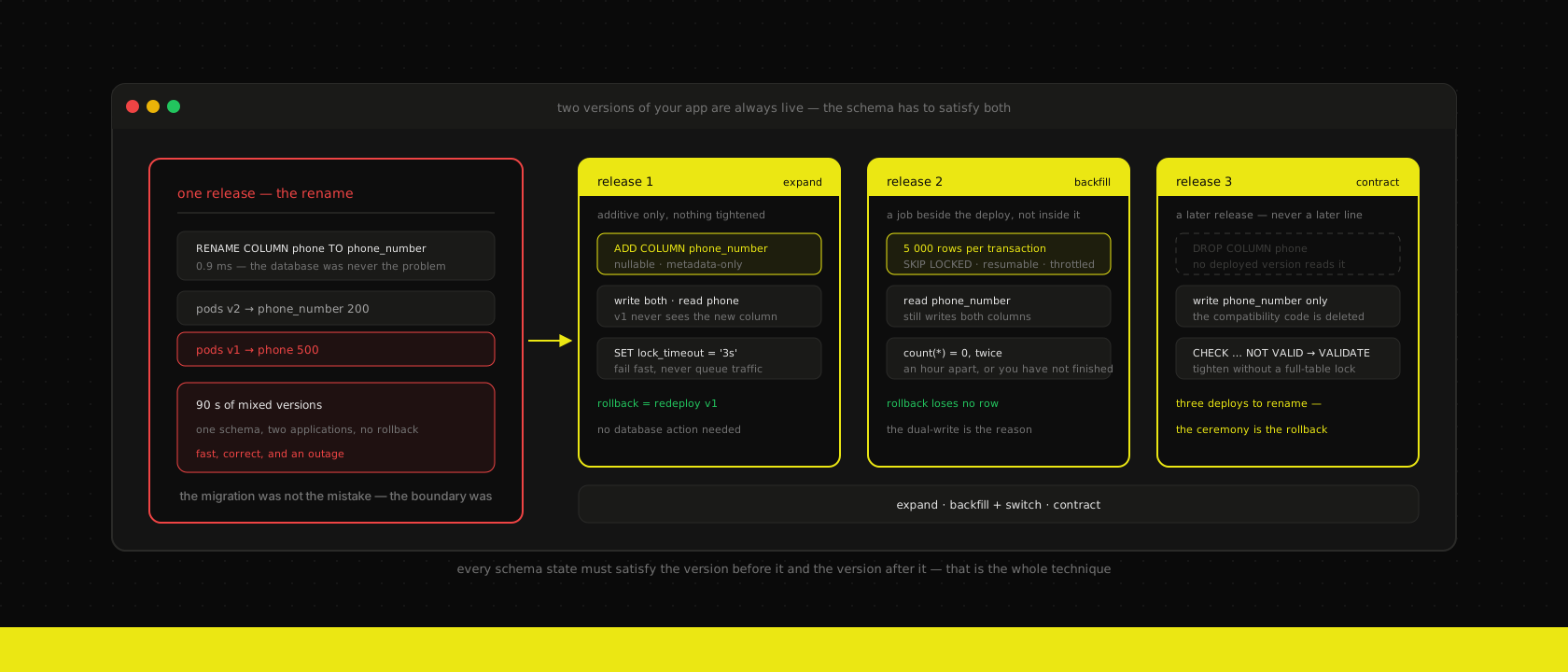
A rename is the smallest change a database is ever asked to make. One column, one word, no rows touched, no index rebuilt — ALTER TABLE contacts RENAME COLUMN phone TO phone_number returns in about a millisecond on four million rows, because nothing about the rows changed.
We watched one of those take a client's customer portal down for ninety seconds on a Tuesday afternoon. The database was fine the entire time: it performed the rename instantly and answered every query after it. What broke was the four pods still running the previous image, which spent those ninety seconds asking for a column that no longer went by that name and returning 500s to whichever visitors the load balancer happened to send their way.
Nobody made a mistake in the usual sense. The migration was correct. The rolling deploy was correct. The failure lives in the gap between them, and it's why we now treat schema changes as a different class of work from application changes — different rules, a different release cadence, and one acceptance test that settles every argument about them.
Two versions of your app are always live
A rolling update replaces pods one at a time and verifies each one before starting the next, which is exactly what you want and exactly what creates the problem: for the length of the rollout, old code and new code are both serving traffic against one database. That window is thirty seconds on a small Next.js deployment and several minutes on a fleet of ERP workers draining long requests. It is never zero.
You cannot close it by choosing a different strategy either. Blue-green shortens the overlap to the instant of the cutover but doesn't remove it — connections in flight against the old stack finish against the same database the new stack has just started using — and it still leaves the reverse case, which is the one people forget: if you cut back, the old version has to work against the new schema. Every deploy strategy we run has this property, because it isn't a property of the strategy. It's a property of there being one database and more than one deploy.
So the constraint isn't "make the migration fast." A rename is already as fast as it gets and it still caused an outage. The constraint is:
Every schema state must be readable and writable by the application version before it and the application version after it.
Say that out loud on a Tuesday and it sounds like bureaucracy. It's actually the whole technique — everything below is just the mechanics of obeying it.
Expand, backfill, contract — across releases, not within one file
The pattern is old and has a dozen names. Ours is three phases, and the only part people get wrong is where the boundaries go.
Expand. Add the new thing. A nullable column, a new table, an index — additive changes only, nothing removed and nothing tightened. The old code doesn't know the new column exists, which is fine, because nothing forces it to.
Backfill. Move the data, in batches, while both shapes are live. New writes go to both columns; historical rows get copied in the background.
Contract. Remove the old thing. Drop the column, drop the dual-write, tighten the constraint.
Here is the part that matters, and it's the reason so many teams believe they've adopted this pattern while still shipping outages: contract belongs to a later release, not to a later line in the same migration file. A single deploy that expands, backfills and contracts is a rename with extra steps. The old pods die at exactly the same moment either way.
For a rename of a column on a busy table, that's three releases:
| Release | Schema | Application |
|---|---|---|
| 1 — expand | ADD COLUMN phone_number (nullable) | writes both columns, reads phone |
| 2 — backfill + switch | none; the backfill runs as a job | reads phone_number, still writes both |
| 3 — contract | DROP COLUMN phone | writes only phone_number |
Three deploys to rename a column looks absurd written down, and the first time we imposed it on ourselves it felt like ceremony. Then you notice that release 1 and release 3 are each individually reversible by redeploying the previous image and doing nothing to the database, which is a property the one-shot rename never had at any point. The ceremony is the rollback.
Not every change needs all three. Most don't need any:
| Change | Safe in one release? |
|---|---|
| Add a nullable column | Yes |
| Add a table | Yes |
| Add an index (concurrently) | Yes |
Widen varchar(50) → text | Yes |
| Rename anything | No — expand/contract |
| Change a column's type | No — expand/contract |
Add NOT NULL to an existing column | No — backfill first, then tighten |
| Drop a column | Only after the code that reads it is gone from production |
That last row is the one people rush. A column is safe to drop when no deployed version reads it — not when no version should read it. If a rollback to last week's image is still on the table, last week's image is a deployed version.
The locks that bite anyway
Getting the release boundaries right removes the application-level breakage. It does not protect you from Postgres, which will happily hand you a statement that looks instant on your laptop and stalls production for a minute.
Two behaviours cause almost all of it.
Most DDL takes an ACCESS EXCLUSIVE lock, which conflicts with everything, including plain SELECTs. That's usually fine, because it's held for a millisecond.
Lock requests queue, and the queue blocks behind the waiter. This is the one that surprises people, and it's worth being precise about because the failure looks nothing like its cause. Your ALTER TABLE needs ACCESS EXCLUSIVE. A reporting query started forty seconds ago holds a ACCESS SHARE lock on the same table, so your DDL waits. Every query that arrives after your DDL now queues behind it — even the trivial ones, even the ones that would have been perfectly compatible with the reporting query. One long-running SELECT plus one instant ALTER TABLE equals a fully stalled table, and the graph you'll be looking at shows connection-pool exhaustion, not DDL.
The fix is one line, and it belongs at the top of every migration:
SET lock_timeout = '3s';
SET statement_timeout = '30s';

ALTER TABLE contacts ADD COLUMN phone_number text;
Now the migration either takes the lock almost immediately or gives up without ever having blocked anyone. A failed migration you can retry in two minutes is a non-event; a migration that quietly queues is an incident. Wrap it in a retry loop in your deploy job and the whole class of problem goes away.
The other half is knowing which statements are cheap and which rewrite the table. On a currently supported Postgres:
ADD COLUMNwith a non-volatile default is metadata-only. Since Postgres 11 the default is stored in the catalogue and applied on read, so adding a column withDEFAULT falseto a large table no longer rewrites it. A volatile default —DEFAULT gen_random_uuid()— still rewrites every row, which is a trap worth remembering because the two statements look nearly identical.SET NOT NULLscans the whole table unless you prepare it. Add the constraint unvalidated first, validate it under a weak lock, and the finalSET NOT NULLcan lean on the constraint instead of re-scanning.CREATE INDEXblocks writes for the duration.CREATE INDEX CONCURRENTLYdoesn't, at the cost of two table passes, no transaction wrapper, and a failure mode you must handle: an interrupted build leaves anINVALIDindex behind that you have toDROP INDEX CONCURRENTLYbefore retrying. Migration frameworks that wrap everything in a transaction by default need an explicit escape hatch here, and finding out which one your ORM uses is a five-minute job that saves an evening.- Foreign keys and check constraints validate on creation.
NOT VALIDdefers that to a second statement that takes a much weaker lock.
-- 1. cheap: the constraint is recorded but not checked
ALTER TABLE contacts
  ADD CONSTRAINT phone_number_not_null
  CHECK (phone_number IS NOT NULL) NOT VALID;

-- 2. scans the table, but only takes SHARE UPDATE EXCLUSIVE — writes continue
ALTER TABLE contacts VALIDATE CONSTRAINT phone_number_not_null;

-- 3. now instant: the planner trusts the validated constraint
ALTER TABLE contacts ALTER COLUMN phone_number SET NOT NULL;
ALTER TABLE contacts DROP CONSTRAINT phone_number_not_null;
Three statements instead of one, and none of them holds a heavy lock long enough to matter. This is the shape of nearly every safe migration: more steps, each individually boring.
Backfill is a job, not a migration
The instinct is to put the data copy in the migration file, because that's where the schema change is. Resist it, for reasons that get worse as the table grows.
A single UPDATE contacts SET phone_number = phone WHERE phone_number IS NULL over four million rows runs in one transaction. That transaction holds row locks on everything it has touched until it commits, generates several gigabytes of WAL that your replicas have to consume before they can serve anything current, and — because Postgres writes a new row version for every update — leaves the table roughly twice its previous size with autovacuum trailing behind for hours. If it fails at 90%, it rolls back to zero and you start again. Meanwhile your deploy is blocked, because the migration job hasn't exited.
Batches fix all of that at once:
BATCH = 5_000

while True:
    with conn:  # one transaction per batch
        rows = conn.execute("""
            UPDATE contacts SET phone_number = phone
            WHERE id IN (
                SELECT id FROM contacts
                WHERE phone_number IS NULL AND phone IS NOT NULL
                ORDER BY id
                LIMIT %s
                FOR UPDATE SKIP LOCKED
            )
            RETURNING 1
        """, (BATCH,)).rowcount

    if rows == 0:
        break
    time.sleep(0.2)   # leave headroom for the application
Three properties earn their keep. It's resumable, because the WHERE phone_number IS NULL predicate is the progress cursor — kill it, restart it, nothing is lost and nothing is done twice. It's idempotent, so running it again after the switch is a no-op rather than a corruption. And it's throttled, because a backfill competing with real traffic for I/O is how a maintenance task becomes a performance incident. SKIP LOCKED is the same primitive that makes a queue out of a Postgres table work, doing the same job here: never wait on a row somebody else is busy with, just take the next one.
Run it as a Kubernetes Job alongside the release, not as part of it — the deploy finishes in a minute, the backfill takes an hour, and coupling them means an hour-long deploy that times out. If your delivery is GitOps, the schema step is a pre-sync hook and the backfill is an ordinary job that outlives the sync — the same pipeline that builds and ships the image simply hands it off and stops waiting.
And put a number on the finish line before you contract anything:
SELECT count(*) FROM contacts
WHERE phone IS NOT NULL AND phone_number IS NULL;
Zero, twice, an hour apart. The second reading is what proves the dual-write is actually running in every code path and not just in the one you remembered — a non-zero second reading means something is still writing only the old column, and that something is almost always a cron job, an import script, or an integration nobody counted as "the application."
Dual-write is where the correctness actually lives
The schema half of expand/contract is mechanical. The half that goes wrong is the application, and specifically the order of two switches that people collapse into one.
During the expand phase the application writes both columns and reads the old one. After the backfill verifies, it reads the new one and still writes both. Only when that's been in production long enough to be boring does the write to the old column go away.
Reading new while writing only new is the tempting shortcut, and it's wrong for a specific reason: it makes the rollback destructive. Roll back to the previous image and it writes only the old column, so every row touched during the window silently loses its new value, and now you have a data reconciliation problem instead of a deploy problem. Dual-write for one extra release is cheap; discovering three weeks later that a thousand rows have a stale phone_number is not.
Two practical notes from doing this on real codebases. Put the dual-write in one place — a repository method, a model write() override, a database trigger if the writers are genuinely too scattered to unify — because a dual-write copy-pasted across eleven call sites will be complete in ten of them. And write down the removal, with the release it belongs to, in the pull request that adds it. Temporary compatibility code is only temporary if somebody scheduled its death; otherwise you find # TODO: drop after backfill in a 2023 commit while trying to understand why a column has two names.
When Odoo owns the schema
Everything above assumes you write the migrations. On an ERP you mostly don't — the ORM does, from the field definitions in your modules — and that changes the mechanics without changing the rule.
Odoo builds and alters columns during a module update, and a module update is not a rolling operation: it needs the registry to itself. That's why we run it exactly the way our deploy strategies post describes — a pre-sync job that runs -u module to completion, then a rollout against a schema every replica already agrees on. Trying to roll pods through an Odoo schema change is the same ninety-second outage as the rename, with a longer window.
The rename trap is sharper here, and it's silent rather than loud. Change phone = fields.Char() to phone_number = fields.Char() in a module and update it: the ORM creates phone_number, empty. It does not move your data, and it does not drop the old column either — phone sits there orphaned, holding every value, while the field your views and reports now read comes back blank. Nothing errors. The error tracking that catches everything else sees a completely healthy application, because from the software's point of view it is one. Somebody in accounting notices a week later.
The fix is a migration script in the module, keyed to a version bump — Odoo only runs migrations/<version>/pre-migrate.py when the manifest version is higher than what's installed, which is the single most common reason a migration script "doesn't run":
def migrate(cr, version):
    if not version:
        return  # fresh install: nothing to carry over
    cr.execute("""
        ALTER TABLE res_partner
        RENAME COLUMN x_phone TO x_phone_number
    """)
Renaming in pre-migrate, before the ORM inspects the table, means it finds the column already present and correctly named and leaves the data alone. openupgradelib wraps this and the fiddlier cases — moving a field between models, splitting one field into two — and is worth the dependency the moment you have more than a couple of these. It's exactly the kind of community package we'd put through the vetting we apply to any OCA module and then use without further ceremony.
The upside of Odoo owning the schema is that the whole thing is one artefact: the module version, the field definitions and the migration script ship together, which is the same discipline that makes a first module survive an upgrade at all. The downside is that the ORM will happily perform a destructive-looking change without complaining, so the review has to happen in the pull request. "Does this rename a stored field?" is a question we ask on every ERP PR, and it has caught more near-misses than any automated check we've written.
The rollback test
All of this compresses into one question, which we ask in review of any pull request that touches a schema:
Can we redeploy the previous image, right now, without running anything against the database?
If yes, the migration is safe and the release is reversible in ninety seconds by a person who wasn't involved in writing it. If no, you're one bad afternoon away from a data recovery, and the change needs splitting until the answer is yes.
This is also why we don't write reversible "down" migrations for anything that removes data. A down migration that recreates a dropped column gives you back the column, not its contents, which makes it a comfort blanket with a hole in it. Removals get their safety from ordering — the code stopped reading it a release ago — and everything else gets fixed forward. Restoring from a backup is the real recovery path for a genuinely destructive mistake, and it's worth knowing how long yours takes before you need the number.
Two things we've stopped expecting from tooling, because they sound like they'd catch this and don't. Per-PR preview environments prove the migration applies cleanly to a realistic dataset, which is genuinely useful and not the same thing as proving it's safe: a preview has one user, no concurrent load and no old pods, so it cannot reproduce a lock queue or a mixed-version window. And the metrics and alerts on the other side tell you when a migration went badly, not whether it will — though a panel for lock waits and long transactions is the cheapest possible early warning, and we put one on every cluster.
The check that actually scales is a linter on the migration file itself. Flag RENAME, flag DROP COLUMN, flag CREATE INDEX without CONCURRENTLY, flag a missing lock_timeout, and require a written justification to merge past it. It's a crude rule that produces the right conversation at the right moment, which is more than most sophisticated checks manage.
The short version
Two versions of your application are always live during a deploy, so every schema state has to work for both of them. That single sentence generates the whole practice: additive changes ship freely, subtractive and tightening changes get split across releases, and the removal happens only once no deployed version depends on what's being removed.
Underneath it, three mechanical habits carry most of the weight. Set lock_timeout so a migration fails instead of queueing traffic behind itself. Run backfills as batched, resumable, throttled jobs rather than one enormous UPDATE. Dual-write across the switch so a rollback costs you a deploy and never a row.
None of this is exotic and none of it is free — a rename genuinely does take three releases, and the first ones feel ridiculous. What you buy is that no deploy ever needs a maintenance window, and that rolling back is something anyone on the team can do at 18:00 on a Friday without waking a DBA.
It's how we ship the custom applications we build and the ERP work behind them, on clusters we run ourselves. If your release notes still contain the phrase "brief maintenance window," the first thing worth checking isn't your deploy pipeline — it's whether the last three schema changes could have been split.
Want us to publish something specific?
Tell us what you'd like to read and we'll add it to our writing queue.
Get the next one in your inbox
New articles, videos and the occasional engineering note — a short mail when there’s something worth reading, nothing else.