

WordPress, headless or custom: a decision framework without dogma
Three good answers to "we need a website", each right for a different shape of requirements. The five questions that actually decide it — who edits, what it talks to, whether visitors change state, who owns it in three years, and what the risk surface has to look like — plus the two migrations that go wrong in both directions.
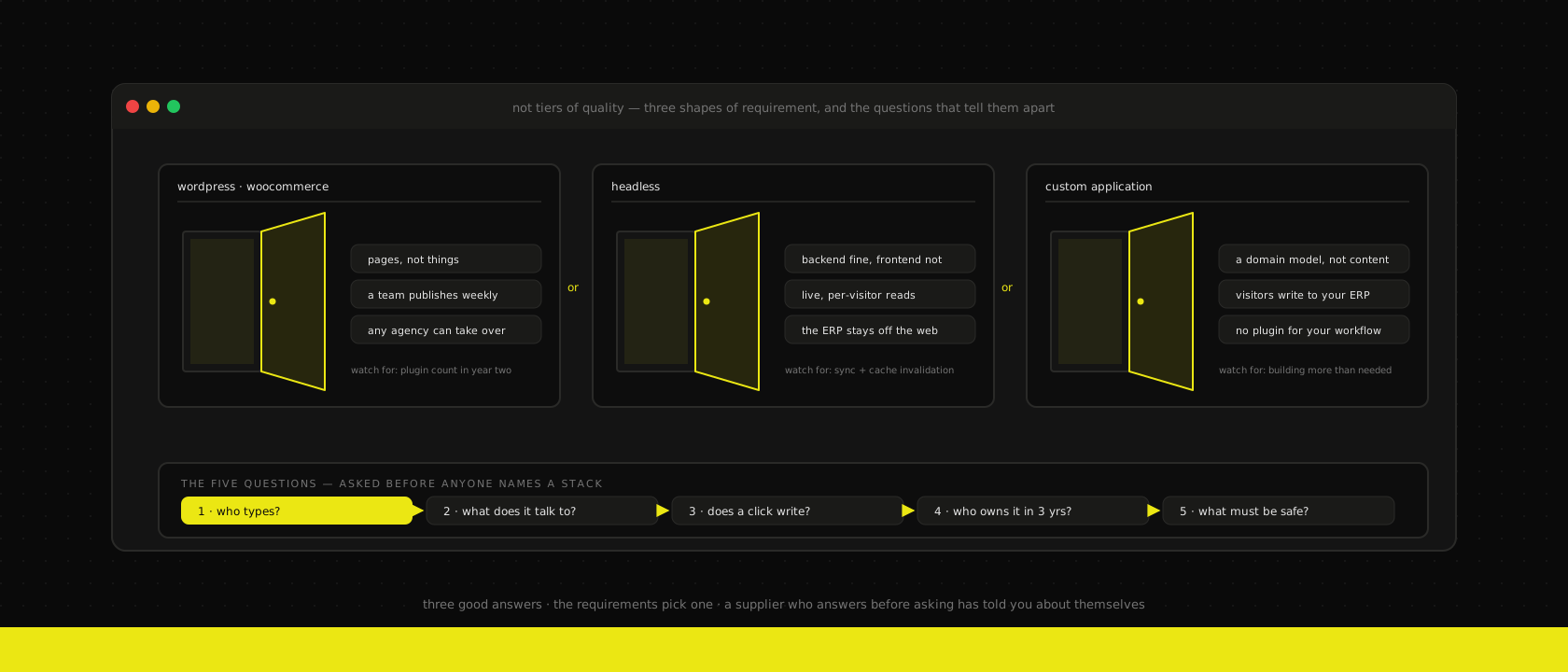
Almost every "we need a new website" conversation arrives with the answer already attached, and the answer is usually whoever they asked. The WordPress shop says WordPress. The JavaScript shop says headless. The custom shop says the current stack has outgrown a CMS. Nobody in that sequence is lying — they're all describing the tool they're best at, which is a reasonable thing for a supplier to do and a terrible basis for a decision that you'll live inside for five years.
We're in the unusual position of selling all three. We build WordPress sites and WooCommerce shops, we build headless storefronts on top of an ERP, and we build custom applications from scratch. That's not a boast, it's the only reason this post can be written honestly: we don't have a favourite to defend, so we had to write down the questions instead. What follows is the actual internal framework — the same one we run in an intake, in the same order.
The three answers, described fairly
Start by being precise about what's on the table, because the words have drifted.
WordPress (with WooCommerce if you sell things). A CMS that owns both the content and the rendering. Your editors log into an admin they either already know or can learn in an afternoon, and the pages they build are the pages visitors get. The ecosystem has a plugin for nearly everything, which is simultaneously its greatest strength and the source of every problem it will ever cause you.
Headless. A backend keeps doing what it's good at — holding content, products, prices, stock, orders — and something else renders the customer-facing site against its API. That backend can be WordPress itself, a dedicated content platform, or an ERP; we most often put a React frontend in front of Odoo or the WooCommerce shop a client already runs. You gain full control of the frontend and pay for it with a second system to build, deploy and keep in sync.
Custom. No CMS at the centre. The domain model is the point — quotes, approvals, planning slots, entitlements — and pages are just one way of looking at it. Content, where it exists at all, is a small supporting cast.
These are not quality tiers, and price is not a straight line through them either. A badly scoped custom build costs more than a well-run WordPress site and does less. A WordPress site bent into an application costs more than the custom app it's impersonating, and the bill arrives in instalments over three years instead of at the start.
First, the questions that don't decide it
Three arrive in almost every intake, and none of them narrows the field.
"Which one is fastest?" All three, or none of them. Speed is a build-quality property, not a platform property. The slow WordPress site everyone points to is slow because it renders a nested page-builder layout through four render-blocking stylesheets and thirty-eight plugins on a shared host — not because PHP is slow. We run WordPress on a stack that keeps the application warm in memory with an object cache and an HTTP layer that purges on publish, and the Core Web Vitals go green and stay there. Meanwhile a React frontend that ships 900 KB of JavaScript to render a text page is slower than the WordPress site it replaced. Performance tells you about the builder, not the category.
"Which one scales?" Almost nothing a Belgian mid-market business builds is anywhere near a scaling limit. Every option here handles more traffic than you will have, provided the pages are cached and the database isn't queried per visitor. If your marketing pages are the same for every visitor — and they are — they don't need a server at all, whatever renders them.
"Which one is more modern?" This is the one to be most suspicious of, because it's the question a supplier can answer in their own favour without ever being wrong. Modern is not a requirement. Nothing on your roadmap gets easier because the stack is fashionable.
Set those aside and five real questions remain.
1. Who types, and what shape is what they're typing?
This is the first question we ask and it eliminates more options than the other four combined. Two axes: who edits, and how structured the content is.
If a marketing person needs to publish a campaign page on a Thursday afternoon without opening a ticket, that is a hard requirement and it is worth a great deal. It is the entire product a CMS sells, and when it's real, WordPress wins outright — the alternative is a developer in the critical path of every word on the site, forever. We say the same thing in the post about running this site with no CMS at all: that architecture works here because the only author is a developer, and it would be the wrong call for a team with a marketeer.
The structure axis matters just as much and gets noticed later. Free-form content — pages, posts, landing pages, the occasional promotional block — is exactly what a page-builder model is designed for. Genuinely structured content is not. If the "content" is 400 products with 40 attributes each, feeding filters, comparison tables and three different views, you don't have content. You have data, and a page builder will fight you for the whole project. That's the point where a headless setup with a real content model, or a custom app with a real schema, stops being over-engineering and starts being cheaper.
The signal to listen for in your own requirements: are you describing pages, or are you describing things? Pages want a CMS. Things want a schema.
2. What does it have to talk to, and in which direction?
Integrations are where projects get reclassified, and direction matters more than count.
Read at build time is the easy case. Prices, a product catalogue, opening hours, job listings — pulled during the build and baked into pages. Any of the three options handles it and it barely affects the decision.
Read at request time, per visitor is the middle case. Live stock, customer-specific pricing, an account that shows this person's orders. WordPress can do it — but every one of those becomes a query on the request path, which is the moment the caching story you were relying on gets complicated. It's usually the strongest argument for the headless split: keep the system of record where it is, render the fast part yourself.
Write into a system of record changes the category outright. A form emailing someone is not an integration. Creating an order in an ERP, booking a slot against real capacity, opening a helpdesk ticket against an active support agreement — those are transactions, with retries, idempotency, error states and a support team who will ask what happened to record 4471. When writes are core to what the site does, you are building an application, no matter what renders the About page. Our usual shape is one API layer in front of the ERP so there's a single door to audit rather than four plugins with database credentials.
3. The transaction test
If you want one question that classifies a project in ten seconds, it's this: does a visitor's action change state in a system your business depends on?
- No. Someone reads, someone fills in a contact form. That's a brochure site, and it wants the cheapest good option — WordPress if a team edits it, MDX in git if a developer does.
- Yes, but it's a standard shop. Cart, checkout, payment, order, invoice. This is solved. Use WooCommerce, or put a React storefront in front of it once the frontend is the bottleneck rather than the shop.
- Yes, and it isn't standard. A quote that needs an approval before it becomes an order, a booking that consumes a technician's capacity, a portal where what you can see depends on your contract. There is no plugin for your business's state machine, and the ones claiming to be close will cost more in configuration than the thing would have cost to build.
The failure mode here is answering "yes, and it isn't standard" while buying option one, which is how sites end up with a custom field plugin used as a database and eleven automations gluing it together.
4. Who owns it in three years?
The least technical question and the one clients most regret skipping.
WordPress has a labour market. If we disappear tomorrow, thousands of agencies can pick up your site, and most of them can do it competently. That liquidity is a genuine architectural property and it's rarely put on the table, because the supplier explaining it has an incentive not to. Custom code has a much smaller market: it needs us, an in-house developer, or a supplier willing to read someone else's codebase. Mitigable — conventional stack, tests, documentation, and everything we build is yours once it's paid for — but never zero.
Run that in the other direction too. WordPress's plugin surface is third-party code with database access, updated on someone else's schedule, and it is the layer that needs the most disciplined maintenance contract of anything here. "WordPress is cheaper" is true at launch and stops being automatically true somewhere in year two, depending entirely on how many plugins were used to avoid writing code.
And ask who hosts it. All three options are only as good as what they run on; a custom application on a neglected VPS is worse than a WordPress site on a platform someone patches. We host what we build on our own infrastructure for exactly that reason — the team that wrote it is the team that gets the alert.
5. What does the risk surface have to look like?
Sometimes this is the whole decision, and it usually arrives via a security questionnaire rather than a requirement.
A CMS puts an authenticated admin panel on the public internet. That's a normal, acceptable trade for most businesses, and it's manageable — locked-down admin, WAF, a curated plugin set, patches applied on a schedule. But if the site touches data with an audit scope attached, the calculus changes: fewer moving parts with database access is worth real money, and the architecture where the backend isn't on the internet at all becomes the reason to go headless rather than a nice property of it.
The table
Read it as a set of tendencies, not rules. Any row can be overridden by a strong answer in another one.
| WordPress / WooCommerce | Headless | Custom | |
|---|---|---|---|
| Primary author | Marketing team, weekly | Marketing team, via a content backend | Developers; content is incidental |
| Content shape | Pages and posts | Structured content or a product catalogue | A domain model, not content |
| Integrations | A few, mostly read | Live reads, some writes | Writes into a system of record |
| Design control | Good, bounded by the theme and editor | Total | Total |
| Time to first version | Weeks | Weeks to months | Months |
| Three-year cost driver | Plugin count and update discipline | Two systems to keep in sync | Feature velocity you actually use |
| Who can take over | Almost any agency | A React team | A team willing to read the code |
| Typical failure mode | Becoming an application by accident | Sync and cache-invalidation bugs | Building more than the business needed |
Hybrids are the normal answer, not a cop-out
Most of what we build is a mix, and treating that as indecision is how projects get worse. Marketing pages on WordPress, where the marketing team belongs; the customer portal as a custom application on app. or portal.; the shop headless in front of the ERP. Three systems, one brand, and each part sits where its own answers pointed.
Two rules keep hybrids from decaying:
One system of record per fact. Prices live in exactly one place. If both the CMS and the ERP believe they own the price, you will find out which one is wrong from a customer.
Shared shell, separate deploys. Header, footer, tokens and typography come from one design system so the seam is invisible to visitors — but the marketing site should not be blocked by the application's release, or vice versa. The moment publishing a blog post requires deploying the portal, someone will stop publishing blog posts.
Multilingual deserves a flag here too: WordPress has a mature answer available on day one, and a custom or headless build needs the i18n decision made up front because retrofitting it is the single most expensive "we'll do it later" on this list.
The two migrations that go wrong
Replatforming too early. A shop is slow, someone proposes a rebuild, and eighteen months of budget go into recreating a working checkout, VAT rules and shipping zones that took three years of edge cases to get right — to fix a problem that lived entirely in a page builder and four unnecessary plugins. Before anyone signs a rebuild, find out where the seconds actually are. Often the answer is a frontend rebuild in front of the shop you already run, which is a fraction of the cost and keeps the admin your team knows.
Bending the CMS too long. The opposite failure and the more expensive one, because it arrives gradually. Custom post types used as tables, a custom-fields plugin used as a schema, twenty automations gluing them together, and a "site" that is now an application maintained by a stack of configuration nobody can read or test. The tell is when a change request needs a diagram to explain, or when someone says "don't touch that plugin". At that point the migration is not a website project — it's a data extraction project with a website at the end of it.
The questions we'd ask you
In an intake, in this order, and the answers usually settle it before we've talked about technology at all:
- Who publishes a new page, and how often? A name and a frequency. "The marketing team, weekly" and "our developer, twice a year" are different projects.
- Is this content or data? Are you describing pages, or things with attributes?
- What has to change in another system when a visitor clicks the button? Nothing, an order, or something only your business does.
- Who maintains this in three years, and what's the plan if it isn't us? Ask every supplier this and watch the reaction.
- What has to be true for security or compliance? Ideally before the questionnaire arrives, not after.
- What's the thing you'll want in year two that you haven't mentioned? Everyone has one. It moves the answer more often than anything on the current requirements list.
It's the same principle behind starting every Odoo project with a fit-gap analysis and behind not reaching for microservices by default: decisions this expensive get made on evidence about your business, not on defaults inherited from whoever you asked first.
The short version
WordPress when a team publishes regularly and the site is pages. Headless when the frontend has requirements the CMS can't meet but the backend is doing its job fine. Custom when the interesting part is a domain model and pages are just a view of it. Hybrid when the answers differ per area of the site, which is most of the time.
And if a supplier gives you their answer before asking who does the editing, you've learned something useful about the supplier rather than about your project. If you're weighing a quote — ours or someone else's — send it over and we'll tell you which of the five questions it hasn't answered.
Want us to publish something specific?
Tell us what you'd like to read and we'll add it to our writing queue.
Get the next one in your inbox
New articles, videos and the occasional engineering note — a short mail when there’s something worth reading, nothing else.