

The stale screen problem: offline-first signage that fails loudly
A dark screen is a support ticket. A screen still showing last week's price is a lie in your store, and nothing in a normal monitoring stack will tell you about it. Content as a versioned bundle instead of a URL, day-parts that depend on a clock you don't control, expiry as a safety feature, and telemetry that reports what's actually on the glass.
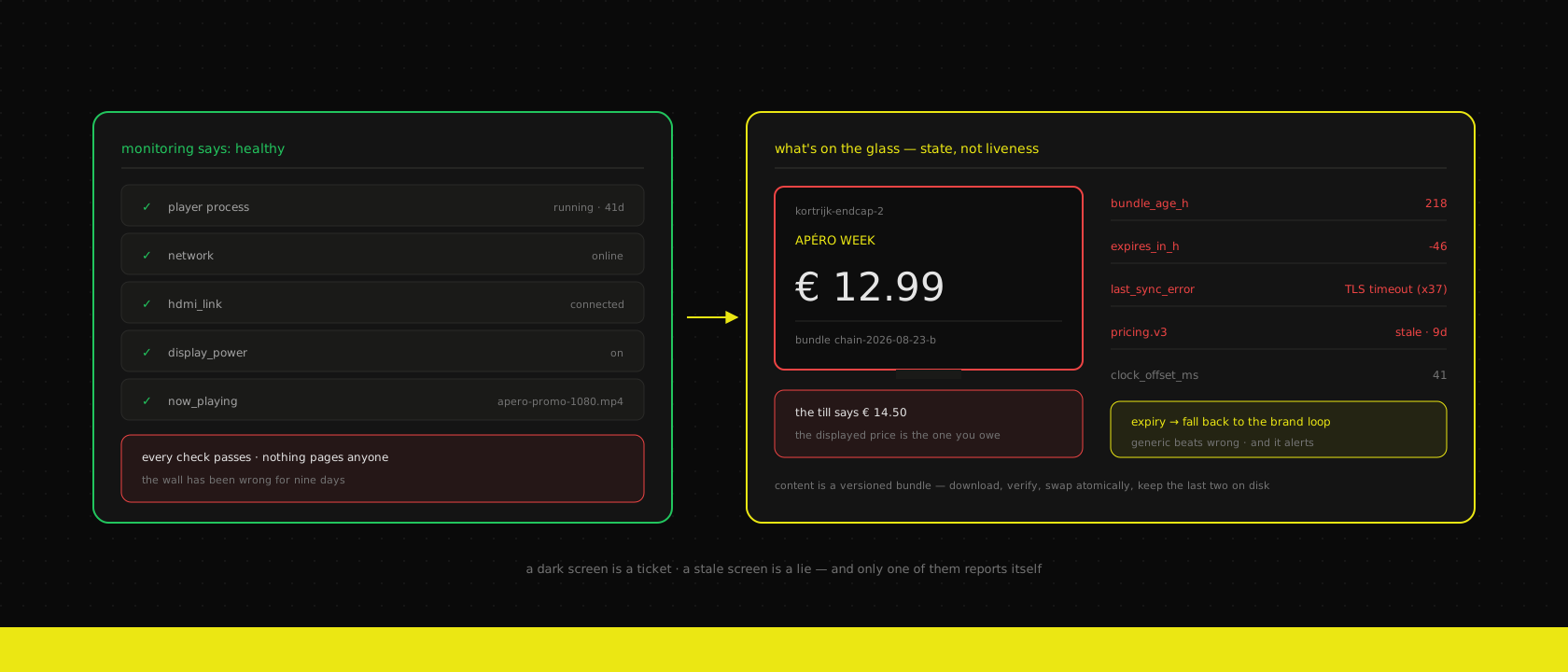
The call never comes in the way you'd expect. Nobody rings to say screen four is dead — a black rectangle in a shop is obvious, embarrassing and fixed by someone unplugging it and plugging it back in within the hour. The call that costs money is the one from a store manager in Kortrijk saying a customer is at the till with a phone photo of the screen behind them, and the screen says €12.99, and the till says €14.50, and the customer is right because the screen is what the shop promised.
That screen was online the whole time. Its player was up, its network was up, its dashboard tile was green. It was simply playing a bundle from nine days ago, because a sync failed once, retried into an error nobody had wired an alert to, and the player did exactly what a well-behaved offline-first device is supposed to do: it kept playing what it had.
This is the failure mode that defines the whole category, and it's the one every signage demo skips. A fleet of screens is not a content problem. It's a distributed systems problem where the clients are unattended, the network is somebody else's shop wifi, and the output medium is a wall that customers read as a promise.
Two failure modes, and only one of them gets reported
Sort every signage incident into two buckets and the engineering priorities fall out immediately.
Dark. The screen is off, frozen, showing a bootloader, or displaying the player software's own error page. Ugly, unmissable, self-reporting. Staff notice within a shift and someone tells you. It costs you the value of the screen for a few hours.
Stale. The screen is playing beautifully. It's playing the wrong thing. Nobody notices, because a screen showing a promotion looks exactly like a screen showing the promotion, and the people standing next to it all day are the ones least likely to read it. It costs you the price difference times the number of customers who saw it, plus whatever the argument at the till costs, and it keeps costing until someone happens to compare.
The uncomfortable part is that almost every off-the-shelf monitoring setup is built for the first bucket and blind to the second. Ping the player, check the process, watch the HDMI link — all of that goes green on a screen that's nine days behind. And the harder you engineer for offline resilience, the more the second bucket fills up, because "keep playing no matter what" and "never show something wrong" are directly opposed instructions. Every design decision below is really about where you put that dial.
Our default: the player caches aggressively, and the content carries its own expiry. Resilience is bounded, in the content, by the person who published it — not decided permanently in the player firmware by us.
Content is a release, not a URL
The most common way to build this is also the one that produces the stale-screen bug: point a browser at a scheduling URL, refresh on a timer, cache whatever comes back. It works on the pilot screen, in the office, on the office wifi. It rots in the field, because "the page" is a moving target with a dozen sub-resources that each fail independently. You end up with screens showing this week's layout with last week's images, or a promo whose price element failed to load and rendered as an empty div — half-updated, which is worse than either state on its own.
Treat a content change as a release instead. The CMS produces an immutable, versioned bundle: a manifest, every asset it references, and a checksum over the lot.
{
  "bundle": "chain-2026-09-01-a",
  "published_at": "2026-09-01T05:12:00Z",
  "expires_at": "2026-09-08T22:00:00Z",
  "scope": { "region": "vlaanderen", "screen_group": "instore-endcap" },
  "playlist": [
    { "asset": "apero-promo-1080.mp4", "duration": 12, "dayparts": ["16:00-20:00"] },
    { "asset": "price-board.html",     "duration": 20, "data": "pricing.v3" },
    { "asset": "brand-loop-1080.mp4",  "duration": 8 }
  ],
  "assets": {
    "apero-promo-1080.mp4": { "sha256": "6f1c…", "bytes": 18446721 },
    "price-board.html":     { "sha256": "a209…", "bytes": 14882 },
    "brand-loop-1080.mp4":  { "sha256": "b7d4…", "bytes": 9112004 }
  }
}
Three properties matter more than the format:
It's atomic. The player downloads the entire bundle into a staging directory, verifies every checksum, and only then swaps a symlink and tells the renderer to reload. A sync interrupted at 80% changes nothing on screen. There is no half-updated state to debug because there is no way to reach one.
It's addressable. chain-2026-09-01-a is a thing you can ask a screen about, grep for in a log, and compare across 68 devices. "Is store 14 up to date?" becomes a string comparison instead of a visual inspection.
It's cheap to re-sync. Assets are content-addressed, so a bundle that changes one price board re-downloads 14 KB, not 27 MB. That matters when a third of your sites are on a DSL line shared with the payment terminal.
The delivery path is the same one we argue for everywhere else: media on a CDN, code and manifests from the origin. The manifest is small, private and needs to be current; the 18 MB video is public, immutable and should be served from wherever is closest to the shop.
# fetch into a staging dir, verify, then flip. Never write into live/.
signage-sync fetch chain-2026-09-01-a --into /var/lib/signage/bundles/
signage-sync verify /var/lib/signage/bundles/chain-2026-09-01-a || exit 1
ln -sfn /var/lib/signage/bundles/chain-2026-09-01-a /var/lib/signage/next
mv -Tf /var/lib/signage/next /var/lib/signage/live
signage-ctl reload           # renderer re-reads live/, no process restart
Keep the previous two bundles on disk. They are your rollback, and they're the reason a bad publish is a thirty-second fix from the CMS rather than a drive to twenty-three stores.
The player is a cache with a clock, not a browser pointed at a page
Once content is a bundle, the player's job gets small enough to reason about: hold the current bundle, decide what should be on screen right now, render it, and report. It should be able to do all of that with the network cable pulled.
That last requirement rules out more architectures than people expect. Anything that resolves a scheduling decision server-side at play time — "ask the CMS what to show next" — has a hard dependency on a shop's wifi at every transition. The schedule has to be data in the bundle, evaluated locally.
If this sounds like the reasoning behind PWA storefronts and service-worker caching, it's the same shape, with one meaningful difference: a storefront has a user who can retry, reload, or go elsewhere. A screen has nobody. Whatever the player decides, it decides alone, for hours, in front of customers. The bar for "degrade gracefully" is higher precisely because there's no human in the loop to notice the degradation.
It's also worth being blunt about hardware here, because it determines how much of this you get to keep. Consumer TVs and consumer-grade sticks are not built to be on sixteen hours a day for four years; they overheat, their storage wears out, and the ones with built-in "smart signage" apps tend to hide the filesystem you need for atomic swaps. Commercial-grade panels and a player you actually control cost more once and stop generating this class of problem. We say this to clients before the first invoice, not after the third RMA.
Day-parts run on the player's clock, so the clock is a dependency
Here is a bug that has bitten us and will bite you: a screen shows the breakfast loop until 15:00 and the apéro loop after it, the player evaluates that locally, and the player's clock is wrong. Now the entire schedule is shifted, silently, on one device, in one store, and it self-corrects at midnight so it never reproduces when you look.
If schedules are evaluated on the player — and per the section above they must be — then the clock is production infrastructure. That means, concretely:
- NTP is mandatory and monitored. Not "configured". Monitored. Clock offset is a metric the player reports, and drift past a couple of seconds is an alert like any other.
- Store timezones and DST are content, not player config. A chain with sites in Belgium and one in the UK will get exactly one hour of wrong content twice a year if the offset is baked into an image somebody flashed in 2024. Put the IANA zone in the bundle scope and let the player resolve it.
- Day-part boundaries need a defined tie-break.
16:00-20:00and20:00-23:00must not both match at 20:00:00. Half-open intervals, documented once, applied everywhere. - A screen with no valid clock plays the fallback loop. Not the breakfast loop, not the last thing it played — the one bundle that is correct at any hour. A device that doesn't know what time it is has no business choosing time-based content.
That last rule is the general principle in miniature: when the player can't establish a precondition, it degrades to the thing that is safe rather than the thing that is most recent.
Every asset needs an expiry, because "keep playing" must not mean "forever"
This is the single highest-value line item in the whole system and it is almost always missing.
expires_at in the manifest is not a cache header. It's a business statement: this content stops being true at this moment. A weekend promo expires Sunday night. A price board expires when the pricing feed's validity window ends. A recruitment slide expires when the vacancy closes. When a bundle passes its expiry and no replacement has arrived, the player does not keep playing it. It falls back — to the evergreen brand loop, or to a neutral holding card — and it escalates.
The politics of this are harder than the code, because it means accepting that a screen will sometimes show generic brand content instead of the promotion the marketing team paid for. That trade is easy once you price it honestly: a brand loop is a wasted impression; a wrong price is a refund, an argument at the till, and in the case of advertised pricing, a consumer-protection problem. In Belgium, the price you display is the price you owe. One is a rounding error and the other has a legal department attached.
Two rules make expiry work in practice:
Expiry is set by whoever publishes, not by the platform. A default (say, 14 days) applied when the field is empty stops the fleet rotting quietly; an explicit value on anything price-bearing makes the risk visible at publish time.
The fallback bundle is itself a maintained artefact. It's the thing that runs when everything else has failed, so it can't reference live data, can't have a date in it, and needs re-checking on the same cycle as anything else. A fallback loop that still says "Winter 2025" is a fallback that failed.
Telemetry has to report what's on the glass
A heartbeat tells you a process is running. It's the least interesting thing a signage player knows. What you actually need on the dashboard is the answer to what is this screen showing right now, and is that what we intended? — which means the player reports state, not liveness.
{
  "screen": "kortrijk-endcap-2",
  "bundle": "chain-2026-08-23-b",
  "bundle_age_h": 218,
  "expires_in_h": -46,
  "now_playing": "apero-promo-1080.mp4",
  "last_sync_ok": "2026-08-23T05:14:11Z",
  "last_sync_error": "TLS handshake timeout (x37)",
  "clock_offset_ms": 41,
  "display_power": "on",
  "hdmi_link": true,
  "data_feeds": { "pricing.v3": { "age_s": 788400, "state": "stale" } },
  "temp_c": 61
}
Read that payload as an on-call engineer: the box is up, the display is on, HDMI is connected, video is playing. Every classic check passes. And the screen has been wrong for nine days, has been past its expiry for two, and has been failing TLS since the 23rd. The interesting fields are all in the second half.
So the alerts that matter are the ones you have to think to write:
- Bundle age above threshold — per screen, and as a fleet percentile. One stale screen is a device problem; the 95th percentile creeping up is a distribution problem.
- Expired bundle still playing — should be impossible if the player behaves. Alert on it anyway; this is exactly where a firmware regression hides.
- Fleet divergence — the count of distinct bundle versions in a group that should be identical. Should be 1, or 2 during a rollout window. Anything else, and a rollout stalled somewhere without failing.
- Feed staleness — the age of the data behind the content, not the age of the content. A fresh bundle rendering a pricing feed from last Tuesday is still a wrong screen.
- Repeated sync failure — not the first error. The seventh. One retry is weather; a pattern is a certificate, a captive portal or a store that changed its wifi password.
None of this needs a special stack. It's the same self-hosted metrics and alerting we run for everything else — the work is in choosing signals that describe correctness rather than uptime. And there's a genuinely useful last resort for the highest-value screens: have the player screenshot its own output on a schedule and upload it. It's crude, it's a few KB, and it is the only check that catches a renderer happily drawing a black rectangle over the right content.
Live data is where the real breakage lives
Static slides are easy. What clients actually want — and what makes signage worth building rather than buying — is screens fed from the systems that already hold the truth: prices and promotions out of Odoo, stock levels, menu availability, queue and wait times. That's also where the failure surface concentrates, because now the screen depends on a live feed as well as a bundle.
Three decisions, and they compound:
Push a snapshot, don't let the player poll the ERP. Sixty-eight players hitting an ERP every thirty seconds is a self-inflicted load test that runs forever and gets worse with every store you open. The CMS pulls once, validates, and publishes a small versioned data file that rides alongside the bundle. The ERP sees one consumer. The player sees a file it can read offline. This is the same argument as putting an API layer in front of the ERP rather than letting every client talk to it directly.
Give the data its own freshness rule, separate from the bundle's. Layout can be a week old and still be correct. Prices cannot. pricing.v3 carries its own valid_until, and when it lapses the price board specifically is replaced — not the whole loop. Losing a price element to a neutral panel while the campaign keeps running is a much better outcome than either extreme.
Decide per field what "unknown" looks like. Blank is honest for a price and terrible for stock. "Sold out" is safe if you're actually out and expensive if you're merely disconnected. Write it down per data type at design time, because the person who finds out you never decided will be a customer.
This is the read-side sibling of the write-side problem in an offline-first point of sale. There, a dead line must not stop you taking money, and the queue is the answer. Here, a dead line must not let you display a promise you can't keep, and the answer is expiry. Same instinct — keep working without the network — pointed in opposite directions, because one of them takes an input and the other makes a claim.
Roll out to screens the way you roll out to servers
A fleet of players is a deployment target, and it deserves the same discipline as one: a canary, a staged ring, an automatic halt, a rollback that doesn't need a van. The pilot-screen-first sequence in how a signage rollout runs exists for the hardware and the mounting; the same shape applies to every content and firmware change afterwards.
In practice, for anything fleet-wide:
- One canary screen — ideally a real one in a real store with real light and real network, not the one in your office. Fifteen minutes.
- One store, then one region. Watch bundle-version divergence and sync-error rate between rings, not just "did it fail".
- Halt on threshold. If more than a small percentage of players fail to reach the new version, stop the rollout automatically and leave everyone else on the last known good bundle. Screens that never moved are screens you don't have to fix.
- Publish outside opening hours where you can. A player that swaps a bundle at 05:30 has a full day to report a problem before a customer reads it.
The strategies are the ordinary ones — rolling, blue-green and canary applied to boring business systems — with one signage-specific twist: your rollback target must already be on the device. A rollback that requires 27 MB over a shop DSL line during business hours is not a rollback, it's a plan. Keeping the previous two bundles on disk is what makes the promise real.
And then do the thing everyone agrees with and nobody schedules. Once a quarter, pull the network cable on a screen for an afternoon and watch what it does: does it keep playing, does it fall back correctly at expiry, does the alert fire, does anyone see the alert? It's the same reasoning as monthly restore drills. An untested fallback path is a belief, not a behaviour.
The honest costs
A player you control costs more than a stick. Commercial-grade panels, a real player, mounting and cabling. The cheap route is genuinely cheaper for about eighteen months, and then you're doing site visits.
Someone owns the fallback bundle. It's a permanent, small maintenance item that nobody wants and that quietly guarantees the worst case.
Expiry generates work. Content that stops itself means someone has to publish replacements on time, and marketing teams that have never had a deadline enforced by a machine feel that in the first month. This is the cost of the feature, not a side effect of it.
Alert design is the actual project. The syncing is a week. Deciding what "wrong" means per screen group, per feed, per data type — and getting a business owner to agree to those thresholds — is the part that takes real calendar time.
Screenshots are storage and a privacy conversation. Useful, small, and still a camera-shaped question if a screen ever renders anything personal. Decide retention up front.
Networks in shops are not your networks. Captive portals, a router someone rebooted, a password rotated by the landlord's IT. Budget for a 4G/5G fallback SIM on sites where a dark screen is expensive; it's cheap insurance and it removes an entire category of ticket.
Where this is over-engineering
- A single screen in a reception. One display, one loop, someone walks past it forty times a day. A bundle pipeline and a telemetry stack for that is a hobby. Use the CMS, skip the fleet thinking.
- Screens with nothing time-bound on them. A wayfinding board or a static brand loop has no staleness problem, because nothing on it stops being true. Expiry buys you nothing.
- Nothing price-bearing, ever. Most of this argument is powered by the cost of displaying a wrong number. If no screen in the network ever shows a price, a stock level or a legal claim, you can genuinely relax the whole thing to "keep playing, sync when you can".
- When nobody will act on an alert. A stale-screen alert going to a distribution list with no owner is worse than no alert — it teaches everyone that signage alerts are noise. If there's no helpdesk or ops rota behind it, build the fallback behaviour and skip the paging.
The short version
A screen fleet fails in two directions, and the expensive one is silent. Dark screens get reported by staff within hours. Stale screens get reported by a customer holding a phone photo at the till, days later, and every green tile on your dashboard will have been telling you it was fine the whole time.
So: make content a versioned, checksummed bundle that swaps atomically, and keep the last two on disk so rollback doesn't need a van. Evaluate schedules on the player so a dead line changes nothing — and then treat the player's clock as production infrastructure, because you just made it one. Put an expiry on everything that stops being true, and let the screen fall back to a maintained evergreen loop rather than keep a promise you've withdrawn. Report what's on the glass, not that the box is up, and write the five alerts that describe correctness. Push data snapshots instead of letting sixty-eight players poll your ERP. Roll out in rings, halt on threshold, and pull a cable once a quarter to check that any of it is true.
That's what we build and run as digital signage networks — screens, players, the CMS behind them and the monitoring that catches a dark or stale screen before the store does — on the same infrastructure we host everything else on. The hard part was never getting a video to loop on a television. It's making sure that when something breaks at 06:00 in a shop in Kortrijk, the wall goes generic instead of going wrong.
Want us to publish something specific?
Tell us what you'd like to read and we'll add it to our writing queue.
Get the next one in your inbox
New articles, videos and the occasional engineering note — a short mail when there’s something worth reading, nothing else.