

PWA storefronts: the app experience without the app store
A home-screen icon, instant repeat visits and a notification when the order ships — you can have all three without two codebases and a review queue. What a PWA storefront genuinely delivers in 2026, where the service worker earns its place and where it quietly lies to your customers, the iOS caveats that decide your push reach, and the parts that still need a real native app.
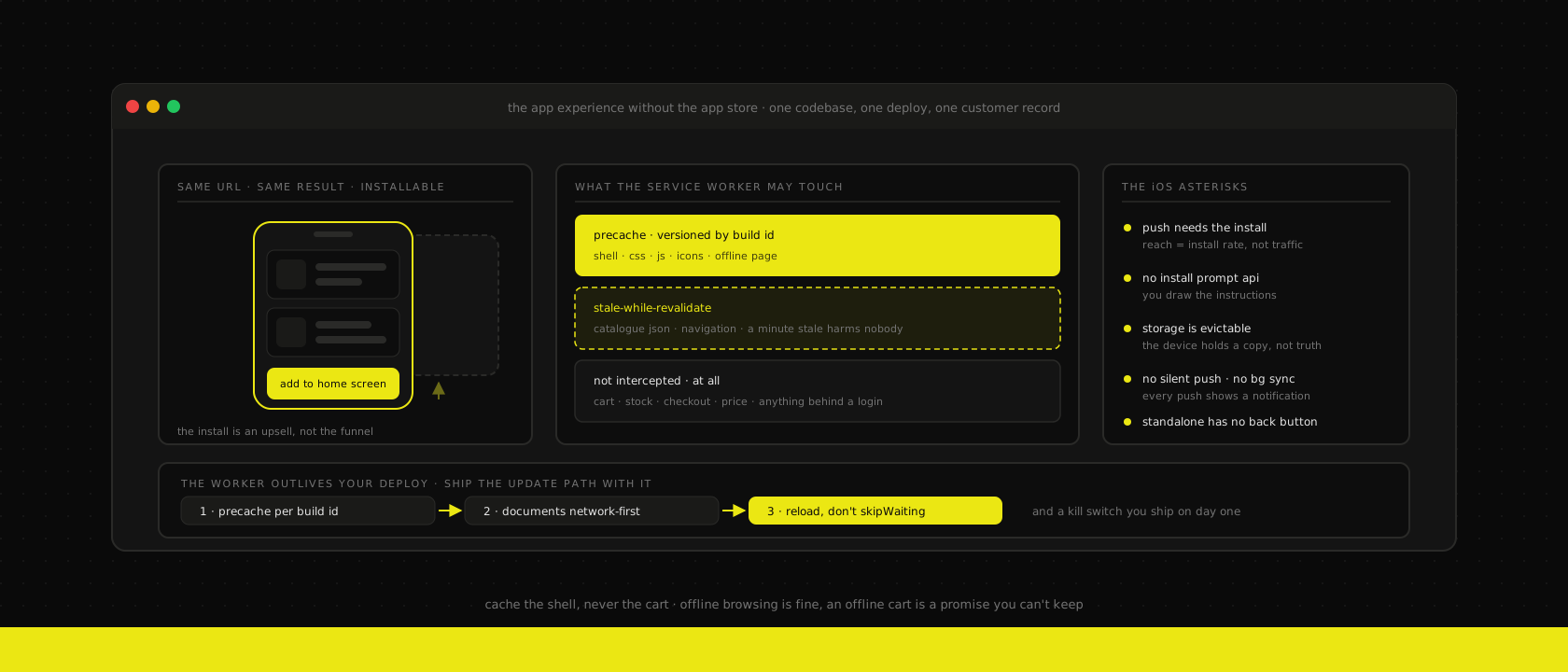
"We need an app" is one of the more expensive sentences a client can say in a first meeting, and maybe a third of the time it turns out they don't. What they want is what an app feels like: an icon on the home screen, a shop that opens instantly, a notification when the parcel is out for delivery. What they are about to buy is two codebases, two release cycles, a store review queue sitting between them and every bugfix, and a set of platform rules that can change under them in a keynote.
There's a second problem, and it's the one that decides the business case. For a shop, the install is the funnel. Someone who found your sofa through Google is not going to detour via the App Store to buy it. Retail app installs come overwhelmingly from customers you already have — which makes a shopping app a retention tool wearing an acquisition tool's clothes. If your repeat-purchase rate is low, you are about to spend a year of budget building loyalty infrastructure for people who buy from you once.
A PWA sits exactly in that gap. Same storefront, same URL, same Google result, but installable, genuinely fast on the second visit, and able to send a push notification. In 2026 the technology is boring, which is the highest compliment we give anything that goes into production. What isn't boring is knowing precisely where it stops — because half the PWA advice still circulating was written when Safari couldn't send a push at all, and the other half quietly assumes everyone is on Android.
The install prompt is the least interesting part
Every PWA article opens with the "Add to home screen" banner, and that's the wrong lead. Most of your customers will never install anything, and it doesn't matter, because the parts that make the shop feel like an app are already running for them.
A registered service worker means the second visit doesn't wait on your origin to decide what a page looks like. The shell — layout, fonts, the CSS and JS that never change between two deploys — comes off the device. Navigation between category pages stops being a round trip. That's the entire perceived-speed story, and it applies to every returning visitor whether or not there's an icon on their home screen. It stacks on top of prefetching on intent rather than replacing it: one predicts the click, the other makes the response local.
So treat the install as an upsell to people who already like you, and gate it behind an intent signal — after a completed order, after someone saves a wishlist, on the account page — never on first paint. On Chromium you stash the event and fire it when you've earned it:
let deferred = null

window.addEventListener("beforeinstallprompt", (event) => {
  event.preventDefault() // suppress the browser's own moment
  deferred = event
})

// later, from a button you only render after a real intent signal
async function promptInstall() {
  if (!deferred) return
  await deferred.prompt()
  deferred = null // one shot; the event is not reusable
}
Safari has no equivalent API. There you draw the instructions yourself — Share, then Add to Home Screen — shown only on iOS Safari, only when navigator.standalone says you aren't already installed, and only once. A permanent "install our app" strip is an ad for your own website that your own customers have to scroll past.
Where installs genuinely pay: B2B reorder portals, service accounts, anything with a login and a rhythm. "Order the same pallet as last month" is one tap from the home screen instead of a search, a cookie banner and a login form. We've seen that shorten reorder cycles in a way that shows up in the numbers. A consumer shop selling a thing people buy once every four years will not see it, and shouldn't pretend otherwise.
What to cache, and what must never touch a cache
This is the same rule we apply in front of a slow ERP and in headless WooCommerce, and a service worker doesn't get an exemption: cache for feel, validate at the moment of truth.
Sorted into three piles:
- Precache, versioned by build. The app shell, the CSS and JS bundles, the icon set, the offline fallback page. Small, deterministic, replaced wholesale on deploy.
- Stale-while-revalidate. Category and product JSON, navigation trees, anything where a minute of staleness harms nobody. The customer sees the cached answer immediately and the fresh one lands before they've finished reading.
- Network only, never cached. The cart, stock at checkout, customer-specific pricing, order totals, anything behind a login. A stale catalogue is a cosmetic problem. A stale cart charges the wrong amount.
// service-worker.js — routing, not magic
const SHELL = `shell-${self.__BUILD_ID__}` // injected at build time

self.addEventListener("fetch", (event) => {
  const url = new URL(event.request.url)

  // money and identity: never intercepted, never stored
  if (url.pathname.startsWith("/api/cart") ||
      url.pathname.startsWith("/api/checkout") ||
      url.pathname.startsWith("/account")) {
    return
  }

  if (url.pathname.startsWith("/api/catalogue")) {
    event.respondWith(staleWhileRevalidate(event.request))
    return
  }

  if (event.request.mode === "navigate") {
    event.respondWith(networkFirstWithOfflineFallback(event.request))
  }
})
Two details that matter more than the strategy names. First, "never cached" has to mean the service worker doesn't touch those requests at all — not that you cache them with a short TTL. A Cache entry is script-writable storage that outlives the session, and a shared phone in a warehouse or a family tablet will hand the next person whatever is still in there. Second, product images do not belong in a service worker cache. They belong on the CDN, where the HTTP cache and the image pipeline already handle them properly — media on the CDN, code on the origin is exactly this boundary, and precaching four thousand product photos onto someone's phone is how you get uninstalled.
Offline browsing is fine; an offline cart is a promise you can't keep
Offline is where PWA demos oversell and production quietly disappoints, so be deliberate about what you actually claim.
What works, and is worth building: browsing pages the customer already visited, reading order history and delivery details from IndexedDB, seeing an offline page that is genuinely useful instead of a dinosaur — last orders, the support number, the address of the nearest branch. On a train through the Ardennes that is a real improvement over a connection error.
What we push back on: letting someone assemble a basket offline as if it were real. Prices move, stock moves, promotions expire. A cart built against a snapshot and submitted forty minutes later is a customer discovering at the payment step that two lines changed and one is gone — and you engineered that disappointment on purpose. If you support it at all, label it as a saved list rather than a cart, and re-validate every line against the server before anything reaches the payment step.
There is a genuine offline-write case, and it isn't the consumer storefront. A till with a flaky uplink has to keep selling, which is why Odoo POS is offline-first by design: a fixed device, a known operator, a bounded queue and a reconciliation story. Those constraints are what make offline writes safe. A random phone on a public network has none of them.
Also worth knowing before you design around it: the Background Sync API — the one that promises to retry a failed request once connectivity returns — is Chromium only. It's a nice enhancement for a newsletter signup. It is not a foundation for anything that moves money.
Push is the part that actually changes behaviour
Web push is the one capability where "it's basically an app" stops being marketing. It's a W3C standard: the browser hands you an endpoint URL, you sign a request to that endpoint with your VAPID key pair, the push service delivers it. No vendor SDK on the page, no Firebase project, no third-party script on the critical path of a page you're being graded on.
const subscription = await registration.pushManager.subscribe({
  userVisibleOnly: true, // no silent pushes on the web, by design
  applicationServerKey: VAPID_PUBLIC_KEY,
})

await fetch("/api/push/subscribe", {
  method: "POST",
  body: JSON.stringify(subscription), // endpoint + keys, stored per customer
})
Store that subscription against the customer record — res.partner in an Odoo-backed shop — and not in a separate push tool's database. The moment push lives somewhere else, you have four channels with four opt-out states and a customer who unsubscribed from one of them getting messages from the other three. One record, one preference set, whether the message goes out over the mailing platform, transactional mail, SMS or push.
Two rules we hold to. Ask at the right moment. A permission prompt on page load gets denied, and browsers treat that denial as permanent — you don't get a second attempt, ever. Ask after the first order, in context, with one sentence saying what you'll send. Send transactional messages. "Your order shipped." "Delivery between 10:00 and 12:00." "The part you asked about is back in stock." Push is a channel that interrupts someone on their lock screen; spend it on things they'd have wanted a text about. Promotional push is how you convert an installed customer into an uninstalled one, and if you want to know whether the channel is worth anything, measure it with a holdout the same way we measure cart recovery — against the customers who got nothing, not against the provider's dashboard.
The iOS asterisks, stated plainly
None of this is a reason to skip a PWA. It is a reason to write the numbers down before someone promises them to a board.
- Push on iOS requires the home-screen install. Safari does not push from a tab. Your push reach on iOS is your install rate, not your traffic — and in a market like Belgium, where iOS carries a large share of mobile commerce, that gap is the whole forecast.
- No install prompt API. Share sheet, Add to Home Screen, manual, and you have to teach it in a UI you built.
- Storage is evictable. Safari clears script-writable storage — caches, IndexedDB — for sites the user hasn't opened in seven days. Home-screen web apps get better treatment than tabs, but the rule stands: anything that matters lives on your server, and the device holds a convenience copy.
- No silent push, no background sync, no periodic background updates. Every push must show a notification. You cannot quietly refresh a catalogue overnight.
- Standalone mode has no browser chrome. No back button. If you don't build the back affordance, people get stuck on a product page and close the app, which is the kind of bug that never shows up in your own testing because you know where the gestures are.
And a footnote that says something about the terrain: in 2024 Apple shipped a beta that demoted installed web apps to plain shortcuts for EU users, then reversed it after the Commission started asking questions. The capability came back. The lesson didn't — this is a platform you use, not one you own, which is precisely the argument for keeping the storefront itself on infrastructure you do control.
The update problem nobody hits until month three
Here is the failure we actually get called about, and it's never in the launch sprint.
You deploy. The service worker on a returning device is still serving last month's JS from cache. That JS calls this month's API, which changed a field name, and the customer gets a white screen that reproduces on exactly one phone in the world. Meanwhile your monitoring is green, because the server is fine.
Three things prevent it:
Version the precache on the build id. Cache names derived from the deployed commit mean a new deploy writes new entries and the activate step deletes everything that isn't current. Never a hand-maintained version constant that someone forgets to bump.
Don't serve HTML cache-first. Documents go network-first with an offline fallback, so a customer with a connection always gets a shell that matches the API behind it.
Be careful with skipWaiting. Activating a new worker under a page that has already loaded old JS chunks means the new worker starts serving new hashed assets to code that's asking for old ones. Either wait for the next full navigation, or show a small "a new version is available — reload" affordance and let the customer take it. The banner is honest, cheap, and it turns an invisible class of bug into a button.
And on day one, before any of this: make sure you can turn it off. A service worker outlives your deploy pipeline — if you cannot unregister it remotely, a bad worker can brick the domain for everyone who has it. Ship the kill switch first and never use it, rather than the other way round.
// the escape hatch, shipped from day one
if (KILL_SWITCH) {
  self.registration.unregister().then(async () => {
    for (const key of await caches.keys()) await caches.delete(key)
    const clients = await self.clients.matchAll({ type: "window" })
    for (const client of clients) client.navigate(client.url)
  })
}
What still needs native
We are not PWA maximalists. The point is to avoid paying for two codebases when one does the job, not to force the web into places it doesn't fit. It doesn't fit here:
- Hardware. Bluetooth scanners on a warehouse floor, NFC tap-to-pay, printers, scales. You can take Apple Pay in Safari; you cannot accept a contactless card from a customer's hand in a browser.
- Background location. Route tracking for technicians in the field runs while the app is closed. That's a native capability, and it's why field service routing usually arrives with a native companion.
- Store presence as the channel. If your customers genuinely find products by searching an app store, the listing is marketing spend, and no amount of web performance substitutes for it.
- Deep OS integration. Widgets, voice assistants, CarPlay, share targets your platform actually respects.
When one of those is on the list, we build a real mobile app and say so in the quote. Usually it's a native app alongside the PWA storefront, for two different audiences, not one replacing the other.
Where we don't recommend a PWA
- Low-frequency purchases. Kitchens, mattresses, machinery. The second-visit value is close to zero, nobody is installing your shop, and the same budget spent on Core Web Vitals and the checkout will move more revenue.
- Sites that aren't fast to begin with. A service worker caches whatever you give it, including slowness. Fix the render path first — often that means going static-first — and add the worker to an already-fast site.
- Content sites with no repeat rhythm. A marketing site does not need offline browsing. It needs to be quick and to stay out of the way.
- When the real requirement is a store listing. If a stakeholder's actual goal is "we want to be in the App Store", a PWA cannot satisfy it, and no amount of Lighthouse score will end that conversation. Say it out loud in the meeting rather than discovering it at launch.
The short version
A PWA is not an app substitute; it's the app-shaped 80% of a storefront that you already own the code for. Register a service worker for the shell and the catalogue, keep the cart and checkout on the network where they belong, be honest in the UI about what offline actually means, put push behind a real intent signal and spend it on transactional messages, and write down the iOS install-rate ceiling before anyone forecasts against it. Version your precache, keep a kill switch, and treat every store platform as weather rather than ground.
That's what we build into the headless storefronts and WooCommerce shops we run — the same pattern we described for headless commerce on Odoo, taken down to the level where it either works on a real phone or it doesn't. One codebase, one deploy, one set of customer preferences, hosted somewhere with a name attached to it. And when the requirement genuinely needs the hardware, we tell you that too.
Want us to publish something specific?
Tell us what you'd like to read and we'll add it to our writing queue.
Get the next one in your inbox
New articles, videos and the occasional engineering note — a short mail when there’s something worth reading, nothing else.