

Nine failed requests, every Tuesday at 14:10: what a rolling update actually drops
Kubernetes reports the rollout as successful, and it is — the guarantee is about pod counts, not about the requests that were in flight. Why a well-behaved process that exits promptly on SIGTERM is the worst kind, what the preStop window is really for, and the four timeouts that have to agree before 'zero downtime' means anything.
The report came in as a shrug. "Sometimes the order form errors, but if you try again it works." Nobody could reproduce it, the client's own staff had stopped mentioning it, and the error rate for the month was 0.02% — which is the kind of number that gets a ticket closed as "monitoring".
What made it findable was plotting the 502s against nothing in particular and noticing they came in tight clusters: eight of them at 14:09 on a Tuesday, eleven at 11:23 on a Thursday, nine more the following Tuesday at 14:10. Then someone put the deploy timestamps on the same axis and the mystery evaporated. Every cluster was a release. The application never failed on its own; it only failed while being replaced.
The rollout, for the record, reported success every single time. It was telling the truth.
"Zero downtime" is a property of the rollout, not of your requests
A rolling update makes one promise, and it keeps it precisely: at every moment during the transition, at least N pods are Running and passing their readiness check. maxUnavailable: 0 tightens that promise. It does not extend it.
Nothing in that promise covers the request that was already being handled by a pod when the decision to remove it was made, or the request that was routed to that pod a beat after. Those are a different problem, and the manifest that produces a clean rollout is not the manifest that handles them. We've written before about matching the deploy strategy to the blast radius, and that advice stands — but strategy is about which version serves traffic. This is about whether the handover between them is clean, and it's a question you have to answer separately no matter which strategy you picked. Blue-green with a broken drain drops the same requests; it just drops them all at once.
There are two distinct races underneath, and they're worth separating because they have different fixes:
- Traffic arriving at a pod that has already begun shutting down.
- Traffic arriving at a pod that is counted as ready but can't actually serve yet.
Most teams find the second one, because a cold start is easy to imagine. The first is the one that produces the Tuesday-afternoon cluster.
Endpoint removal is not ordered with SIGTERM
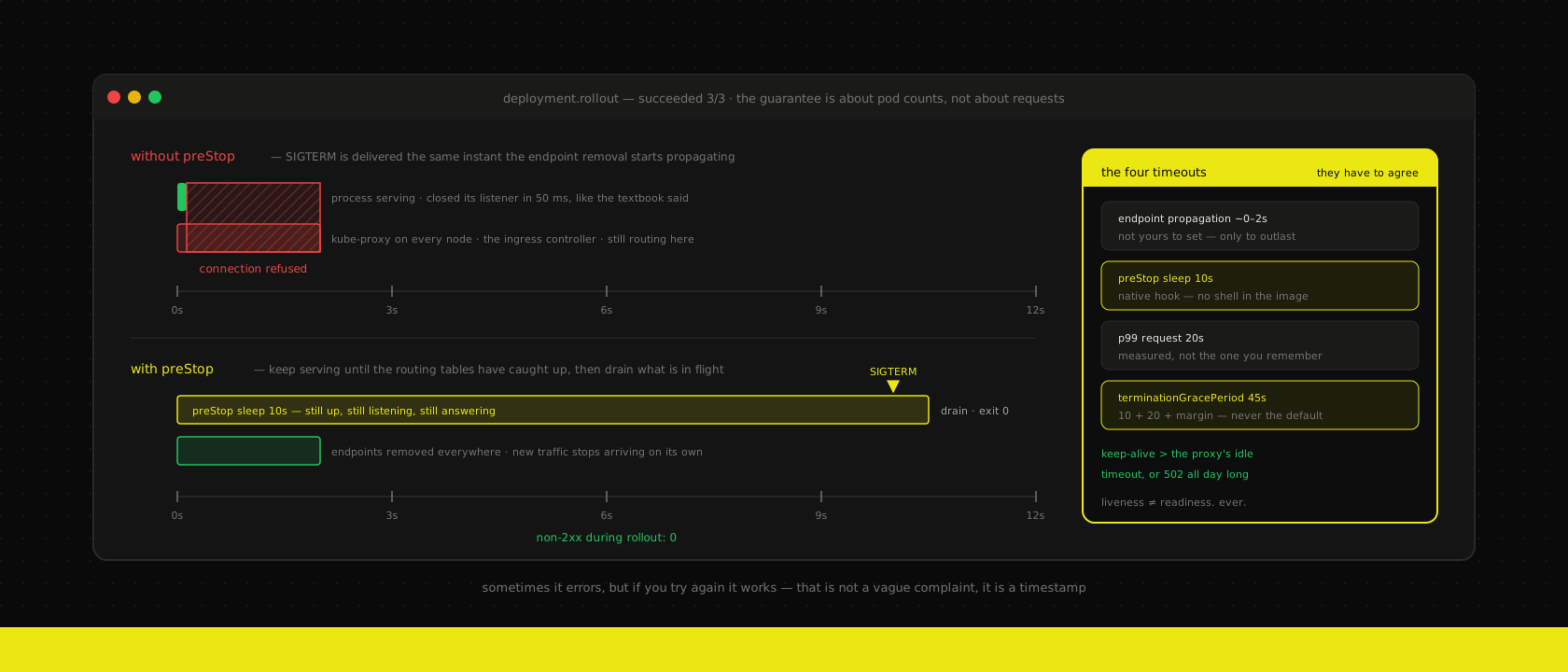
Here is the part that the diagrams leave out. When a pod is deleted, two things start happening in parallel, not in sequence:
- The kubelet sends
SIGTERMto the container. - The API server removes the pod from its EndpointSlice, which then has to propagate to kube-proxy on every node in the cluster, and to your ingress controller, and to any service mesh sidecar, each of which updates its own routing table on its own schedule.
The first is instantaneous. The second is eventually consistent across the whole cluster, and on a real cluster under real load it takes somewhere between a couple of hundred milliseconds and a few seconds. Nothing coordinates them. Kubernetes never promised it would.
Follow that through and you get the conclusion that surprises people: a process that exits promptly and cleanly on SIGTERM is the worst possible citizen. It has done exactly what the textbook says, closed its listener within 50 ms, and disappeared — while three nodes and an ingress controller are still confidently sending it traffic. Those connections get refused, and a refused connection at the proxy is a 502 to somebody's browser.
The fix is not to make shutdown faster. It's to make the container keep serving for long enough that the routing tables catch up, and the hook for that is preStop, which runs before SIGTERM is delivered:
spec:
  terminationGracePeriodSeconds: 45
  containers:
    - name: web
      lifecycle:
        preStop:
          sleep:
            seconds: 10
Ten seconds of doing nothing, during which the container is still up, still listening, still answering. Anything routed to it in that window is served normally. By the time SIGTERM lands, the pod is no longer in anyone's endpoint list and new traffic has stopped arriving on its own.
Two details that cost people an afternoon each. The native sleep hook above needs no shell in the image — worth knowing if you build minimal images without a package manager in them, where the old exec: ["sh", "-c", "sleep 10"] trick fails with a confusing no such file or directory and the pod terminates instantly anyway. And terminationGracePeriodSeconds is the budget for everything: the preStop sleep comes out of it first, then whatever time the process has left to finish in-flight work. Set the grace period to the sleep, plus your slowest realistic request, plus margin. Leave it at the default 30 with a 10-second sleep and a 25-second report, and the kernel kills the report at second 30.
Your process is probably ignoring SIGTERM entirely
Before any of that matters, the signal has to actually arrive somewhere that cares. Two extremely common container patterns mean it doesn't.
The first is PID 1. Linux does not apply default signal dispositions to PID 1 — a signal with no explicit handler registered is simply discarded. A Node process started as PID 1 with no SIGTERM listener does not terminate on SIGTERM; it ignores it, sits there until the grace period expires, and is then SIGKILLed. Everything still "works", which is why this survives for years. The symptom is not an error, it's a smell: every deploy takes exactly terminationGracePeriodSeconds to finish. If your rollouts always take 30 seconds and the number 30 appears nowhere in your application, you have found it.
The second is the shell wrapper. CMD npm run start or CMD ["sh", "-c", "node server.js"] puts a shell at PID 1, and the shell does not forward signals to its child. Same outcome, different cause. Use the exec form, or put tini in front as an init that reaps and forwards.
Then handle the signal on purpose:
const server = app.listen(3000)

// Must exceed the proxy's idle timeout, or the proxy will reuse a socket
// we are closing at that exact moment — the other classic 502.
server.keepAliveTimeout = 65_000
server.headersTimeout = 66_000

let shuttingDown = false

process.on("SIGTERM", () => {
  if (shuttingDown) return
  shuttingDown = true

  // Fail readiness immediately; the preStop window already bought us the
  // time for that to propagate.
  server.close(async () => {
    await queue.close()
    await db.end()
    process.exit(0)
  })

  // A client holding an idle keep-alive connection will not close it for us.
  setTimeout(() => process.exit(0), 30_000).unref()
})
That keepAliveTimeout line is not decoration. It is its own independent source of intermittent 502s, entirely unrelated to deploys: if the server's idle keep-alive timeout is shorter than the load balancer's, the LB will eventually pick a pooled socket in the microsecond the server is closing it, and the request dies before it's sent. The rule is simple and one-directional — the thing closest to the client gives up first. We've chased that one across an ingress in front of a NestJS layer and it presents exactly like a bad deploy, except it happens at random all day.
Readiness and liveness answer different questions
The single most common probe configuration we inherit is the same HTTP path wired to both, with the same timeout. That's not a shortcut, it's a failure amplifier.
Readiness asks: should this pod receive traffic right now? A "no" is cheap, reversible and local. Liveness asks: is this pod broken in a way only a restart can fix? A "no" destroys the process. Wiring them to the same check means every condition that makes a pod briefly slow also makes it get killed.
You can watch the cascade happen on a busy morning. Load rises, response times rise, the readiness check on /health — which happens to touch the database — crosses its 1-second timeout on one pod. That pod leaves the rotation. Its traffic moves to the remaining pods, which are now slower. They cross the threshold too. If liveness is pointed at the same path, Kubernetes now starts restarting pods that were merely busy, each restart taking a pod out for its full startup time, and a slow morning becomes an outage the load alone would never have caused.
What we actually set:
- Liveness is nearly unkillable and touches nothing external. A handler that returns 200 if the event loop is turning. No database, no cache, no third-party API. A dependency in a liveness probe converts somebody else's outage into your restart loop.
- Readiness may check what this pod needs to serve — its own connection pool, its own warmed cache — but never shared downstream state. A readiness probe that returns 503 when the ERP is down doesn't route around anything; it removes every pod simultaneously and turns a degraded API into a hard 503 from the ingress. Serve the error yourself, with a page that says what's wrong.
startupProbefor anything slow to boot. This is the one people skip and then compensate for with a giantinitialDelaySeconds, which is a worse trade — it delays detection of a genuinely hung process forever. A startup probe with a generousfailureThresholdlets liveness stay aggressive after boot. On Odoo, which loads a module registry before it serves anything, this is the difference between a clean start and a CrashLoopBackOff that looks like a code problem.- Readiness fails the moment shutdown begins. Flip a boolean in the SIGTERM handler and return 503. Belt and braces with the preStop window — the window is what makes the flip propagate in time.
And a PodDisruptionBudget, because deploys are not the only time pods move. A node upgrade, a cluster autoscaler scale-down or a drain at three in the morning does the same thing to your endpoints with nobody watching. Everything in this post applies to those too — and they're the ones that hit while you're asleep. If the requests and limits are sized so the scheduler can actually place the replacement, a drain is uneventful. If they aren't, the PDB is what stops the drain rather than letting it take the last healthy pod.
Long-lived connections don't drain, they get cut
Everything above assumes requests that finish. A 45-second grace period is generous for a JSON endpoint and completely irrelevant to a connection that has been open since 08:30.
If you have server-sent events, websockets, or Odoo's longpolling worker holding 50-second requests, no grace period will ever be long enough. The connection is going to be severed on every deploy, and the honest design goal is not to avoid that — it's to make the severing a non-event. That's the argument we made for a change log the client can replay after reconnecting: when the truth lives in a table and the stream is only a doorbell, a dropped connection costs one reconnect and a catch-up query, not a stale screen.
Two things to get right there. Reconnect with backoff and jitter, or a rollout will hand you a thundering herd — every browser in the company reconnecting in the same 100 ms window, to the one new pod that is ready. And put the long-lived endpoints in their own Deployment with their own grace period, because the correct number for a streaming worker and the correct number for a web worker are not the same number, and the union of both settings is wrong for both.
The same logic covers slow work that isn't a stream: a five-minute PDF render cannot be drained by any grace period you'd be willing to set. Don't lengthen the window — move the work to a queue, so the deploy interrupts a job that will simply be picked up again rather than a request somebody is waiting on. That is the real reason to make background work idempotent and retryable, well before you have a throughput problem.
The deploy where two versions are both live
For the duration of a rolling update, version N and version N+1 are serving simultaneously, against one database. That's not an edge case to be minimised; it's the normal steady state of every deploy you do, and any change that is only correct after the last old pod exits will fail for the minute in between.
This is the whole reason we do expand/contract schema migrations rather than "migrate, then deploy". Every schema change is split so that both versions are valid at once. Skip that and the smoothest drain in the world won't help: the old pods will be querying a column that no longer exists, and they'll be doing it correctly right up until they're terminated.
The only test that counts is traffic through a real deploy
None of this can be verified by reading the manifest. The check is embarrassingly simple, takes a minute, and we've never run it on an unprepared service without finding something:
# In one terminal: modest, constant load against a real endpoint.
hey -z 90s -q 20 -c 10 https://preview-142.example.be/api/orders

# In another, once traffic is steady:
kubectl rollout restart deployment/web
The pass condition is zero non-2xx responses. Not "few", not "0.02%" — the whole point is that a healthy drain produces none at all, so any number above zero is a finding with a cause you can go look for.
Run it on a PR preview instance rather than a staging environment, because the thing you're testing is the interaction between your manifest, your ingress and your image, and that's exactly what a per-PR instance reproduces and a hand-maintained staging box drifts away from. Run it again whenever someone adds a streaming endpoint, raises a timeout, or changes the base image — all three quietly invalidate the result.
While it runs, two things are worth watching. kubectl get pods -w during the restart: if terminating pods consistently disappear at exactly the grace period, nothing is handling SIGTERM. And your error rate by deploy timestamp on a dashboard you keep — the graphs you already self-host will show the Tuesday-afternoon clusters immediately once you know to look for them, and their absence afterwards is the proof that the fix worked.
What we set by default
For a normal HTTP service on a cluster we run:
preStop: sleep 5–10s, always, on everything that receives trafficterminationGracePeriodSeconds= preStop + p99 request duration + margin, set deliberately rather than left at 30- A real SIGTERM handler that fails readiness, stops accepting, and drains — with a hard exit timer behind it
maxUnavailable: 0,maxSurge: 1for anything customer-facing; a PodDisruptionBudget so drains obey the same rules- Separate readiness and liveness endpoints, liveness dependency-free,
startupProbeon anything with a slow boot - Server keep-alive timeout greater than the proxy's idle timeout, checked whenever either is changed
- Long-lived connections in their own Deployment, clients reconnecting with jitter
Where we don't bother
We are not precious about this. A static-first marketing site served from a CDN has no origin in the request path to drain — the deploy swaps files, and there's nothing to be graceful about. An internal tool used by twelve people who deploy at 18:00 does not need a drain plan; it needs someone to press the button after everyone's gone home. A dev instance can be killed mid-request forever.
The line is whether a failed request has a person or a transaction behind it. A checkout, a payment callback, an inbound webhook that will not be retried, a form somebody spent ten minutes filling in — those are worth the ten lines of YAML. A dashboard that refreshes every thirty seconds isn't.
The short version
Zero downtime isn't a setting. It's four timeouts agreeing with each other: how long before the routing tables forget this pod, how long the process keeps serving after it's been told to stop, how long the longest request actually takes, and how long the proxy holds a socket open. Get any one of them wrong and the failures are small, clustered, unreproducible on demand, and reported as "sometimes it errors, but if you try again it works."
That sentence is not a vague complaint. It's a timestamp, and it almost always matches a deploy. If nobody has checked, it's worth an hour of somebody's Tuesday to find out.
Want us to publish something specific?
Tell us what you'd like to read and we'll add it to our writing queue.
Get the next one in your inbox
New articles, videos and the occasional engineering note — a short mail when there’s something worth reading, nothing else.