

One login for the whole stack: OIDC on the tools you already self-host
Every self-hosted tool ships its own user table, and a leaver has to be removed from all of them. The identity provider we put in front of Grafana, Metabase, ArgoCD and the custom apps — which parts map cleanly, why Odoo is the awkward one, and what you owe the thing once everything depends on it.
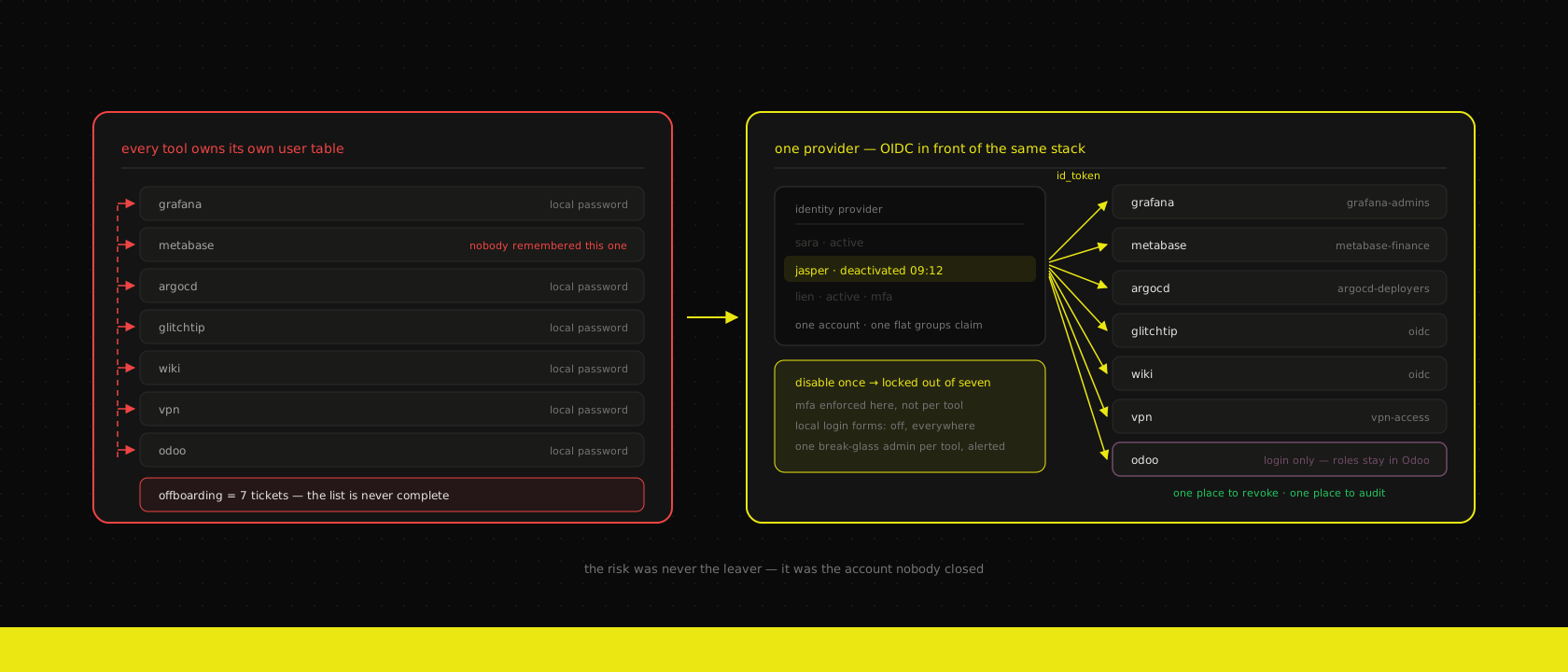
We run a lot of software on behalf of clients that nobody markets to them: Grafana, Metabase, GlitchTip, ArgoCD, a wiki, whatever internal apps we built, the VPN, and Odoo underneath all of it. Each one arrived with its own user table and its own idea of what a password policy is. Each one was set up on a different Tuesday by a different person.
That's fine right up until somebody leaves the company.
The offboarding test
Ask any client this and watch the pause: when someone hands in their notice, how many systems does someone have to go into and disable them?
The answer is never a number. It's a list somebody starts assembling out loud, and it's always missing something. HR knows about Odoo. IT knows about the VPN. Nobody thinks of Metabase, because Metabase was set up for a reporting project two years ago and it holds a copy of everything the ERP knows about revenue.
That's the actual risk, and it's worth being precise about why. It isn't that leavers turn malicious — that's rare enough to be the wrong thing to design around. It's that the account stays valid, and it's a credential sitting in a password manager on a laptop that is no longer under anyone's control, on a service with no MFA and no logins-since-March alert. It doesn't get abused by the person who left. It gets abused by whoever ends up with their reused password after an unrelated breach.
Single sign-on is usually sold on convenience — one password, fewer support tickets — and that's real but it's the small half. The reason we push it is that it turns n offboarding steps into one, and makes "who can reach production dashboards" a question with a single answer instead of eight partial ones.
Pick one protocol: OIDC, and LDAP only where you must
There are three protocols you'll meet and only one worth standardising on.
OIDC is the default. It's OAuth 2.0 with an identity layer bolted on properly, it's JSON, the tokens are inspectable, every tool released in the last decade supports it, and configuring a new client is four values and a redirect URI. Everything below assumes OIDC unless stated otherwise.
SAML you use when the tool only supports SAML. It's XML, the assertions are signed, debugging it means base64-decoding things out of a browser devtools panel, and the certificate expires in a year and takes the login page down on a Saturday. It works. It's just nobody's first choice, and it's mostly enterprise SaaS that forces it.
LDAP is not single sign-on — it's a directory that tools query for username/password verification. There's still no session being shared; every tool prompts separately, it just checks the same place. Keep it available anyway, because a handful of things in a real stack still only speak LDAP, and a provider that also exposes an LDAP outpost lets those keep working while everything modern moves to OIDC. Treat that as a compatibility shim with an end date, not part of the target design.
The important discipline: one provider, all protocols served from it. The failure mode we clean up most often isn't a bad choice of protocol — it's two identity systems, an old LDAP for the legacy tools and a new OIDC provider for the new ones, with two copies of the group memberships. That's the original problem with a nicer interface.
Which provider we actually run
All three of the serious open-source options work. They fail differently, which is the useful thing to know.
Authentik is what we default to for a client stack. The reason isn't a feature — it's that a small team can operate it. The admin interface is comprehensible, the flow builder means "require MFA for these apps only" is a change you make in the UI rather than in a realm export, the proxy outpost puts a login in front of an app that has no auth at all, and it does the LDAP outpost mentioned above. Python and Postgres underneath, which fits what we already run and back up.
Keycloak is what we run when the client is bigger or the requirements are stranger. It's the most battle-tested of the three and has the deepest support for the parts of the spec people rarely touch — fine-grained authorisation, token exchange, custom SPIs when a mapper has to do something genuinely bespoke. The cost is operational weight: more memory, more concepts, an admin console that assumes you know what a realm is. If a client already runs Keycloak, we don't migrate them for aesthetics.
Zitadel is the one we watch and have shipped once. Go, sensible multi-tenancy, an event-sourced model that makes the audit log a first-class thing rather than a table someone remembered to write to. The ecosystem is younger, so you occasionally get to be the first person to integrate something.
What doesn't distinguish them is the OIDC itself. Any of the three issues correct tokens. Choose on who has to operate it at 2 a.m. and what the group model looks like in six months.
Wiring the tools you already have
The good news, and it's genuinely good: for most of the stack this is configuration, not integration work. An afternoon gets you through the list.
Grafana wants environment variables and nothing else:
[auth.generic_oauth]
enabled = true
name = Company SSO
client_id = grafana
client_secret = $__env{GRAFANA_OIDC_SECRET}
scopes = openid profile email groups
auth_url = https://id.example.be/application/o/authorize/
token_url = https://id.example.be/application/o/token/
api_url = https://id.example.be/application/o/userinfo/
role_attribute_path = contains(groups[*], 'platform-admins') && 'Admin' || contains(groups[*], 'platform-viewers') && 'Editor' || 'Viewer'
allow_assign_grafana_admin = true

[auth]
disable_login_form = true
That last line is the one people forget, and it's the one that matters. Wiring up OIDC while leaving the local login form enabled means you've added a login method, not replaced one. The old accounts still work, the leaver's password still works, and you've bought nothing except a nicer button. Every tool in the list has an equivalent switch — disable_login_form, admin_users shrunk to one break-glass account, local signup off — and turning them off is the step that converts the work into an actual security improvement.
ArgoCD is a dex.config block or a direct oidc.config in the argocd-cm ConfigMap, plus RBAC that maps a group to a role. GlitchTip and Metabase are both a form in the admin UI with the same four values. The pattern repeats: issuer URL, client ID, secret, group claim.
Two things that will cost you an hour each if nobody warns you. Redirect URIs are exact strings — a trailing slash, http where the app builds https because it's behind an ingress that terminates TLS, or a preview hostname you forgot to register, and you get a generic invalid-request page that says nothing useful. Client secrets belong in the secret pipeline, not in the values file — ours come out of Infisical through External Secrets like everything else, because a client secret pasted into a Helm values file in git is a credential in git.
Odoo is the awkward one
Odoo supports OAuth2 through auth_oauth. It works, users land in the right place, and we've run it at several clients. But it is not a full OIDC relying party in the way Grafana is, and pretending otherwise causes a specific disappointment about three weeks in.
What you get is authentication. A user clicks the button, comes back with a token, Odoo finds or creates a res.users record. Fine.
What you don't get is authorisation. The groups in that token do not map themselves onto Odoo groups. There is no built-in "members of finance become Accounting / Billing Administrator" — that's either a small custom module reading the claim and writing groups_id, or it's a human ticking boxes in Settings → Users. We've written that module more than once, and we've also decided several times not to: Odoo's access rights and record rules are a real permission model with its own logic, and squeezing it through a flat list of IdP groups tends to produce an abstraction that's wrong in both directions.
So the line we draw, and recommend: the identity provider owns whether you can log in; Odoo owns what you can do once you're in. Deactivating someone centrally locks them out of the ERP immediately, which is the offboarding property we came for. Their group assignments inside Odoo are managed inside Odoo, by someone who understands what "Billing Administrator" implies for the journal entries.
One configuration detail worth stating outright, because it's the difference between a good setup and a fake one: set the provider so that Odoo does not auto-create users for anyone in the directory who happens to click through. An ERP login is a licensed, consequential thing. Provisioning stays deliberate; SSO changes how people authenticate, not who gets an account.
The same reasoning applies to the ERP's network position. If the backend is not on the internet at all, the browser doing the OIDC dance still has to reach both the provider and Odoo — usually meaning the provider is publicly reachable and Odoo stays behind the tunnel, with the redirect happening inside it. Worth drawing on a whiteboard before you configure anything, because it's the one part of this that isn't just filling in forms.
Groups are the hard part, not tokens
Every SSO project we've done had the same shape: two days of protocol work, then three weeks of arguing about groups. The token part is solved. The modelling part is yours.
The trap is mirroring your org chart. Groups named marketing, sales, development feel obviously correct and then don't survive contact with reality, because access doesn't follow departments. The developer on call needs Grafana admin; the rest of development doesn't. The external accountant needs one Metabase dashboard and nothing else, and doesn't belong to any department at all.
What works better is naming groups after the access they grant, scoped by system:
grafana-admins          # on-call rotation, currently 3 people
grafana-viewers         # everyone technical
metabase-finance        # incl. the external accountant
metabase-ops
argocd-deployers        # can sync; not everyone who can read
argocd-readonly
erp-users               # licensed Odoo seats — login only, roles live in Odoo
vpn-access
It's less elegant and it stays accurate, which is the trade you want. grafana-admins describes a fact you can verify; development describes an intention that drifted the moment someone changed teams. Membership can still be driven by department where that's genuinely how it works — the point is that the group's name is a claim about access, so a wrong membership is visible rather than merely implied.
Then keep the claim itself boring. One groups claim, flat, strings. Nested structures and per-application custom claims mean every tool needs a different mapper, and mappers are the thing nobody documents. And put a review in the calendar — quarterly is enough — where somebody actually reads the membership lists. SSO makes access easy to grant, which means without a review it only ever accumulates. We fold that into the care plan for clients we operate, because a review that isn't somebody's job doesn't happen.
MFA belongs here too, at the provider, once, rather than being configured tool by tool. That's most of the argument for centralising in the first place: enforcing hardware keys or app-based TOTP for the groups that reach production is one policy change, and it applies to everything behind the provider — including the tools that never supported MFA on their own. Our position on which second factors are worth enforcing hasn't changed, and having one place to enforce it is what makes it practical.
Your own apps: stop writing login pages
Everything above is off-the-shelf tools. The part that changes how we build is what it does to the applications we write.
A custom internal tool with its own users table means a login page, a password reset flow, a session store, a lockout policy, an audit trail, and a permanent low-grade obligation to keep all of that correct. None of it is the thing the client is paying for. All of it is a place to get security wrong.
With a provider in place, that whole surface goes away. The frontend redirects to the IdP and gets a token back. The API layer in front of the ERP validates it against the provider's JWKS — signature, issuer, audience, expiry — and derives the user from the claims:
const jwks = createRemoteJWKSet(new URL(`${ISSUER}/jwks/`))

export async function currentUser(token: string) {
  const { payload } = await jwtVerify(token, jwks, {
    issuer: ISSUER,
    audience: CLIENT_ID,
  })
  return {
    email: payload.email as string,
    groups: (payload.groups as string[]) ?? [],
  }
}
That's the whole thing. No password hashing, no reset emails, no "forgot password" edge case that turns out to be an account takeover. When we build internal tools on TanStack Start, authentication stops being a feature with a sprint attached and becomes a middleware.
The rule that keeps it safe: verify the token on every request, server-side, and never trust claims the client hands you. A decoded JWT in browser state is display data. The authorisation decision happens where the signature gets checked.
You just built a single point of failure
Be honest about what this changes. Before, eight tools failed independently. Now, if the identity provider is down, nobody logs into anything — including the monitoring you'd use to find out why, and including the ArgoCD you'd use to fix it.
Four things make that acceptable, and we don't consider a deployment finished without them.
Run it like production, because it is. More than one replica, a Postgres with a real failover story, and a place in the same restore drill rotation as everything else. A provider whose database has never been restored is a bet that the offboarding problem was worse than the total-lockout problem.
Keep a break-glass account per critical tool. Exactly one local admin, a long generated password in the password manager under an entry that says what it's for, MFA where the tool supports it, and an alert when it's used. This feels like it undermines the whole exercise and it doesn't — one documented, monitored exception is a different thing entirely from twelve forgotten accounts. Test it once a year, at the same time as the restore drill, because an untested break-glass account is usually a break-glass account with a stale password.
Watch it. Provider availability and certificate expiry are alerts, not dashboard panels. The failure everyone hits eventually is a signing certificate or a client secret expiring quietly, and turning that into a page a week beforehand costs ten minutes.
Write down what to do. Half a page: where the provider runs, where break-glass credentials live, who can reach them, how to bring it back. On a wiki that isn't behind the provider.
Where we don't bother
This isn't universal, and proposing it everywhere is how it gets a reputation as overhead.
We skip it when there are three or four people and two tools — the provider is then more moving parts than the problem it solves, and a password manager with shared vaults is genuinely the right answer at that size. We skip it for anything customer-facing: a storefront or portal login is a product decision about signup friction and passkeys, not an internal access question, and it wants its own design. And we don't retrofit a tool that's being decommissioned this quarter.
The threshold, in practice, is roughly: more than about five internal tools, more than about ten people, and any staff turnover at all. Below that, the offboarding checklist is short enough to actually be followed. Above it, it isn't — and the checklist quietly stops being a control and becomes a document.
If your answer to the offboarding question is a list somebody has to assemble out loud, you already know which side of that line you're on. For the custom applications we build and the stacks we host and operate, one provider in front of everything is now the starting assumption rather than a phase two — because it's an afternoon of configuration at the beginning, and a migration with a login page in it later.
Want us to publish something specific?
Tell us what you'd like to read and we'll add it to our writing queue.
Get the next one in your inbox
New articles, videos and the occasional engineering note — a short mail when there’s something worth reading, nothing else.