

The redirect map is the migration: relaunching a site without losing the traffic
The new site is faster and better looking, and three weeks later organic sessions are down a third. Nothing looks broken, because a 404 is a working page. Where the URL inventory actually comes from, why the sitemap isn't it, where redirects belong in a Next.js stack, and the rule that stops people blanket-redirecting a thousand URLs to the homepage.
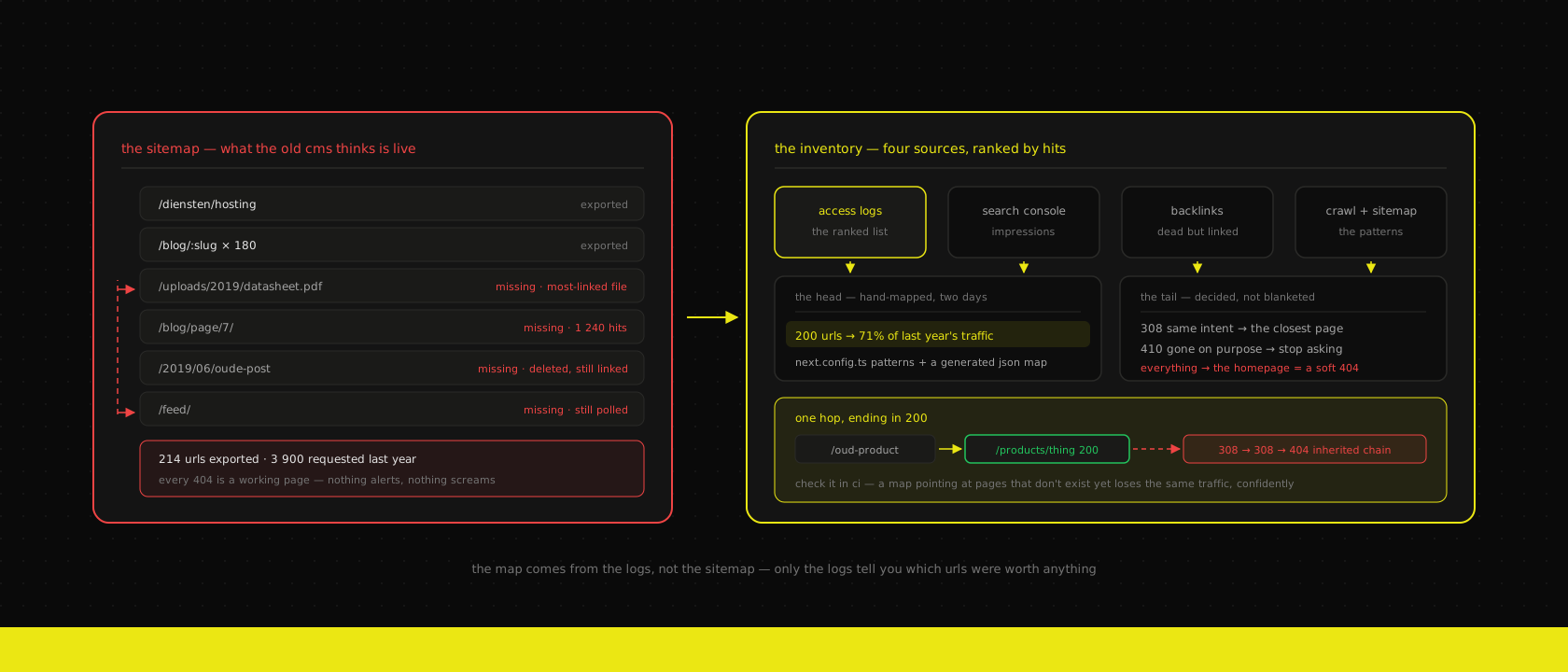
The relaunch goes live on a Tuesday. The new site is faster, the design finally matches the company, the forms work, and everyone who sees it says so. Two people check the homepage on their phone and the project is declared done.
Three weeks later somebody opens the analytics and organic sessions are down about a third. Nothing is broken. Every page you click loads. There is no error to point at, no alert that fired, no support ticket. The pages that used to bring in leads aren't slow or ugly — they're gone, and the only systems that noticed were a search engine's crawler and the people who never arrived.
We've been called in to fix this often enough to have an opinion about the order of work: a relaunch has two deliverables — the new site, and the map from the old URLs to it — and only one of them ever gets a design review.
A 404 is a working page, which is why nobody notices
This is the whole reason the failure lands late and lands hard.
When a database goes down, something screams. When a URL stops existing, the server returns a perfectly valid HTTP response, the browser renders a perfectly nice "page not found" that somebody on the team probably designed, and the request is logged as served. The site is up. Uptime monitoring is green. The person who typed that URL is gone, and they were the kind of visitor you'd have paid for.
The delay compounds it. A search engine doesn't recrawl your whole site on Tuesday afternoon; it works through it over weeks, in an order weighted by how important it thinks each page is. So the traffic doesn't fall off a cliff on launch day, which would at least be legible. It sags, gradually, starting a week or two later, at which point the relaunch is no longer top of anyone's mind and the drop gets attributed to seasonality, or the market, or the new design.
By the time it's obvious, two things have already happened that are expensive to undo. The old rankings have been reassigned to somebody else's page. And whoever links to you — the trade publication, the partner directory, the client who wrote a case study about working with you — is now linking to a dead end, which is a conversation you have to have one at a time.
Your sitemap is not the inventory
The instinct is to export the old sitemap, map those URLs to the new ones, and call it a map. It's a reasonable instinct and it produces a map that's missing most of the URLs that matter.
A sitemap lists what the old CMS believed was currently live. It does not list:
- Pages deleted two years ago that still hold inbound links from other people's sites
- Category, tag and author archives — often hundreds of them on a WordPress site nobody pruned
- Paginated URLs (
/blog/page/7/) that accumulated links from feed readers and aggregators - PDF datasheets, price lists and spec sheets under
/wp-content/uploads/, which in some businesses is the single most-linked file on the domain - Campaign landing pages built outside the CMS by whoever ran last year's ads
- Feed URLs (
/feed/,/rss,/comments/feed/) that other systems still poll - Language-prefixed variants from a translation plugin that was switched off in 2023 and left its URLs behind
None of that is in the sitemap and all of it is in your access logs. So the inventory comes from the union of four sources, not one:
| Source | What only it tells you |
|---|---|
| Server access logs, 12 months | What humans and crawlers actually requested, with a count — the only ranked list you'll get |
| Search Console | What earns impressions, including pages you forgot you had |
| Backlink data | Which dead URLs other people are still pointing at |
| A crawl of the old site + its sitemap | The structure as the CMS understands it, useful for patterns |
The logs are the load-bearing one, because they're the only source that gives you a ranking. You are not going to hand-map eight thousand URLs, and you don't need to: on a typical business site a couple of hundred URLs carry the overwhelming majority of the traffic, and the tail is archives and noise. Ranking the inventory turns an impossible task into a two-day one.
# distinct paths that returned 200 to a non-asset request, by hit count
zcat -f /var/log/nginx/access.log* \
  | awk '$9 == 200 {print $7}' \
  | sed 's/?.*//' \
  | grep -vE '\.(css|js|png|jpe?g|svg|webp|woff2?|ico|map)$' \
  | sort | uniq -c | sort -rn \
  > url-inventory.txt

head -200 url-inventory.txt   # hand-map these
wc -l url-inventory.txt       # pattern-map or measure the rest
Strip the query string for counting, but keep a second pass that doesn't — if the old site used ?p=1234 permalinks or ?lang=fr, the query string is the URL and you'll need it in a minute.
If the old site is a WordPress install you still have database access to, the wp_posts table gives you every published slug including the ones that were later unpublished, which is the cheapest way to catch the "deleted but still linked" category. That's usually one of the more useful hours in a WordPress-to-custom migration.
Build the map before you build the site
The map is treated as a launch-week task. It isn't. It's a design constraint that lands in week one, because the cheapest redirect by an enormous margin is the one you didn't need.
When a client asks whether the blog should move from /blog/my-post to /insights/2026/my-post, the honest answer is: it can, and it will cost you four thousand redirects, a permanent maintenance surface, and a small amount of ranking equity that leaks at every hop. If the reason is that "insights" tests better with the board, that's not worth it. If the reason is that the old structure genuinely can't express the new content model, fine — but decide it now, while it's a discussion, not in week eight when it's a migration.
Our default position, which we'll argue for in the kickoff and then implement whatever the client decides:
| Keep | Change only with a reason |
|---|---|
| Article and post slugs | The path prefix in front of them |
| The domain and its www/apex choice | Language prefixes |
| Deep-linked file paths (PDFs, images) | Category and taxonomy structure |
| Anything with meaningful inbound links | Anything that only exists because the old CMS made it |
The related failure mode is doing everything at once. A relaunch that changes the platform, the design, the URL structure, the content and the domain in one deploy is a relaunch where a traffic drop cannot be attributed to anything. Was it the URLs? The thinner copy on the new service pages? The domain? You will never know, and you will spend a month arguing about it. Change the URLs in one step and the domain in another, a few weeks apart, and each one gets its own before-and-after.
Where the redirects live
Three plausible homes, and they are not interchangeable.
In next.config.ts. The right place for patterns and for anything you'd want to read in a code review. Rules are declarative, they're checked before the filesystem, and they're in git.
const nextConfig: NextConfig = {
  async redirects() {
    return [
      // WordPress dated permalinks → flat blog slugs
      {
        source: "/:year(\\d{4})/:month(\\d{2})/:slug",
        destination: "/blog/:slug",
        permanent: true,
      },
      // an entire section folded into one page
      {
        source: "/diensten/:path*",
        destination: "/services",
        permanent: true,
      },
      // the old ?p=1234 permalink, which only matches on the query
      {
        source: "/",
        has: [{ type: "query", key: "p", value: "1234" }],
        destination: "/blog/odoo-on-kubernetes",
        permanent: true,
      },
    ]
  },
}
permanent: true emits a 308, which is the modern permanent redirect and keeps the request method — for a GET from a crawler or a browser it behaves exactly like the 301 everyone still calls it. Query values on the incoming request are passed through to the destination automatically, which is the behaviour you want and the one people write extra code to reimplement.
In proxy.ts. Next 16 renamed the file: what you knew as middleware.ts is now proxy.ts, exporting a function called proxy. Config redirects run before it, so the two compose in the obvious order. This is where the long tail goes — the few thousand exact-match entries that would turn next.config.ts into an unreadable phone book:
import { type NextRequest, NextResponse } from "next/server"
import redirects from "./lib/redirects.generated.json"

const map = redirects as Record<string, string>

export function proxy(request: NextRequest) {
  const { pathname } = request.nextUrl
  const destination = map[pathname] ?? map[pathname.replace(/\/$/, "")]

  if (destination) {
    return NextResponse.redirect(new URL(destination, request.url), 308)
  }

  return NextResponse.next()
}

export const config = {
  // never let this run on assets — it is per-request work on every hit
  matcher: ["/((?!_next/|favicon.ico|covers/|images/).*)"],
}
A plain object lookup is O(1) and the JSON is a few hundred kilobytes at worst; you do not need a bloom filter, a KV store or an edge database for the four thousand URLs a Belgian SME accumulated since 2014. Reach for those when the map is genuinely large or has to change without a deploy — and notice that "without a deploy" is usually a want, not a requirement.
At the ingress. Protocol and host normalisation — http → https, www → apex, old domain → new domain — belongs in front of the application, in the ingress or reverse proxy, because it's infrastructure and because doing it there costs one hop instead of two. On our Kubernetes setup that's an annotation on the ingress, not code in the app — the same boundary that keeps deployment strategy out of the application.
Our actual split, most projects: patterns in next.config.ts, exact matches in a generated JSON read by proxy.ts, host and protocol at the ingress. The generated file is committed, which means adding a redirect is a pull request with a diff and a reviewer — an audit trail rather than a mystery, and one more thing that gets exercised on a PR preview instance before it reaches production. That's the same reasoning as keeping the whole site's content in git without a CMS: the map is content, and content in git is content you can review, revert and diff.
The rules that catch the long tail
Most of the URLs you'll lose aren't lost because you forgot a page. They're lost on the boring edges.
Trailing slashes. WordPress served /about/. Your new stack probably serves /about. Pick one, set trailingSlash in the config, and make sure the map's keys match whichever you chose — otherwise every single entry misses by one character. This is far and away the most common reason a map that "was tested" catches nothing in production.
Case. Old IIS and some WordPress setups happily served /About-Us and /about-us as the same page. A case-sensitive stack 404s one of them. If the logs show mixed case with real traffic, lowercase the pathname before the lookup rather than doubling every entry.
Encoded characters. Belgian sites collect these: /diensten/beheer-én-onderhoud, French accents, a stray space encoded as %20. Normalise with decodeURIComponent on both sides when you generate the map, and test at least one of them for real, because this is the category people assume works.
Paginated archives. /blog/page/7/ should go to /blog, not to the homepage and not to a 404. There's no equivalent page seven; there is an equivalent section.
Feeds. /feed/ and /rss are still polled by aggregators and by people's readers years later. Point them at your actual feed — ours is /feed.xml — rather than letting them die quietly.
Uploads. /wp-content/uploads/2019/06/datasheet.pdf is often the most-linked URL on an industrial company's domain, and it will not be in anyone's sitemap. If those files move to object storage or a CDN as part of the relaunch, that move is a redirect too — the same boundary we describe in media on the CDN, code on the origin. Keep the old paths resolving.
Language prefixes. If a translation plugin left /nl/ and /fr/ behind, or if the new site introduces them, that's a structural change to every URL at once and deserves its own pass rather than being folded in — see the multilingual stack for what that decision actually costs.
Redirect to the closest equivalent, or don't redirect at all
Here is the request we get most often and refuse most consistently: "just point everything that doesn't exist any more at the homepage."
It sounds harmless. It's worse than doing nothing. A search engine that follows a redirect and finds a page with no relationship to the one it asked for treats it as a soft 404 — the redirect is discounted, no equity transfers, and you've spent your one signal. The visitor gets it worse: someone who clicked a link about barcode scanning in a warehouse lands on your homepage, has no idea why, and leaves. A 404 page with a search box and a link to the relevant section is genuinely more useful than a homepage redirect, because at least it tells the truth.
The rule we apply per URL, in order:
- Same content, new address → redirect to it. This is most of the map.
- No exact equivalent, but a page that serves the same intent → redirect to that. The old product page for a discontinued model goes to the category, not the homepage.
- Nothing serves that intent any more → do not redirect. Return a status that says so.
For that third case, 410 Gone is the right answer and almost nobody uses it. A 404 means "not found, maybe try again later"; a 410 means "this is gone deliberately, stop asking." For the six hundred tag archives you removed on purpose, a 410 gets them out of the index faster and keeps your crawl budget on pages you care about. It's a deliberate signal, and being deliberate is the whole point.
The one place we do accept a wholesale redirect is a section that genuinely collapsed into one page — an old six-page /diensten/* tree that is now a single services overview. That's rule 2 applied to a directory, not a blanket rule applied to everything.
Chains, loops, and the hops you forgot
Every hop loses a little, and hops compound quietly because each rule was added by a different person for a different good reason.
A request for http://www.example.be/diensten/hosting/ on a badly assembled setup goes: HTTP to HTTPS, www to apex, trailing slash stripped, then the path redirect. Four round trips before anything renders, on a mobile connection, before the Core Web Vitals work even starts to matter. Collapse them: the ingress should do protocol and host in one response, and the application map should redirect straight to the final destination.
The subtler version: the old site already had redirects of its own. If you build the new map from the old site's routing table rather than from what actually resolves, you'll faithfully reproduce chains that existed for years — /oud-product → /product → /products/thing — except now the middle hop doesn't exist, so the first entry 404s. Every entry in the map must point at a URL that returns 200 on the new site, in one hop.
That's a test, not a discipline, and it belongs in CI next to the rest of the pipeline:
import redirects from "../apps/web/lib/redirects.generated.json"

const base = process.env.CHECK_BASE_URL ?? "http://localhost:3000"
const failures: string[] = []

for (const [source, destination] of Object.entries(redirects)) {
  const hop = await fetch(base + source, { redirect: "manual" })

  if (hop.status !== 308) {
    failures.push(`${source} → ${hop.status}, expected 308`)
    continue
  }

  const location = hop.headers.get("location") ?? ""
  if (new URL(location, base).pathname !== destination) {
    failures.push(`${source} → ${location}, expected ${destination}`)
    continue
  }

  // the destination itself must be final, not another redirect
  const final = await fetch(new URL(location, base), { redirect: "manual" })
  if (final.status !== 200) {
    failures.push(`${destination} → ${final.status}, expected 200`)
  }
}

if (failures.length) {
  console.error(failures.join("\n"))
  process.exit(1)
}
Run it against the PR preview before launch and against production after. It catches the loop somebody introduces in month four when they redirect /contact to /contact-us without noticing there's already a rule going the other way — which is a genuinely fun outage to debug at 9 a.m. and takes four minutes to prevent.
Launch day is a measurement day
The map ships with the site. Not the week after, not "once we see what breaks," because the window in which the damage happens is the crawl window and it opens the moment you deploy.
Then you watch, and there are three things worth watching for six weeks:
The 404 rate, from your own logs. This is the fast signal — same afternoon, not next month. If it steps up at deploy time, something in the map missed. Ours goes into the same place as everything else we look at, because a dashboard for one thing is a dashboard nobody opens.
awk '$9 == 404 {print $7}' /var/log/nginx/access.log \
  | sed 's/?.*//' | sort | uniq -c | sort -rn | head -40
Search Console's not-found report. Slower — days to weeks — but it's the only view of what the crawler is finding rather than what visitors are. Expect the number to rise before it falls; that's the crawler working through the old inventory, and it's not, by itself, evidence of a mistake.
A human, once a week. Somebody opens that top-40 list and asks whether each entry deserves a rule. The automated map catches everything you predicted. The log catches the campaign landing page from 2022 that nobody remembered, and there is always one.
Six weeks of that and the list goes quiet. Then leave the redirects in place — permanently, in practice. They're a few hundred kilobytes of JSON in a repo; the cost of keeping them is nothing, and the cost of removing them in 2029 is a link somebody wrote in a PDF that nobody can edit.
Where we push back
"Redirect everything to the homepage." Covered above. We'll do rule 2 for a collapsed section; we won't do it for the whole tail.
"We'll add redirects after launch, once we see what breaks." The thing that breaks is invisible and the clock starts at deploy. This one comes from a reasonable place — nobody wants to spend two days mapping URLs before the design is signed off — so the compromise we offer is real: hand-map the ranked top two hundred before launch, ship the patterns, and treat the tail as the launch-week job it genuinely is.
"Can we keep the old site running on a subdomain, just in case?" Then you have two sites serving the same content, competing for the same queries, and a URL people will start linking to. If you need a rollback plan, make it a deploy you can revert, not a second live site.
"Can we move the domain at the same time?" You can. Don't. Two changes, two windows, two clean measurements.
"Do we need an SEO agency for this?" For the strategy, sometimes. For the map, no — it's an inventory problem and an infrastructure problem, and the people who should build it are the people who know where the redirects execute. What we won't do is accept a spreadsheet of five thousand rows from a third party and implement it without running the one-hop check over it first, because roughly a tenth of those rows will point at a page that doesn't exist yet.
The short version
A relaunch doesn't lose traffic because the new site is worse. It loses traffic because a few hundred addresses that people and crawlers had memorised stopped resolving, and nothing in the building was watching the one signal that would have said so.
The map is built from logs, not from the sitemap, because only the logs tell you which URLs were worth anything. It's ranked, because you'll hand-map the head and pattern-map the tail. It's decided in week one, because the cheapest redirect is the URL you left alone. It lives in git, because it's a thing people will need to review and revert. And it's tested — one hop, ending in a 200 — because a map that points at pages which no longer exist is a more confident way of losing the same traffic.
If you're planning a relaunch, the useful question to ask in the first meeting isn't what the new site looks like. It's who is producing the URL inventory, and from what. If the answer is "we'll export the sitemap," you've found the gap while it's still cheap. That inventory is a standing step in the custom web applications and WordPress and WooCommerce work we do, and the redirects themselves end up in the same repo and the same pipeline as everything else we host and run — because a redirect map is not a launch task you finish. It's part of the site.
Want us to publish something specific?
Tell us what you'd like to read and we'll add it to our writing queue.
Get the next one in your inbox
New articles, videos and the occasional engineering note — a short mail when there’s something worth reading, nothing else.