

The tab had been open since Tuesday: what a deploy does to a client already running
Everybody who loaded the dispatch board after the 14:20 deploy was fine. The two people who hadn't reloaded since Tuesday morning got a white screen and a save that silently didn't happen. Version skew, why lazily loaded code is the fuse, what `deploymentId` actually fixes, and why the reload was never the hard part.
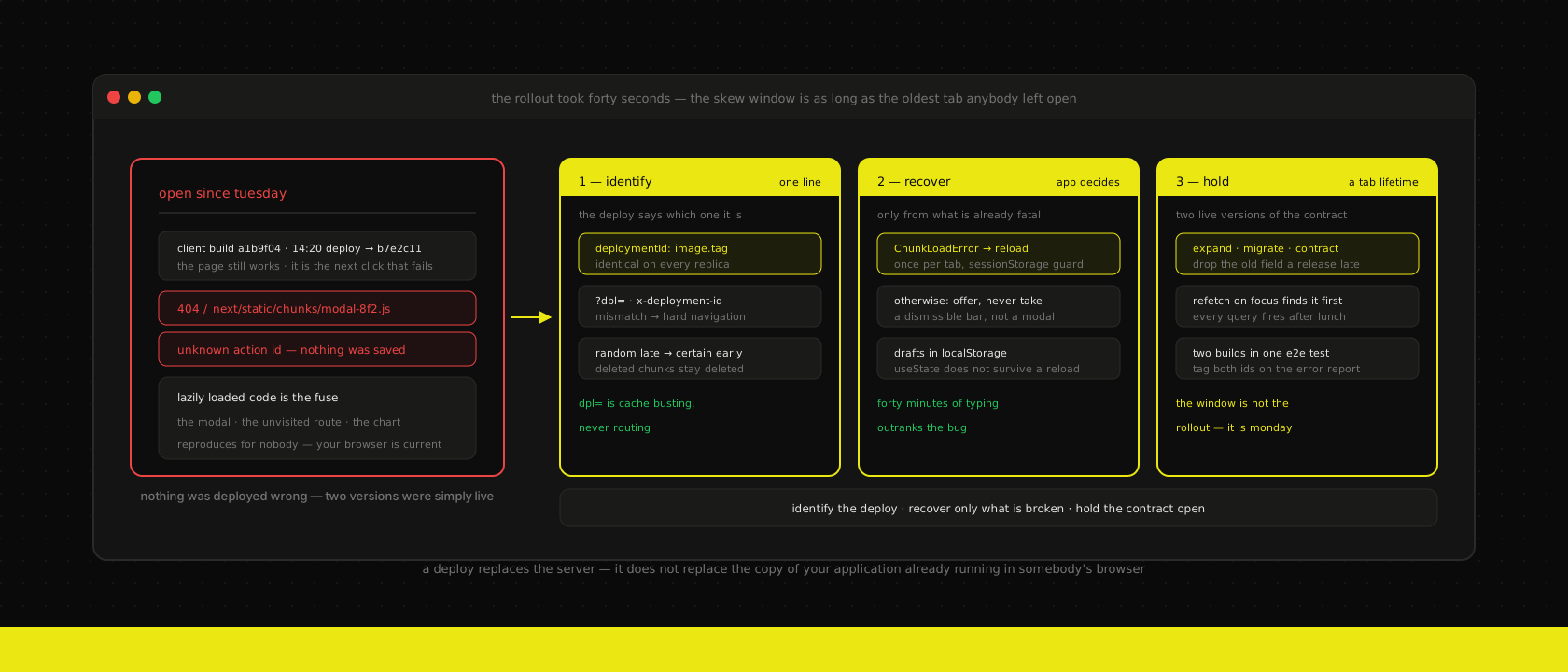
The deploy went out at 14:20 on a Thursday and it was a label on a button. Rollout took forty seconds, the probes went green, the pipeline went green, and nobody thought about it again.
At 15:05 the client's planner sent a screenshot of a white page with one apologetic sentence on it. At 16:40 a colleague sent a different screenshot: a form they had filled in, a spinner, and then nothing — no error, and the record unchanged when they went back to check. Everybody who opened the dispatch board after 14:20 was fine. Both of the people who weren't fine had had the tab open since Tuesday morning, on a second monitor, the way you do with a tool you live in all day.
Neither of us could reproduce it, because by the time we looked our own browsers had the new bundle. The deploy wasn't the bug and the one-line change wasn't the bug. The bug was that for the length of a working day there were two versions of that application running, and one of them was in somebody's browser.
The client is a version too
We talk about deployments as though the application were the server. Old pods drain, new pods take over, the rollout is a forty-second event with a start and an end. For the request-and-response half of a website that is entirely true, and it is why rolling updates are the right boring default for most business apps.
It stops being true the moment part of your application is a long-lived process running in a browser. After the first client-side navigation, a React app is not fetching pages any more — it is a program, loaded from a build you shipped at some point in the past, making requests against a server running a build you shipped four minutes ago. That gap has a name in the Next.js docs, and it is worth using because it names the thing precisely: version skew.
The important number is not how long the rollout takes. It is how long the oldest live client has been running. On a marketing site that is a couple of minutes, because visitors arrive, read and leave. On an internal tool — a dispatch board, a planning grid, an ERP front-end somebody has open for eight hours — the skew window is a working day. Over a weekend it is three days. Nobody closes tabs.
Four things break in that window, and they are not equally visible:
| The old client does this | The new server answers | The user sees |
|---|---|---|
| Requests a JS chunk by its hashed filename | 404 — that filename only ever existed in the old build | A white screen, usually the moment they open something they hadn't opened yet |
| Invokes a Server Function by its build-scoped id | An id it has never heard of | "Something went wrong." Nothing was saved |
| Asks for the route payload for a soft navigation | A payload the old client can't apply | A dead click, or a full reload that eats the form |
| Calls an API whose response shape moved | 200, with a field renamed | undefined is not an object, in a component that has been fine for a year |
Row two is the expensive one. A white screen is unmistakable and someone reports it. A mutation that fails while looking like it worked is how a planner reassigns a job, walks away, and finds out on Monday that they didn't.
Lazily loaded code is the fuse
Here is the part that makes this class of bug feel haunted: the deploy does not break the page. The page is already parsed, already in memory, and it keeps working perfectly. What breaks is the next thing the user asks for that hadn't been downloaded yet.
Which is, by construction, everything you were careful to split out — the route they hadn't visited, the modal behind a rare button, the lazily loaded chart, the heavy scene you deliberately kept off the critical path. Code splitting is the correct thing to do and it is also the mechanism that converts a forty-second rollout into a delayed fuse burning in every open tab, pointed at exactly the interactions with the least test coverage and often the most business weight.
So the failure arrives minutes or hours after the deploy, on a screen nobody was touching at 14:20, and it is gone by the time you investigate. ChunkLoadError is the least useful error class in front-end engineering for precisely this reason: it reproduces for nobody, and the stack trace points at a loader, not at a cause.
The instinct is to treat it as a front-end bug and wrap something in a try. It isn't one. It's a deployment property, and it wants a deployment answer.
deploymentId makes it deterministic, which is most of the fix
Next.js has a built-in mechanism for this and it is one config line. Give the build an identity, and the client and the server can notice they disagree:
const nextConfig: NextConfig = {
  output: "standalone",
  // Same value for every replica of one deploy, different for the next one.
  // The image tag is the honest source: it is what GitOps actually rolled out.
  deploymentId: process.env.DEPLOYMENT_ID,
}
With that set, Next does five things. It appends ?dpl=<id> to static asset URLs, sends an x-deployment-id header on client-side navigation and Server Function requests, returns x-nextjs-deployment-id on navigation responses, writes a data-dpl-id attribute onto the <html> element, and folds the id into the 'use cache' key. When the client sees a response id that isn't its own, it stops doing a soft navigation and performs a hard one — a real page load, against one consistent version.
That is a genuine upgrade, and it is worth being precise about what kind. It does not make the old chunks exist again. Nothing about dpl= resurrects a deleted file. What it buys you is that a skewed client fails deterministically, early, and in a recoverable way — a full reload — instead of randomly, late, and in whatever state the component happened to be in. Determinism is the thing you can build on.
Two details that are easy to get wrong, both worth knowing before you ship it:
- Next does not read
?dpl=on the way in. The query parameter is cache busting for browsers and CDNs, not version-aware routing. If you want a request for build A's assets to be served build A's assets, that is a routing problem for your ingress or your CDN, and nothing in the framework does it for you. - The id belongs to the deploy, not the build. All replicas of one rollout must carry the same value, or your pods will disagree with each other and every navigation becomes a hard reload. In our clusters it comes from the same image tag the deployment references, which means one value per rollout by construction:
env:
  - name: DEPLOYMENT_ID
    value: {{ .Values.image.tag | quote }}   # git sha, never "latest"
  # Baked in at build time so the browser can be asked what it is running.
  - name: NEXT_PUBLIC_BUILD_ID
    value: {{ .Values.image.tag | quote }}
One non-cost worth mentioning, since it looks like one: the 'use cache' key already includes the build id, so cached entries never survive a deploy anyway. Configuring deploymentId overrides the build id in that key rather than adding a new invalidation — you are not trading cache warmth for skew protection.
Keeping the old assets alive is a retention decision, and we mostly decline it
The 404 is not mysterious. Every build emits a fresh set of content-hashed filenames, each pod ships only its own, and a rolling update deletes the pods that held the previous set. The chunk is gone because the thing that had it is gone.
There are three ways to keep it around, and we have costed all of them:
Keep the old environment up. Blue-green does this for free: the previous environment stays warm and intact until you tear it down, which means the old assets are still being served by something. It is the only approach that needs no new machinery — but it also means paying for two environments, and we run that pattern for major version cutovers, not for a button label.
Serve /_next/static from shared storage with retention. Put an assetPrefix in front of a bucket that holds the last N builds and the chunk survives the pod that made it. This is also where you land straight back in an argument we have already had with ourselves and lost: we keep code on the origin and media on the CDN, specifically because a CDN in front of your JavaScript makes rollback an asynchronous purge against a vendor's control plane, on the critical path of an incident.
Bake the previous build's static output into the new image. COPY --from=<previous tag> genuinely works. It also buys you exactly one build of runway, adds a build-time dependency on the last image's existence, and does nothing whatsoever for the other three rows of that table.
So our position, on the stacks we host: don't chase asset retention. It solves the loudest failure and the cheapest one to recover from, and leaves the silent save untouched. Spend the effort on making skew detectable and survivable instead — and if you do want retention, get it as a side effect of a deploy strategy you already wanted, not as a bespoke asset pipeline.
The reload was never the hard part. The unsaved form was.
This is where we part company with most advice on the subject, which ends at "detect the new version and reload."
Reloading is trivial. The Next.js docs even flag the consequence in passing, and it deserves to be the headline rather than a footnote: a hard navigation loses component state. useState is gone. URL state and localStorage survive. Everything a person typed in the last forty minutes and hasn't submitted is in the first category.
An automatic reload is therefore not a neutral recovery action. It is a data-loss event with a good excuse, and the people it hits hardest are the ones using the application most seriously — the long form, the multi-step intake, the price calculation with fourteen fields. Shipping a version check that force-reloads every open tab is how you take a rare, quiet bug and convert it into a reliable, loud one that fires on every deploy.
So we split the decision in two, and we are strict about which half belongs to whom:
- The application decides whether a reload is safe — is there unsaved input in the tree, is a mutation in flight, is the user mid-flow.
- The user decides whether it happens now — unless the app is already broken, in which case there is nothing left to lose and reloading is the only move available.
In practice that is a small amount of code in two places. First, the boundary that recovers from the failure that is already fatal — with a guard, because an unconditional reload on a genuinely broken deploy is a reload loop:
"use client"

import { useEffect } from "react"

/** A missing chunk is a skew symptom, not a bug in this page. */
function isStaleBuildError(error: Error): boolean {
  return (
    error.name === "ChunkLoadError" ||
    /Loading (CSS )?chunk|dynamically imported module|Importing a module script failed/i.test(
      error.message
    )
  )
}

export default function ErrorPage({ error, reset }: { error: Error; reset: () => void }) {
  useEffect(() => {
    if (!isStaleBuildError(error)) return
    // sessionStorage, not localStorage: the guard should expire with the tab,
    // so tomorrow's deploy gets its one attempt too. Without it, a build that
    // is genuinely missing a chunk reloads this tab forever.
    if (sessionStorage.getItem("reloaded-for-stale-build")) return
    sessionStorage.setItem("reloaded-for-stale-build", "1")
    location.reload()
  }, [error])

  // …the normal error UI, for every other error
}
Second, the polite version, for tabs that are skewed but still working. Ask the server what it is running, compare, and then get out of the way:
"use client"

import { useEffect, useState } from "react"

const OURS = process.env.NEXT_PUBLIC_BUILD_ID

/**
 * Deliberately not read from `document.documentElement.dataset.dplId`: Next
 * injects that attribute and then deletes it during hydration, so reading it
 * from app code is a race we would lose intermittently. A build-time public
 * env var is boring and always there.
 */
export function useNewVersion(intervalMs = 5 * 60_000): boolean {
  const [stale, setStale] = useState(false)

  useEffect(() => {
    if (!OURS) return
    let cancelled = false

    async function check() {
      // Only while the tab is actually in front of someone — a laptop lid
      // closed for a week should not have been polling all week.
      if (document.visibilityState !== "visible") return
      try {
        const res = await fetch("/api/version", { cache: "no-store" })
        const { id } = await res.json()
        if (!cancelled && id && id !== OURS) setStale(true)
      } catch {
        // Offline, or mid-rollout. Not an error worth telling anyone about.
      }
    }

    const timer = setInterval(check, intervalMs)
    document.addEventListener("visibilitychange", check)
    check()
    return () => {
      cancelled = true
      clearInterval(timer)
      document.removeEventListener("visibilitychange", check)
    }
  }, [intervalMs])

  return stale
}
The route it polls is three lines, and it is one of the rare cases where being statically generated is exactly right — the value is baked in at build time, so whichever pod answers tells you the truth about that pod's build:
export function GET() {
  return Response.json({ id: process.env.NEXT_PUBLIC_BUILD_ID ?? null })
}
What that flag drives is a bar, not a modal: one line, dismissible, "A new version is available — reload to get it." Two rules we have settled on after getting both wrong at least once. It never blocks the page, because a banner that interrupts work gets clicked away reflexively and teaches people to ignore the next one. And it does not reload on navigation behind the user's back — a soft navigation to a route whose chunk is missing will hit the error boundary above anyway, which is the same reload arriving honestly, at a moment the user caused.
If you want the belt-and-braces version, the real safety net is not the banner. It is that the form survives the reload at all: draft state in localStorage, keyed by record, written on change and cleared on successful submit. Thirty lines, and it turns every remaining variant of this problem — skew, crash, closed laptop, a mis-hit keyboard shortcut — from an incident into a shrug.
For a working day, your API has two live versions
Everything above is about code and assets. The quieter half of skew is data shape, and it behaves exactly like a schema migration one layer up.
If release N+1 renames a response field, every client still running release N is calling a contract that no longer exists — and it will not be your code that notices first. It'll be a refetch. A tab returning to the foreground after lunch fires every query it has, all at once, which means the first thing a returning user sees is every screen revalidating against the new shape simultaneously. A component that has worked for a year throws on a field it has always had.
The discipline is the one we already apply to databases: expand, migrate, contract, with the contract step one release later than feels necessary. Add the new field, write both for a release, stop reading the old one, and only then remove it. The window you need to hold open is not "until the deploy finishes" — it is the longest plausible tab lifetime, which for an internal tool means "until Monday."
This is also the single strongest day-to-day argument for a typed API layer in front of the ERP rather than each client talking to it directly. One service owns the contract, so the compatibility window is a decision somebody makes in one place, in a pull request, with a note about when the old field goes. Three clients each holding their own copy of the ERP's API surface means three overlapping windows and no one tracking any of them.
How we actually catch this
Honestly: not with a unit test. Version skew has no single-build representation, so the test has to involve two builds, which makes it the least elegant thing in the suite and one of the more valuable.
The shape that works is a Playwright spec that loads the app against build A, swaps the server underneath it for build B, and then asks the page to do something it hasn't done yet:
test("a stale tab recovers instead of white-screening", async ({ page }) => {
  await page.goto("/")                       // build A is in the browser now
  await swapServerTo(buildB)                 // rolling update, in effect

  // A route whose chunk was never downloaded: the fuse.
  await page.getByRole("link", { name: "Projects" }).click()

  await expect(page.getByRole("heading", { name: /projects/i })).toBeVisible()
  expect(await page.evaluate(() => sessionStorage.getItem("reloaded-for-stale-build"))).toBe("1")
})
It is slow, it needs two artefacts, and it earns its place because it is the only check that can fail for the right reason. Like the functional e2e suite that finally caught a bug lint and typecheck had both waved through, the value is in exercising a path that only exists when something is actually running.
There is also a manual version that costs nothing and catches most of it. Before a Friday afternoon deploy, have a tab open from that morning, deploy, and then click the five things — open a modal, submit a form, navigate to a route you haven't visited. If the answer is a white screen, you found it in front of your own browser rather than in a screenshot from a planner.
And instrument the symptom, because it is cheap and specific: report chunk-load failures and unknown-Server-Function errors to the error tracker tagged with the client's build id and the server's. A spike shaped like a deploy, twenty minutes after every deploy, is not ambiguous — and it is the one signal that survives the fact that nobody can reproduce it.
What we don't do
Force every tab to reload on deploy. It makes each deploy a small outage, and teams respond to that by deploying less often and batching more into each one — which makes every deploy riskier. The whole point of merging small changes through a fast pipeline is that the changes stay small.
Reach for a service worker. A service worker does give you real control over which build a client is running, and if you already have one because the storefront needs to work on a bad connection, use it. Installing one purely for version control adds a second versioned artefact with its own skew semantics and its own lifecycle bugs, and that trade is bad unless offline was already a requirement.
Pin clients to their original build indefinitely. Version-aware routing sounds appealing until you notice you have just committed to running every build anyone still has open, including the one with the security fix in it. A bounded window with a graceful reload at the end is the better shape.
The short version
A deploy does not only replace the server. It leaves every browser that was already running your application holding a version you have stopped serving, and it does that for as long as the longest-lived tab — a working day in an internal tool, a weekend if you ship on a Friday.
- Set
deploymentIdfrom the image tag, identically across every replica of a rollout. It converts a random late failure into a deterministic early one. It does not bring deleted chunks back. - Expect the fuse to be lazily loaded code — the modal, the unvisited route, the chart. That is why it never reproduces and why it lands on the interactions you test least.
- Recover automatically only from the failure that is already fatal, once per tab, guarded in
sessionStorage. Offer the reload the rest of the time; never take it. - Persist drafts. A reload that loses forty minutes of typing is a worse outcome than the bug you reloaded to fix.
- Treat response shapes as expand-and-contract, with the contract step a release late — the compatibility window is a tab lifetime, not a rollout.
- Test it with two builds, and instrument chunk failures with both build ids. A twenty-minutes-after-every-deploy shape is the whole diagnosis.
None of it is difficult. It is one config value, one error boundary, one polling hook and a decision about who gets to press reload — maybe a day, most of which is the test. What it buys is that the next deploy stops being something the people who use your application most are quietly punished for. We build the custom applications that get left open all day, run the clusters they roll out on, and maintain the ERP behind them — and version skew is one of the few bugs where the fix is genuinely finished once, rather than being a thing you get better at noticing.
Want us to publish something specific?
Tell us what you'd like to read and we'll add it to our writing queue.
Get the next one in your inbox
New articles, videos and the occasional engineering note — a short mail when there’s something worth reading, nothing else.