

The version you can't take back: releasing a React Native app when the store is in the middle
The fix took forty minutes and a quarter of your users still hit the bug three weeks later, because a mobile release is a copy on somebody else's device. What over-the-air updates genuinely replace, the minimum-version gate you have to ship in v1 or never, why your API is permanently multi-version, and the autumn maintenance window nobody schedules.
A technician opens a job on Monday morning, signs it off, and the signature doesn't attach. It's a two-line bug — a race between the photo upload finishing and the form submitting — and it takes forty minutes to find and fix. On the web that would be the whole story: merged before lunch, deployed after it, and by two o'clock nobody in the field can reproduce it any more.
This one is a React Native app. The fix went out that afternoon. Three weeks later, roughly a fifth of the technicians were still on the broken build, still losing signatures, and the client — reasonably — kept asking why a bug we'd fixed in August was still generating support calls in September.
Nothing went wrong in that story. That is the mechanism. And the mistake wasn't in the fix or the release; it was six months earlier, in an architecture that quietly assumed a mobile app behaves like a website.
Deploy and release stopped being the same word
Everything about how we work on the web collapses those two into one action. You merge, the pipeline builds, the deploy strategy decides how the switch happens, and within a few minutes every human being using the product is on the new code. Rollback is the same mechanism run backwards. It's so reliable that most teams have stopped noticing it's a property of the platform rather than a law of nature.
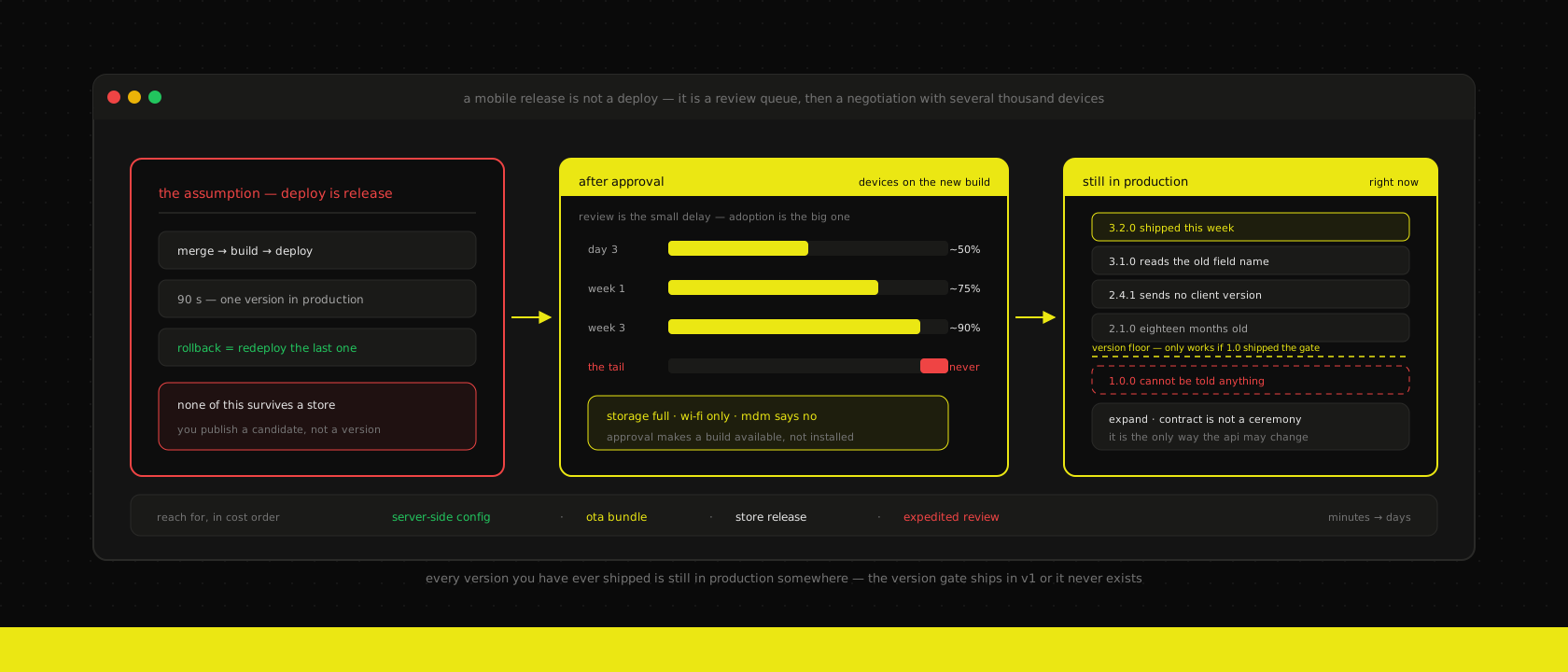
A mobile release is a different object. You do not deploy an app. You publish a candidate, and then two independent systems decide when — and whether — it reaches anyone:
Review. Apple's own published figure is that the large majority of submissions are reviewed inside a day, and in practice that's what we see. It is not, however, a guarantee, and the variance is what hurts: the resubmission that clears in three hours four times in a row is the one that sits for two days when you actually need it. Google Play is usually fast for an established app on an established account and can be considerably slower for a first release or after a policy flag. Both stores have an expedited path. Both treat it as a favour, not a feature, and you get to use it about twice a year before it stops working.
Adoption. This is the part that surprises clients, and it's much bigger than review. Approval doesn't put the build on a phone; it makes the build available. Auto-update is on by default on both platforms and it is neither instant nor universal. Devices update on Wi-Fi, on charge, on their own schedule. Storage-full phones silently stop updating and stay that way for months. Corporate fleets under an MDM update when the MDM says so, which is sometimes never. On the fleets we run, the shape is consistent enough to plan against: about half of active devices within three days, roughly nine in ten within two to three weeks, and a tail of a few percent that simply never converges until the app stops working for them.
So the honest framing, and the one we now put in front of clients before we write any code:
Your web app has one version in production. Your mobile app has every version you have ever shipped in production, simultaneously, and you control none of them.
Everything below is a consequence of that sentence.
Your API is permanently multi-version
This is the expensive one, and it's expensive because it's structural rather than occasional.
We've written before about expand, backfill, contract — the discipline that gets a schema change past a rolling deploy where two versions of the app are briefly live at once. On the web, "briefly" is ninety seconds and the technique is a per-migration ceremony you perform and then forget.
Put a mobile client in front of that same backend and the window stops closing. Two versions live for ninety seconds becomes eight versions live for eighteen months. Expand-contract stops being a technique you reach for and becomes the only way you are allowed to change the API, permanently.
What that means concretely, at the contract layer — for us usually a NestJS service in front of Odoo rather than Odoo's own endpoints exposed directly, precisely because it gives us somewhere to put the compatibility:
| Change | Safe for old clients? | What we do instead |
|---|---|---|
| Add an optional response field | Yes | Ship it. Old clients ignore it. |
| Add a required request field | No | Optional with a server-side default, required only once the floor moves |
| Rename a field | No | Emit both, for as long as any supported version reads the old one |
| Change a field's type or units | No — and it fails silently | New field name. Never repurpose. |
| Tighten validation | No | Enforce for clients above a version, log violations below it |
| Remove an endpoint | No | Keep it answering until the version floor passes it |
The row worth staring at is "change a field's type or units". Every other bad row produces an error, and an error is a thing you can see. Turning weight from kilograms into grams, or a total from a number into a formatted string, produces an app that keeps working and is wrong — a warehouse showing quantities off by a factor of a thousand, a scanning workflow that cheerfully books nonsense, and not a single error anywhere to point at. Renaming is free. Take the free option.
The mechanical part is easy and worth doing on day one: every request from the app carries its version, and the backend logs it.
// The app sets this on every request; the value is the store build,
// not the OTA bundle — see the runtime-version section below.
const raw = request.header("x-app-version") ?? "unknown"

// Log it on every request. The point is not this request; the point is
// being able to answer "who is still on 2.3?" in one query, at any time.
metrics.increment("api.request", { clientVersion: raw, route })

if (isBelowFloor(raw)) {
  // 426 is the one HTTP status that means exactly this
  throw new HttpException({ code: "UPGRADE_REQUIRED" }, 426)
}
Without that log, "which versions are still out there?" is a question you answer with a store dashboard that reports installs rather than usage, which is the wrong number. With it, dropping compatibility code becomes a decision you make from data instead of from hope. It goes to the same place as the rest of our metrics, because a number nobody has a dashboard for is a number nobody checks.
What over-the-air updates actually give you back
React Native's real operational advantage over a fully native build isn't the shared codebase — that's the commercial argument. It's that most of your application is JavaScript, and JavaScript can be replaced without the store's involvement.
With Expo, that's EAS Update; the same idea predates it under other names. You publish a new JS bundle and its assets, the app checks for one at launch, downloads it in the background, and runs it next time it starts. Minutes rather than days, and no review queue.
It is genuinely transformative for the class of bug that makes up most of what you'll actually ship: a wrong label, a broken validation rule, a race between an upload and a submit, a screen that crashes on an edge case in the data. All of that is JavaScript. All of that can be out inside an hour.
What it cannot touch is anything native, and the boundary is sharper than people expect:
- Adding a library with a native module — a new camera, a Bluetooth printer, a payment SDK
- Anything that changes permissions or the strings shown in the permission prompts
- App icon, splash screen, display name, deep-link and URL-scheme configuration
- Upgrading the Expo SDK or React Native itself
- Anything in the native project's build configuration
Those need a build, and a build needs the store.
And there is a policy boundary on top of the technical one. Both stores permit an app to download and run interpreted code — Apple's review guidelines carve out exactly this case, and Google Play's device-and-network-abuse policy has an equivalent exception for interpreted languages. The condition in both is the same and it's not subtle: the update has to be consistent with what the app was reviewed and advertised to do. Fixing a bug, adjusting copy, correcting a layout — squarely inside. Shipping a new revenue stream, a new content category or a feature you expected to be rejected — outside, and the consequence isn't a rejected build but an account problem, which is a much worse morning.
We use OTA for fixes and small changes. Features go through review. That's not caution for its own sake; it's that the store relationship is the single asset in this stack we can't rebuild ourselves.
The runtime version is the whole safety mechanism
Here is the failure that turns OTA from an advantage into an outage, and it's worth being blunt about because it's the one people discover in production.
A JS bundle is compiled against the native code inside a particular binary. Push a bundle that calls a native module to a binary that doesn't contain it, and the app doesn't degrade — it crashes at launch, on every device that received the update, with no working screen from which the user could possibly recover. You have bricked an install remotely, and the fix has to travel through the same channel that broke it.
runtimeVersion is what prevents that. It's a fingerprint of the native layer; an update only ever reaches a binary with a matching one. Set it by policy rather than by hand, so that changing a native dependency changes the fingerprint whether or not anyone remembered:
{
  "expo": {
    "runtimeVersion": { "policy": "fingerprint" },
    "updates": {
      "url": "https://u.expo.dev/<project-id>",
      "fallbackToCacheTimeout": 0
    }
  }
}{
"build": {
"preview": { "channel": "preview", "distribution": "internal" },
"production": { "channel": "production", "autoIncrement": true }
}
}Two rules we hold to, both learned the boring way:
Every OTA update goes to preview first and is opened on a real device. An OTA push is a deploy straight to production with no canary and no gradual rollout, which makes it the least protected release channel you own. Our web work gets a preview instance per pull request; the mobile equivalent is an internal-distribution build on the same channel, and it costs about ninety seconds.
Rollback is republishing the previous bundle, and it must be a runbook, not a memory. This is the one place where mobile behaves like the web, and it's worth protecting. Whoever is on call should be able to roll back an OTA update without reading documentation.
The kill switch you cannot add later
Sooner or later some version out there has to stop working. A security fix. A backend change you genuinely cannot make compatible. A payment provider deprecating an SDK on a schedule that isn't yours.
The mechanism is simple: at launch, the app asks the server whether its version is still supported, and the server answers. Recommended, or required.
The part that matters is the timing. A version gate only protects versions that shipped with it. If 1.0 has no gate, 1.0 can never be told anything — it will keep hitting your API on some technician's phone in 2029, and your only options are to keep supporting it forever or to break it without warning. It costs an afternoon in v1 and it cannot be retrofitted at any price.
type Gate = { minimum: string; recommended: string; message: string }

const gate: Gate = await fetch(`${API}/v1/app/gate`, {
  headers: { "x-app-version": nativeApplicationVersion },
}).then((r) => r.json())

if (semverLt(nativeApplicationVersion, gate.minimum)) {
  // Hard block: the app cannot function, so say so and link to the store.
  return <BlockingUpdateScreen message={gate.message} />
}

if (semverLt(nativeApplicationVersion, gate.recommended)) {
  // Soft nudge: dismissible, and it stays dismissed for a week.
  showUpdateBanner(gate.message)
}
The values live in server config, not in a build. That's the entire point: the lever has to be pullable without a release, because the situation in which you need it is exactly the situation in which you can't ship one.
We reach for the hard block rarely — a blocked app is a worker who can't do their job, and if that worker is a technician on a roof then the cure can genuinely be worse than the bug. The soft nudge does most of the work, and it does noticeably more of it than the store's own auto-update, because it's a person deciding rather than a background process waiting for Wi-Fi.
Which lever, for which bug
By the time something is broken in production, the useful question is not "how do we fix it" but "which of the four release channels is this?" We work down the list, and the list is in cost order:
- Server-side. Config, feature toggles, a rule in the API. Instant, reversible, reaches every version at once — including the ones from last year. If a behaviour is plausibly going to need changing, put it here rather than in the bundle. This is the lever people forget they have, and it's the best one.
- OTA update. Any JavaScript fix. Minutes to an hour. Preview channel first, always.
- Store release. Native changes, and anything a reasonable person would call a feature. Days, plus the adoption curve.
- Expedited review. Genuine emergencies. Twice a year. Spending it on something that could have waited is the reason it won't be available for the thing that couldn't.
The design consequence runs backwards through that list. An app where business rules — thresholds, required fields, which workflow steps apply to which customer — are compiled into the bundle is an app where every rule change is a level 2 or 3 event. An app that fetches its rules from the API is an app where most changes are level 1. That decision gets made in week two of the build, in a conversation that sounds like it's about architecture and is actually about how fast you'll be able to respond for the next five years.
The autumn you don't get to schedule
Web software left alone tends to keep working. Mobile software left alone expires.
Every year, both platforms ship a major OS release in the autumn, and every year something in a mature app reacts to it — a layout that assumed a safe-area inset, a permission that now prompts differently, a background task that gets killed under a stricter policy. Separately and on its own timetable, each store raises the floor on what it will accept: Google Play enforces a target-API-level requirement with an annual deadline at the end of August, and Apple periodically requires new builds to be compiled against a recent SDK. Miss those and you can't ship an update at all — the existing app stays installed, but you have lost the ability to fix it, which is the worst of both worlds.
So the app that "hasn't needed anything in a year" is not stable. It is one OS release away from a support ticket and one policy deadline away from being unshippable. We put two things in the care plan for every app we run, and we'd argue for them even where we're not the ones running it:
- A beta pass in late summer, on the OS beta, before the public release. Cheap, and it turns October's incident into September's chore.
- An SDK upgrade budgeted annually, whether or not there are features to go with it, because the alternative is a three-version jump under deadline pressure with a store cut-off behind it.
Neither is glamorous and neither generates a demo. Both are the difference between an app that lasts five years and one that gets rewritten in three because upgrading it became scarier than starting over.
You cannot debug what you can't identify
"It works on my phone" is not a joke in mobile; it's the default state, and it stays that way until every report carries a version.
We attach three identifiers to every crash and every error, and it needs to be all three: the store build (what native binary is running), the OTA update ID (which JS bundle is on top of it), and the OS version. Two out of three tells you almost nothing — an error that only occurs on one bundle running on one build is a different investigation from one that spans all of them, and you can't tell those apart without both numbers. It goes to the same error tracking as everything else, so a spike in the app is visible in the same place as a spike in the backend that may well have caused it.
The version dimension changes what a graph means, too. Crashes rising after a release is expected and usually fine — it's adoption, not regression. Crash rate per version rising is the real signal, and the two graphs point in opposite directions during exactly the week you most need to read them correctly.
The other reason to log versions properly is commercial rather than technical. "Which versions are still in use, by how many people, doing what" is the number that turns "can we drop support for 2.x?" from an argument into a decision — and it's the number a client needs to see before they'll agree to a forced upgrade that inconveniences forty of their staff.
Where we push back
"Can't we just force everyone onto the latest version?" You can, and occasionally you should, but understand what you're buying. A forced update is an interruption you're imposing on someone mid-task, sometimes with no signal and no time. We'll build the mechanism into v1 because you must, and then we'll argue for using it about once a year.
"Let's do everything over the air and skip the store." Two failure modes, both bad. Technically, a bundle that outruns its native layer crashes every device it reaches. Commercially, using OTA to route around review is the one thing that puts a developer account at risk, and a suspended account is not a bug you can fix.
"We'll add the version check later, it's not urgent." It's the one thing in this post that genuinely cannot be added later. Every day without it is another cohort of installs you will never be able to talk to.
"Do we need a native app at all?" Ask it properly, early, and be willing to hear no. Everything above is real, permanent cost that a web app does not carry, and for a lot of what clients describe as "an app" the honest answer is a PWA — a home-screen icon and instant updates, and none of this. Where it is a real app — hardware access, reliable background work, genuine offline operation, a store presence customers look for — then it's a real app, and the release train is part of the price rather than an argument against it.
"Can we ship on Thursday and go on holiday?" Publish, then watch the adoption curve and the per-version crash rate for a few days with somebody available. The window in which a bad mobile release does its damage opens after you stop paying attention, because that's when the update actually reaches people.
The short version
A mobile release isn't a deploy. It's a request to a review queue, followed by a slow negotiation with several thousand devices that update when they feel like it — and the result is that every version you have ever shipped is still in production somewhere.
That fact has four consequences, and all four are decisions you make before the first sprint, not after the first incident. The API is permanently multi-version, so expand-contract is the standing rule rather than an occasional ceremony. Over-the-air updates buy back the JavaScript layer, which is most of your bugs, provided runtimeVersion is on a policy and provided you don't use them to route around review. The minimum-version gate ships in v1 or it never exists. And business rules that live on the server are rules you can change today, while rules compiled into the bundle are rules you can change in three weeks.
Get those right and a mobile app is an ordinary thing to operate: most fixes go out in an hour, the rest go out on a train you can see coming, and nobody is surprised in October. Get them wrong and you own an application you can fix in forty minutes and cannot deliver for a month.
That's the difference between the mobile app work we're happy to still be running in year four and the ones we get called in to rescue — and it's the same instinct that runs through the rest of our custom application and hosting work. Shipping is not the hard part. Being able to keep shipping is.
Want us to publish something specific?
Tell us what you'd like to read and we'll add it to our writing queue.
Get the next one in your inbox
New articles, videos and the occasional engineering note — a short mail when there’s something worth reading, nothing else.